
Doc Scanner PDF, Convert & OCR
Ruslan Khalikov Business iPhoneiPadiPod touch
Doc Scanner PDF, Convert & OCR is a free Business app for iPhone and iPad by Ruslan Khalikov. Rated 4.7/5 from 478 ratings. Requires iOS 16.0.
- Rating
- 4.7
- 478 ratings
- Price
- Free
- on the App Store
- Size
- 171 MB
- Age 4+
- Updated
- Sep 21
- 2026 · v2.3.3
Screenshots


About Doc Scanner PDF, Convert & OCR
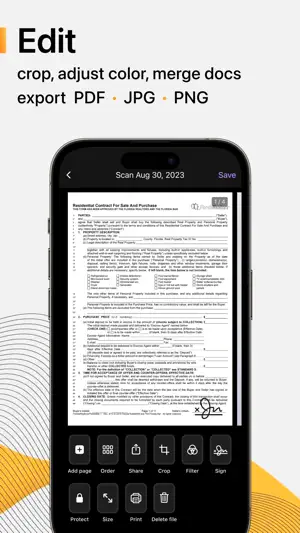
Welcome to Scanius Pro, your ultimate solution for effortless document scanning on the go! Say goodbye to bulky scanners and messy paperwork, as Scanius Pro transforms your smartphone into a powerful portable scanner. Whether you're digitizing receipts or contracts Scanius Pro simplifies the process, ensuring crisp, clear scans with just a few taps. Scanning, editing, signing, and sharing multipage documents in high-quality PDF, JPEG, PNG formats has never been easier. INSTANT SCANNING With Scanius Pro, capture documents in seconds. Simply point your camera, and Scanius Pro automatically detects edges, enhances image quality, and produces high-resolution scans. Scan quickly and smoothly: - Business documents, agreements, letters, invoices, order sheets; - Paper notes and sketches so they are always at hand; - Rent payments, credit notes, invoices, or any other printed documents. AI FUNCTIONS WITH GPT-5.1 - Work with text. Edit, summarize, reduce, enlarge, rephrase, and paraphrase. - Translate text into any language in one click. - Convert documents to pdf, png, jpg, docx, pptx, txt, xml, txt, json and more. - Use assistants: study, work, horoscope, health, sports, etc. CONVERT SCANNED DOCS TO VARIOUS FORMATS - Convert pdf to other docs: docx, pptx and xlsx - Convert pdf to images: png and jpg AUTO-CROP & PERSPECTIVE CORRECTION No need to worry about aligning your documents perfectly. Our intelligent algorithms automatically crop and correct perspective, delivering professional-looking scans every time. OCR - OPTICAL CHARACTER RECOGNITION Transform scanned documents into editable text with OCR feature. Easily extract text from scans, making it convenient to search, copy, and edit your documents. - Extract and modify text from books, invoices, scans, and more; - Both printed and handwritten text are automatically detected; - Translate recognized text. SIGN SCANS IN THE APP E-Sign scanned documents directly on your device: - Create one or multiple signatures within the app; - Easily add them to any scanned pages with a single tap. MULTI-PAGE SCANNING Effortlessly scan multiple pages into a single document. Scanius Pro streamlines the process, allowing you to add pages seamlessly to create comprehensive PDFs. CUSTOMIZABLE SETTINGS Tailor Scanius Pro to suit your preferences with customizable settings. Adjust resolution, file format, and other parameters to meet your specific scanning needs. SECURE SHARING Share your scans securely with password protected sharing feature. Send documents via email, messaging apps, or directly to colleagues and clients, knowing your data is protected. - Email or messaging in PDF, JPEG, or PNG formats, or save directly to Photos; - Export to Dropbox, Google Drive, or open in any third-party application. ORGANIZATIONAL TOOLS Keep your scanned documents organized with Scanius Pro's intuitive file management system. Create folders and easily locate your documents for quick access. Scanius Pro is essential for remote workers, students, professionals in various industries such as accounting, real estate, management, and law. Effortlessly digitize essential documents including contracts, tax forms, tickets, receipts, handwritten notes, and assignments, then export them in PDF, JPG, PNG formats. SCANIUS PRO - Subscribe to access Pro features of the app. Payment will be charged upon purchase confirmation. - A free trial period is available with the subscription, which automatically extends to a paid subscription after the trial period ends. - Subscriptions automatically renew 24 hours before the expiration date. You can cancel the free trial or subscription at any time in the account settings on the App Store. Privacy Policy: https://scaniusapp.com/privacy Terms of Use: https://scaniusapp.com/terms Your feedback matters! Share your thoughts by leaving a review to assist us make Scanius Pro better. And feel free to contact us [email protected]
Ratings & reviews
4.7
478 ratings
What’s new
Version 2.3.3 · Updated September 21, 2026
Bug fixes and stability improvements.
App privacy
The developer, Ruslan Khalikov, reported these privacy practices to Apple.
Data Not Linked to You
The following data, which may be collected but is not linked to your identity, may be used for the following purposes:
- Usage Data: Product Interaction
- Diagnostics: Crash Data
Used for: Analytics, App Functionality
Alternatives to Doc Scanner PDF, Convert & OCR
Looking for apps like Doc Scanner PDF, Convert & OCR? Here are 6 similar apps on the App Store. The highest rated is Invoice Maker・Estimate App (4.9/5), and all 6 are free to download.
-
 Invoice Maker for Contractors
4.8
Invoice Maker for Contractors
4.8
-
 Invoice Maker・Estimate App
4.9
Invoice Maker・Estimate App
4.9
-
 eSign: Digital Signature Maker
4.8
eSign: Digital Signature Maker
4.8
-
 Scarlet AI – Chatbot Assistant
4.6
Scarlet AI – Chatbot Assistant
4.6
-
 Invoice Maker Simple Generator
4.7
Invoice Maker Simple Generator
4.7
-
 ShiftFlow: Track Team Hours
4.8
ShiftFlow: Track Team Hours
4.8
| App | Rating | Price | Last updated | Compare |
|---|---|---|---|---|
| Doc Scanner PDF, Convert & OCR | 4.7 / 5 (478 ratings) | Free | September 21, 2026 | |
| Invoice Maker for Contractors | 4.8 / 5 (224) | Free | Oct 3, 2026 | Compare |
| Invoice Maker・Estimate App | 4.9 / 5 (201) | Free | Sep 18, 2026 | Compare |
| eSign: Digital Signature Maker | 4.8 / 5 (147) | Free | Jan 22, 2026 | Compare |
| Scarlet AI – Chatbot Assistant | 4.6 / 5 (252) | Free | Feb 14, 2026 | Compare |
| Invoice Maker Simple Generator | 4.7 / 5 (221) | Free | Mar 6, 2026 | Compare |
| ShiftFlow: Track Team Hours | 4.8 / 5 (2,322) | Free | Oct 4, 2026 | Compare |