

Render Networks
Render Networks Business iPhoneiPadiPod touch
Render Networks is a free Business app for iPhone and iPad by Render Networks. Rated 2.3/5 from 10 ratings. Requires iOS 16.0. Updated September 29, 2026.
- Rating
- 2.3
- 10 ratings
- Price
- Free
- on the App Store
- Size
- 50 MB
- Age 4+
- Updated
- Sep 29
- 2026 · v2.1.2
Screenshots


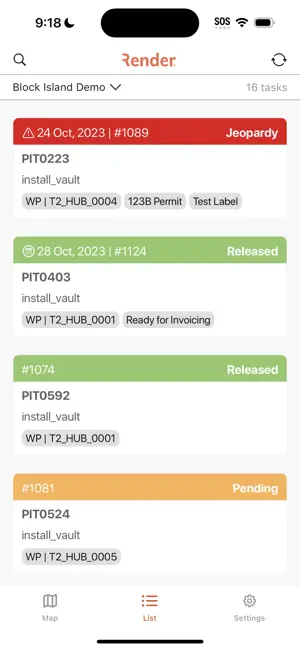
About Render Networks
Render Network iOS App for Field Crews! Empower your mobile field crews with the enhanced freedom and flexibility they deserve. Say goodbye to device limitations and embrace efficiency and convenience as your teams streamline tasks, capture data, and document their work seamlessly. Crafted as an indispensable companion tool for field crews, the Render Networks iOS app offers a comprehensive overview of assigned work, equipping crews with essential information and instructions for efficient task completion. Beyond delivering crucial details, the app empowers crews to create, collect and submit real-time as-built data with high-accuracy GPS positioning, including information about completed work, materials used, and identification of any issues requiring attention. Crews can also redline task geometries/locations and provide photographic evidence, supporting supervisors and project managers in quality assurance and compliance activities. The app enabling users to: * View their released tasks in both a Map and List view * Access detailed task information * Collect as-built task information using task forms * Create new tasks * Redline Tasks (Edit task geometries) * Navigate directly to task locations with turn-by-turn directions * Save areas of design layers to your device for offline usage to access them when disconnected * Manage task photos with GPS accuracy metadata embedded in EXIF data * Sync data back to the Render Database * View geo-referenced construction drawings as a visual overlay directly on the project map. * View file attachments on every task * Collect professional GPS accuracy through integration with Trimble GNSS receivers * Live, color-coded GPS accuracy indicators across all map views * Field Quality Agent (paid add-on, 30-day free trial available) – Automatic, on-device photo quality checks (blur, brightness, distance, recency) once enabled for your project. Catch quality issues before they leave the field. Get in touch for a demo. -- Data Transfer Instructions -- From time to time you may wish to switch which device you want to use the Render Networks field application with. One important thing to understand is that ONLY ONE Render account should be using one device at any given time or you are risking data loss! To avoid data loss when switching between devices, follow these simple steps: 1. Sync your data on Device 1 (e.g., iPad) 2. Log out from Device 1 (e.g., iPad) 3. Log in on Device 2 (e.g., iPhone) 4. Sync to ensure you have the latest data on Device 2 (e.g., iPhone) If you’re already logged in on Device 2, use the ‘Reset Device Data’ on the settings page. This will fetch the latest data from the Render server without sending any outdated task data from device 2 to overwrite the more recent data collected on Device 1. --Feedback Your valuable feedback matters! If you have suggestions or encounter any issues, reach out to us at [email protected]. Thank you for being part of this exciting journey towards a more unified Render experience! Licensed images: -- MIT Licenses -- PlusImage -- ListTab -- Creative Commons BY 3.0 -- Network: Icon made by Freepik from Flaticon -- Labels: Icon made by Freepik from Flaticon -- Address: Icon made by Freepik from Flaticon
Ratings & reviews
2.3
10 ratings
What’s new
Version 2.1.2 · Updated September 29, 2026
Version 2.1.2 - This release includes important bug fixes and general app maintenance. Your feedback is crucial to us as we continue to refine and improve Render. If you have any issues or suggestions, please reach out to us at [email protected].
App privacy
The developer, Render Networks, reported these privacy practices to Apple.
Data Linked to You
The following data, which may be collected and linked to your identity, may be used for the following purposes:
- Identifiers: User ID
- Usage Data: Product Interaction
- User Content: Photos or Videos, Other User Content
Used for: Analytics, App Functionality
Data Not Linked to You
The following data, which may be collected but is not linked to your identity, may be used for the following purposes:
- Location: Precise Location
- Diagnostics: Crash Data
Used for: App Functionality
Alternatives to Render Networks
Looking for apps like Render Networks? Here are 6 similar apps on the App Store. The highest rated is 811 Assist (5.0/5), and all 6 are free to download.


| App | Rating | Price | Last updated | Compare |
|---|---|---|---|---|
| Render Networks | 2.3 / 5 (10 ratings) | Free | September 29, 2026 | |
| VETRO | 3.5 / 5 (8) | Free | Oct 16, 2026 | Compare |
| Vitruvi | 4.9 / 5 (16) | Free | Oct 2, 2026 | Compare |
| DigiTrak LWD | 4.4 / 5 (8) | Free | Sep 30, 2026 | Compare |
| Nrby | 2.7 / 5 (21) | Free | Feb 2, 2026 | Compare |
| 811 Assist | 5.0 / 5 (2) | Free | Sep 23, 2026 | Compare |
| EXFO Exchange | 1.6 / 5 (9) | Free | Aug 17, 2026 | Compare |
Compare Render Networks with the top alternatives: ratings, updates, ASO score and keyword gaps →