

DigiTrak LWD
Digital Control, Incorporated Productivity iPhoneiPadiPod touch
DigiTrak LWD is a free Productivity app for iPhone and iPad by Digital Control, Incorporated. Rated 4.4/5 from 8 ratings. Requires iOS 13.4.
- Rating
- 4.4
- 8 ratings
- Price
- Free
- on the App Store
- Size
- 250 MB
- Age 4+
- Updated
- Sep 30
- 2026 · v5.2
Screenshots

About DigiTrak LWD
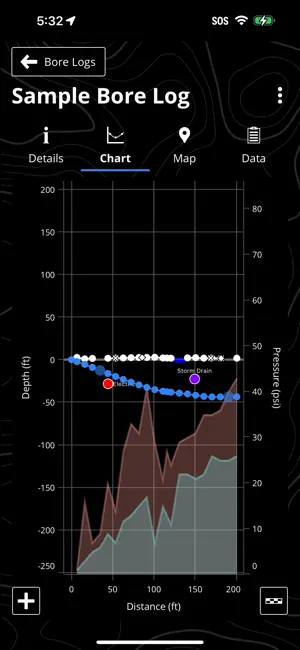
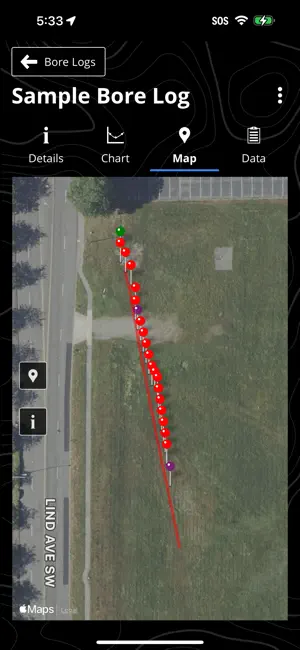
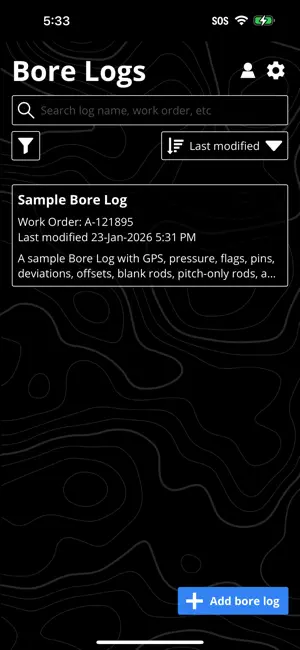
LWD Data available everywhere at any time DigiTrak LWD™ allows for an easy transfer of DigiTrak ARES™ and Falcon F5® drill data to your mobile device for viewing of your drill data at any point during the pilot bore. Perform edits on the mobile device and upload to the cloud via the LWD Cloud™ subscription for immediate availability of data for others within the organization. Features at a Glance - Connect to the DigiTrak ARES and Falcon F5 series of locators and transfer drill data to your mobile device - View a chart and rod by rod drill data - View detailed information for each data point in the bore including map view when using iGPS® - Name the bore and include pertinent client and job site information - Edit and annotate drill data as necessary - Download and view or edit job files on your mobile device - Generate a customizable PDF report and e-mail directly from your mobile device - Import and associate white line data from a DigiTrak ARES and Falcon F5® to your job data - Geotag entry and exit locations using your mobile device's location or by tapping on a map - Immediate access to drill data – no need to keep field logs for drilling decisions Note: This application is not compatible with DigiTrak F5 locators. Professional documentation of your job Using LWD to document your bore is simple. All the data required to create a chart of the bore profile including detailed data for each rod is saved with a single click on the locator. Adding jobsite data such as utilities and other annotation provides a clear and complete graphical representation of the bore. Full details on rod-by-rod data including fluid pressure and GPS coordinates when using iGPS are provided as well. Professional reports providing your clients with varying levels of detail, where you can select what is appropriate in each situation.
Ratings & reviews
4.4
8 ratings
What’s new
Version 5.2 · Updated September 30, 2026
Bug fixes and improvements.
App privacy
The developer, Digital Control, Incorporated, reported these privacy practices to Apple.
Data Not Linked to You
The following data, which may be collected but is not linked to your identity, may be used for the following purposes:
- User Content: Other User Content
- Diagnostics: Crash Data, Other Diagnostic Data
- Location: Precise Location
Used for: Analytics, App Functionality, Other Purposes
Alternatives to DigiTrak LWD
Looking for apps like DigiTrak LWD? Here are 6 similar apps on the App Store. The highest rated is Inrock HDD HydroCalc (5.0/5), and all 6 are free to download.
-
 Phrikolat HDD Basics
4.0
Phrikolat HDD Basics
4.0
-
 Inrock HDD HydroCalc
5.0
Inrock HDD HydroCalc
5.0
-
 EWN Mobile
4.6
EWN Mobile
4.6
-
 GY Bore Logs
5.0
GY Bore Logs
5.0
-
 ITS Connect
3.9
ITS Connect
3.9
-
 HEC Bore
| App | Rating | Price | Last updated | Compare |
|---|---|---|---|---|
| DigiTrak LWD | 4.4 / 5 (8 ratings) | Free | September 30, 2026 | |
| Phrikolat HDD Basics | 4.0 / 5 (1) | Free | Oct 26, 2026 | Compare |
| Inrock HDD HydroCalc | 5.0 / 5 (6) | Free | Nov 12, 2025 | Compare |
| EWN Mobile | 4.6 / 5 (12) | Free | Oct 29, 2026 | Compare |
| GY Bore Logs | 5.0 / 5 (4) | Free | Oct 27, 2026 | Compare |
| ITS Connect | 3.9 / 5 (18) | Free | Aug 27, 2026 | Compare |
| HEC Bore | – | Free | Oct 21, 2026 | Compare |
Compare DigiTrak LWD with the top alternatives: ratings, updates, ASO score and keyword gaps →