

KeePass - Password Manager
Ravi Kakadiya Productivity iPhoneiPadiPod touchMac
KeePass - Password Manager is a free Productivity app for iPhone and iPad by Ravi Kakadiya. Rated 4.1/5 from 57 ratings. Requires iOS 15.0.
- Rating
- 4.1
- 57 ratings
- Price
- Free
- on the App Store
- Size
- 57 MB
- Age 17+
- Updated
- Sep 26
- 2026 · v2.2.1
Screenshots

About KeePass - Password Manager
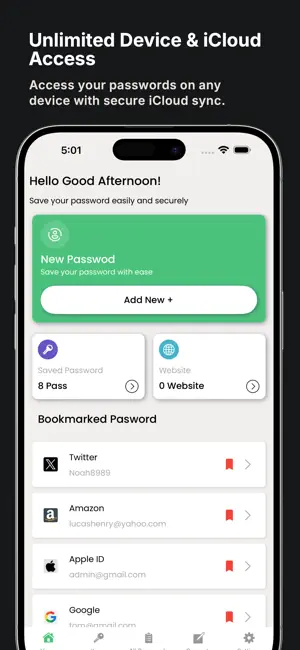
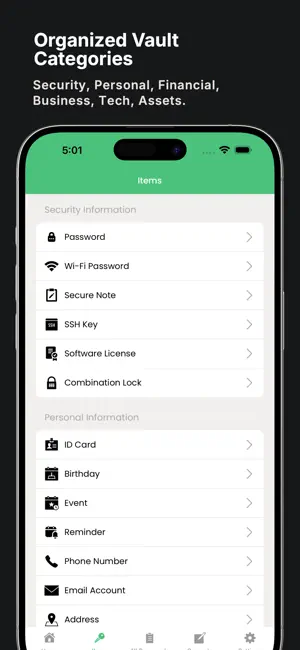
Are you tired of struggling to create strong and secure passwords for your online accounts? KeePass - Password Manager is your complete solution for generating, storing, and managing passwords and sensitive information with ease. Key Features: Strong and Secure Passwords - Generate complex and highly secure passwords to protect your accounts from unauthorized access Customization - Customize password generation with options for length, symbols, numbers, and character types Secure Vault - Store and organize all types of sensitive information securely in one place Biometric Authentication - Access your vault quickly and securely using fingerprint or facial recognition Password History - Track previously generated passwords for reference or reuse Offline Access - Access and generate passwords even without an internet connection Sync Across Devices - Seamlessly access your stored data across multiple devices Password Strength Analysis - Evaluate existing passwords and identify weak ones to improve your security Securely Store a Wide Range of Data: Security Information - Password, Wi-Fi Password, Secure Note, SSH Key, Software License, Combination Lock Personal Information - ID Card, Birthday, Event, Reminder, Phone Number, Email Account, Address, Tax Number, Passport, Social Security Number, Driver’s Licence, Voter ID Financial Information - Payment Card, Bank Account, Loan, Stock, Mutual Funds, Insurance Policy, Health Insurance Business Information - Company Details, Calling Card, Website Technology and IT - Database, Server, FTP Info Membership and Services - Reward, Membership Assets - Vehicle, Property Emergency Information - Emergency Number KeePass - Password Manager is designed to make your digital life more secure and organized. With strong encryption, offline support, and a user-friendly interface, it’s the smart and safe way to manage your personal data. Need Help? Email us at: [email protected] Privacy Policy https://www.freeprivacypolicy.com/live/473902f1-bdeb-4b4c-9157-48fe3ee5da2f Terms of Use https://www.freeprivacypolicy.com/live/415811ad-048d-4867-957c-1c228eb93e09 Download KeePass - Password Manager today and take control of your online security.
Ratings & reviews
4.1
57 ratings
What’s new
Version 2.2.1 · Updated September 26, 2026
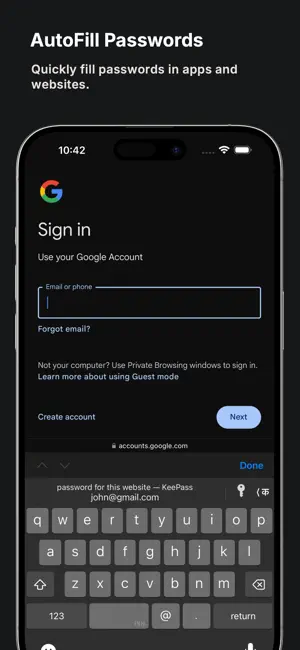
• Added passkey support — create, store and sign in with passkeys via AutoFill • Added a Home Screen widget for favourites and your Security Health score • Search now looks across every saved field, not just item names • Added category filters in All Passwords for quicker browsing • Added a configurable Auto-Lock delay • Improved overall performance for a faster and smoother experience • Minor bug fixes and stability enhancements
App privacy
The developer, Ravi Kakadiya, reported these privacy practices to Apple.
Data Not Collected
The developer does not collect any data from this app.
Alternatives to KeePass - Password Manager
Looking for apps like KeePass - Password Manager? Here are 6 similar apps on the App Store. The highest rated is KeePassium (KeePass passwords) (4.7/5), and all 6 are free to download.
-
 KeePass Touch
3.7
KeePass Touch
3.7
-
 KeePassium (KeePass passwords)
4.7
KeePassium (KeePass passwords)
4.7
-
 Strongbox - Password Manager
4.7
Strongbox - Password Manager
4.7
-
 KeyPass – Passwords Manager
4.5
KeyPass – Passwords Manager
4.5
-
 OneKeePass - Password Manager
3.9
OneKeePass - Password Manager
3.9
-
 PDF Editor-Scan & Converter
4.7
PDF Editor-Scan & Converter
4.7
| App | Rating | Price | Last updated | Compare |
|---|---|---|---|---|
| KeePass - Password Manager | 4.1 / 5 (57 ratings) | Free | September 26, 2026 | |
| KeePass Touch | 3.7 / 5 (344) | Free | Jun 23, 2026 | Compare |
| KeePassium (KeePass passwords) | 4.7 / 5 (1,417) | Free | Nov 19, 2025 | Compare |
| Strongbox - Password Manager | 4.7 / 5 (4,070) | Free | Sep 1, 2026 | Compare |
| KeyPass – Passwords Manager | 4.5 / 5 (81) | Free | Oct 10, 2026 | Compare |
| OneKeePass - Password Manager | 3.9 / 5 (13) | Free | Sep 29, 2026 | Compare |
| PDF Editor-Scan & Converter | 4.7 / 5 (152) | Free | Sep 20, 2026 | Compare |