

KeyPass – Passwords Manager
NAVYNEXA TECHNOLOGIES LLP Productivity iPhoneiPadiPod touchMac
KeyPass – Passwords Manager is a free Productivity app for iPhone and iPad by NAVYNEXA TECHNOLOGIES LLP. Rated 4.5/5 from 81 ratings. Requires iOS 16.6.
- Rating
- 4.5
- 81 ratings
- Price
- Free
- on the App Store
- Size
- 31 MB
- Age 4+
- Updated
- Oct 10
- 2026 · v4.12.2
Screenshots


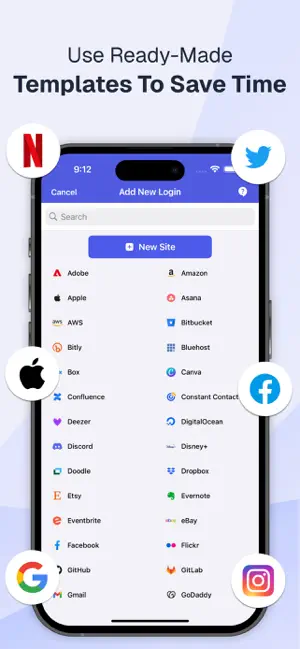
About KeyPass – Passwords Manager
KeyPass - Password Manager isn’t only about passwords—it’s your secure digital vault for storing personal documents, notes, and anything else you want to keep private yet easily accessible. Why Choose KeyPass - Password Manager? * Securely store and organize passwords, ID cards, credit cards, secure notes, addresses, health insurance, driver’s licenses, passports, and more. * Store Wi-Fi, bank accounts, crypto wallets, insurance, software licenses, SSH keys, and dozens of other private records in one vault. * Create, save, and autofill passkeys so you can sign in without a password. * Built-in authenticator for two-factor codes. Scan a QR code or enter a setup key, then copy the current code. * Customize the password generator with length, letters, numbers, and symbols, and create strong, unique passwords instantly. * Auto-fill your passwords easily and securely. Log in to your favourite apps and websites without typing—just one tap, every time. * Password Health Check – Identify and fix weak, reused, and compromised passwords. * Get reminders before cards, IDs, passports, licenses, and memberships expire. * Attach files to saved items. * All Items – Easily access and manage all your saved details in one place. * Unlock securely with Face ID, Touch ID, Passcode, or your Master Password. * Lock the app on your schedule, from immediately to several hours later. * Secure notes with customizable fonts, colors, and formatting (bold, italic, and underline). Ideal for personal notes, to-do lists, tasks, and private journaling. * Encrypted local backup and restore, plus iCloud Sync across iPhone, iPad, and Mac. * Zero-knowledge security means your data is always protected. You’re the only one with access to your information. * Advanced encryption keeps your information secure at all times. * Automatically clear copied passwords from your clipboard after a few seconds. * Advanced Filtering – Quickly find what you need with search and filters. * Supports light mode, dark mode, and the system appearance. Sync Across Devices with iCloud Sync * Access and manage your data anytime with easy, secure iCloud Sync. * Your data stays encrypted in iCloud and is only accessible by you. Download KeyPass - Password Manager today and take the first step towards a safer digital experience! About Premium Plan Billing: If you upgrade to the Premium plan, payment will be charged to your Apple ID account. Your account will be charged for renewal within 24 hours prior to the end of the current period. You can choose to be billed monthly or yearly. You can turn off auto-renew in your Apple ID Account Settings at any time. Privacy Policy: https://www.navynexa.com/keypass/privacy/ Terms of Use: https://navynexa.com/keypass/terms/ Contact Us: For any questions or support, reach out to us at [email protected]
Ratings & reviews
4.5
81 ratings
What’s new
Version 4.12.2 · Updated October 10, 2026
• Password Health — Find weak, reused, old, and compromised passwords. • Breach Check — Check for breached passwords while keeping your data private. • Smarter AutoFill — Faster password search, passkeys, keyboard suggestions, and iCloud updates. • Expiry Reminders — Get reminders before cards, IDs, passports, licenses, memberships, and more expire. • Passkeys & Authenticator — Manage passkeys and 2FA codes, including 8-digit and SHA-256/SHA-512 codes. • Better Security — Improved app locking, AutoFill protection, Face ID/passcode support, and clipboard clearing. • Backup & Restore — Restore from Files or AirDrop without duplicates and safely replace your vault. • Password Generator — Better generated passwords with customizable special characters. • Restore Purchases — Restore your plan instantly without unexpected Apple ID prompts. • Improvements & Fixes — Better translations, Mac improvements, performance updates, crash fixes, and security improvements.
App privacy
The developer, NAVYNEXA TECHNOLOGIES LLP, reported these privacy practices to Apple.
Data Not Collected
The developer does not collect any data from this app.
Alternatives to KeyPass – Passwords Manager
Looking for apps like KeyPass – Passwords Manager? Here are 6 similar apps on the App Store. The highest rated is Yata for GTD: Todo & Calendar (4.8/5), and all 6 are free to download.
-
 Authen・2FA & MFA Authenticator
4.7
Authen・2FA & MFA Authenticator
4.7
-
 Yata for GTD: Todo & Calendar
4.8
Yata for GTD: Todo & Calendar
4.8
-
 AI Podcast Maker - PODLM
4.1
AI Podcast Maker - PODLM
4.1
-
 Email Writer : AI Email Writer
4.8
Email Writer : AI Email Writer
4.8
-
 Daily Routines & Planner App
4.2
Daily Routines & Planner App
4.2
-
 Yard Sale +
4.3
Yard Sale +
4.3
| App | Rating | Price | Last updated | Compare |
|---|---|---|---|---|
| KeyPass – Passwords Manager | 4.5 / 5 (81 ratings) | Free | October 10, 2026 | |
| Authen・2FA & MFA Authenticator | 4.7 / 5 (128) | Free | Jul 24, 2025 | Compare |
| Yata for GTD: Todo & Calendar | 4.8 / 5 (84) | Free | Sep 18, 2026 | Compare |
| AI Podcast Maker - PODLM | 4.1 / 5 (128) | Free | May 29, 2026 | Compare |
| Email Writer : AI Email Writer | 4.8 / 5 (316) | Free | Feb 25, 2025 | Compare |
| Daily Routines & Planner App | 4.2 / 5 (34) | Free | Aug 28, 2024 | Compare |
| Yard Sale + | 4.3 / 5 (84) | Free | Jul 14, 2026 | Compare |