

Docuslice - Poster Printing
Jeremiah Lachica Graphics & Design iPhoneiPadiPod touch
Docuslice - Poster Printing is a free Graphics & Design app for iPhone and iPad by Jeremiah Lachica. Rated 4.8/5 from 312 ratings. Requires iOS 15.6.
- Rating
- 4.8
- 312 ratings
- Price
- Free
- on the App Store
- Size
- 85 MB
- Age 4+
- Updated
- Oct 31
- 2026 · v2.57
Screenshots



About Docuslice - Poster Printing
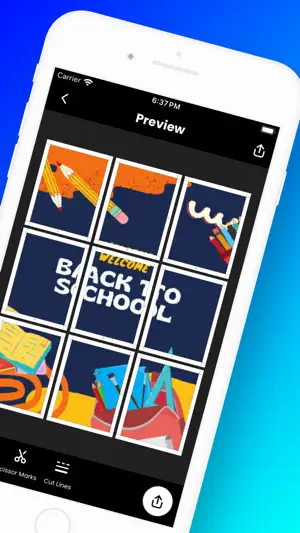
No giant printer? No problem! Want to create massive posters, banners, or wall art with your home printer? Docuslice lets you turn any image, PDF, or SVG into a stunning, multi-page masterpiece using your regular printer! Tiled printing is easier than ever — simply print across multiple pages and assemble them into one giant poster. Here’s how it works: - Choose your layout: - Grid Mode – set poster size using rows and columns (fixed number of papers). - Size Mode – set exact width and height for your poster. - Import any image, PDF, or SVG. - Customize it to perfection: Resize, add text and paragraphs, and style them with 1,900+ free fonts. - Docuslice magically slices your design into printable tiles. - Export your way — three options to choose from: - PDF (Standard) – a rasterized PDF, perfect for photo-heavy posters. - PDF (Vector) – razor-sharp at any size, ideal for text, logos, and line art. - Images – saved straight to your photo gallery. - Print directly to your home printer or send to print shops if you don’t have one. New: Paragraphs and rich text — text that wraps to its box, alignment, bullet and numbered lists, line and letter spacing, mixed styles, and 1,900+ free fonts. Text and fonts: - Paragraphs that wrap to their box — drag a side to change the width - Align text left, center or right, and justify paragraphs - Bullet and numbered lists, with nesting - Line and letter spacing - Mix fonts, styles, sizes and colors in one text - 1,900+ free fonts, in every weight each family has - Sharp text on paper — real vector text in the vector PDF Perfect for: - Eye-catching event posters (birthdays, holidays, etc.) - Educational charts, decorations, and classroom posters - Unique wall art for your home or office - Campaign, activism, and protest posters - Large banners, signage, and shop displays - Blueprints, floor plans, and CAD drawings - Engineering and architectural diagrams - Logos, branding, and wordmarks - Maps and infographics - Line art, coloring pages, and stencils - Stained glass patterns - Cut files for vinyl and signage - Sewing, quilting, and craft patterns - Sheet music and lyric posters Docuslice is: - FREE to download and use - Incredibly easy to learn - Compatible with images, PDFs, and SVGs - Packed with 1,900+ free fonts - Exportable as standard PDF, vector PDF, or images - Lets you print large image on multiple pages — at any size - Cost-efficient – no need for large format printers - Eco-friendly – save resources by using your home printer Ready to unleash your creativity and print giant posters with ease? Download Docuslice today!
Ratings & reviews
4.8
312 ratings
What’s new
Version 2.57 · Updated October 31, 2026
- Paragraphs: Add a text box that wraps to its width. Drag a side to change the width — the height follows your text. - Text Alignment: Align text left, center or right, and justify paragraphs. - Lists: Bullets and numbered lists, with indent and outdent. Type "1. " or "- " to start one. - Line & Letter Spacing: Fine-tune the spacing with a slider. - Mixed Styles: Give any word its own font, style, size and color. - 1,900+ Fonts: The full Google Fonts library, free for everyone — search, browse by category, and use every weight a family has. - PDF Vector Export: Export true vector PDFs that stay razor-sharp at any print size. - Size Mode: Set your poster’s exact width and height. - Performance Improvements: Bug fixes and stability enhancements for a smoother experience.
App privacy
The developer, Jeremiah Lachica, reported these privacy practices to Apple.
Data Used to Track You
The following data may be used to track you across apps and websites owned by other companies:
- Identifiers: Device ID
- Usage Data: Advertising Data
Data Linked to You
The following data, which may be collected and linked to your identity, may be used for the following purposes:
- Identifiers: Device ID, User ID
- Usage Data: Advertising Data
- Contact Info: Email Address
Used for: Third-Party Advertising, Product Personalization, App Functionality
Data Not Linked to You
The following data, which may be collected but is not linked to your identity, may be used for the following purposes:
- Contact Info: Name
- Identifiers: Device ID
Used for: Third-Party Advertising, App Functionality
Alternatives to Docuslice - Poster Printing
Looking for apps like Docuslice - Poster Printing? Here are 6 similar apps on the App Store. The highest rated is Griddy: Split Photo Grid Posts (4.7/5), and all 6 are free to download.
-
 Griddy: Split Photo Grid Posts
4.7
-
 Creador (Party Designer)
4.5
-
 ImgSplitter -Image Split-
4.6
-
 Grid Post Pic Collage Maker
4.5
-
 Silhouette Go
4.2
-
 SubPrinta Sublimation Designer
4.6
| App | Rating | Price | Last updated | Compare |
|---|---|---|---|---|
| Docuslice - Poster Printing | 4.8 / 5 (312 ratings) | Free | October 31, 2026 | |
| Griddy: Split Photo Grid Posts | 4.7 / 5 (2,662) | Free | Sep 9, 2026 | Compare |
| Creador (Party Designer) | 4.5 / 5 (89) | Free | Oct 14, 2026 | Compare |
| ImgSplitter -Image Split- | 4.6 / 5 (11) | Free | Nov 9, 2024 | Compare |
| Grid Post Pic Collage Maker | 4.5 / 5 (7,024) | Free | Aug 7, 2025 | Compare |
| Silhouette Go | 4.2 / 5 (4,667) | Free | Oct 30, 2026 | Compare |
| SubPrinta Sublimation Designer | 4.6 / 5 (927) | Free | Oct 21, 2026 | Compare |