

Griddy: Split Photo Grid Posts
keang david Graphics & Design iPhoneiPadiPod touch
Griddy: Split Photo Grid Posts is a free Graphics & Design app for iPhone and iPad by keang david. Rated 4.7/5 from 2,660 ratings. Requires iOS 15.
- Rating
- 4.7
- 2.6K ratings
- Price
- Free
- on the App Store
- Size
- 191 MB
- Age 4+
- Updated
- Sep 9
- 2026 · v4.0.30
Screenshots



About Griddy: Split Photo Grid Posts
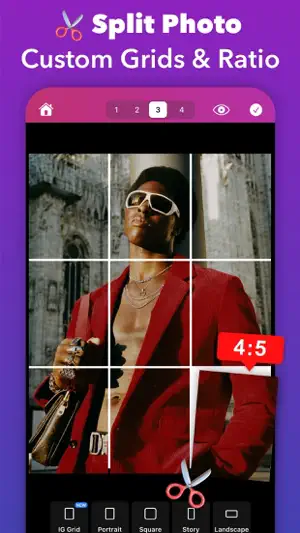
Transform your Instagram Profile into a professional look with Griddy – the All-In-One tool for creating grid posts, seamless carousel layouts, engaging instagram stories, and visually captivating content. Whether you’re an influencer, small business owner, or content creator, Griddy simplifies Instagram marketing like never before. *** Key Features *** 1. Photo Splitter Griddy makes it easy to split your photos into grid layouts for Instagram, with options for up to 10 rows (30 posts) to create eye-catching feed layout. YChoose from predefined grid layouts such as 1x3, 2x3, 3x3, or 4x3 with a single tap to quickly achieve a stunning Instagram feed or slice panorama photos into seamless carousel posts with ease. For more control, you can split your photo into custom grid layouts and adjust the aspect ratio (landscape, square, portrait, story to fit your unique style. 2. Puzzle Feed Templates Design seamless puzzle-style Instagram feeds with our aesthetic template. Perfect for creating a cohesive, professional look. 3. Carousel Post Maker Turn your regular carousel posts into seamless photo collages or image galleries in seconds, ensuring your audience swipes for more. 4. Photo Collage Maker Easily combine multiple photos with our easy-to-use, free photo collage maker app. Create beautiful collages from your photos and choose from dozens of creative layouts! 5. 500+ Customizable Templates Choose from a diverse collection of fully customizable templates for different content types such as Grid Feeds, Carousel Posts, Stories, and Square Posts, curated for your business and brand. 6. Design Anything Create on-trend Instagram posts with beautiful text fonts, stickers, and shapes. With our easy-to-use tools, you can do anything effortlessly with zoom & edit mode, working with layers, and multiple selection. 7. Add Text with Style Enhance your posts with text effects like curved text, strokes, shadows, background colors, and rounded corners to make your captions pop. 8. Resize & Crop Photos Quickly resize your photos to different Instagram Post sizes with a beautiful background color selection. 9. Watermark Tool Protect your photos and content with an instant watermarking feature, ideal for maintaining your brand’s identity. 10. Brand Kit Manage and apply your brand's logos, fonts, and colors to your designs easily. Import custom fonts to elevate your projects. 11. Preview Mode See how your Instagram feed, carousel post, or story will look before sharing with your audience. 12. Share to Instagram Export your grid or carousel posts directly to Instagram in HD quality with just a few taps. Why Choose Griddy? Griddy is your all-in-one solution for Instagram marketing, helping you: • Split photos into Instagram grid layouts. • Create seamless carousel posts from panoramic photos. • Design professional-looking puzzle feeds. • Save time with easy-to-use design tools. • Grow your brand with visually stunning content. Download Griddy Now! Level up your Instagram profile with creative grids, seamless carousels, and aesthetic puzzle feeds. Whether you’re growing a brand or expressing your creativity, Griddy makes it easy and fun! Follow us on Instagram @griddyapp to get inspired and explore amazing designs made with Griddy. If you enjoy using Griddy, we’d love to hear from you! Leave a review or contact us at [email protected]. Terms of Use: https://cornapps.com/griddyapp-terms/ Privacy Policy: https://cornapps.com/griddyapp-terms#privacy
Ratings & reviews
4.7
2.6K ratings
What’s new
Version 4.0.30 · Updated September 9, 2026
• Improved Feed Planner • Bugs fixes and performance improvements to make your experience smoother. If you enjoy using Griddy, please leave us a review on the AppStore!
App privacy
The developer, keang david, reported these privacy practices to Apple.
Data Used to Track You
The following data may be used to track you across apps and websites owned by other companies:
- Identifiers: Device ID
Data Not Linked to You
The following data, which may be collected but is not linked to your identity, may be used for the following purposes:
- Identifiers: Device ID
- Usage Data: Product Interaction
- Diagnostics: Crash Data
Used for: Third-Party Advertising, Analytics
Alternatives to Griddy: Split Photo Grid Posts
Looking for apps like Griddy: Split Photo Grid Posts? Here are 6 similar apps on the App Store. The highest rated is Pixislice - Image Splitter (4.7/5), and all 6 are free to download.
-
 Grid Post Pic Collage Maker
4.5
Grid Post Pic Collage Maker
4.5
-
 Grid layout for Instagram feed
4.6
Grid layout for Instagram feed
4.6
-
 UNUM — Layout & Feed Preview
4.5
UNUM — Layout & Feed Preview
4.5
-
 Panorama Scroll Carousel Maker
4.6
Panorama Scroll Carousel Maker
4.6
-
 ImgSplitter -Image Split-
4.6
ImgSplitter -Image Split-
4.6
-
 Pixislice - Image Splitter
4.7
Pixislice - Image Splitter
4.7
| App | Rating | Price | Last updated | Compare |
|---|---|---|---|---|
| Griddy: Split Photo Grid Posts | 4.7 / 5 (2,660 ratings) | Free | September 9, 2026 | |
| Grid Post Pic Collage Maker | 4.5 / 5 (7,023) | Free | Aug 7, 2025 | Compare |
| Grid layout for Instagram feed | 4.6 / 5 (503) | Free | Apr 19, 2026 | Compare |
| UNUM — Layout & Feed Preview | 4.5 / 5 (12,215) | Free | Oct 27, 2026 | Compare |
| Panorama Scroll Carousel Maker | 4.6 / 5 (1,436) | Free | Oct 28, 2026 | Compare |
| ImgSplitter -Image Split- | 4.6 / 5 (11) | Free | Nov 9, 2024 | Compare |
| Pixislice - Image Splitter | 4.7 / 5 (18) | Free | May 19, 2025 | Compare |