

Stopwatch - Multiple Stopwatch
Assem Ahmed Productivity iPhoneiPadiPod touch
Stopwatch - Multiple Stopwatch is a free Productivity app for iPhone and iPad by Assem Ahmed. Rated 5.0/5 from 3 ratings. Requires iOS 15.1.
- Rating
- 5.0
- 3 ratings
- Price
- Free
- on the App Store
- Size
- 51 MB
- Age 4+
- Updated
- Aug 9
- 2026 · v3.0.0
Screenshots



About Stopwatch - Multiple Stopwatch
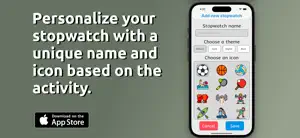
Discover the power of time management with WatchHub - Stopwatch, a versatile iOS app designed to help you track multiple activities from the same app. Whether you're a fitness enthusiast, a dedicated student, or a busy parent, WatchHub - Stopwatch is your perfect companion to keep track of time in a more organized and efficient way. Key Features: 1. Multiple Stopwatches: Create and manage multiple stopwatches for different activities. Each stopwatch operates independently, allowing you to track various tasks without any overlap. 2. Persistent Tracking: Your stopwatches keep running even when the app is in the background. This ensures that you never lose track of time, no matter what comes up in your day. 3. Lap Records: Keep a detailed record of your laps. This feature is perfect for runners, swimmers, or anyone who needs to monitor their progress over time. 4. Customization: Assign unique theme, name and icon to each stopwatch for easy identification. This feature helps you quickly locate the right stopwatch for the task at hand. 5. User-Friendly Interface: The app boasts a clean, intuitive interface that makes it easy to use, even for those who are not tech-savvy. WatchHub - Stopwatch is more than just a time-tracking tool. It's a productivity booster that helps you manage your time more effectively. Download WatchHub - Stopwatch today and experience the difference it makes in your daily routine. Introducing WatchHub Pro - Unleash the Full Potential! Upgrade to WatchHub Pro and experience a whole new level of convenience and customization. With a range of useful features, our Pro version is designed to elevate your experience and unlock endless possibilities. Here's what you get with WatchHub Pro: 1. Create Unlimited Stopwatches: Never be limited by the number of stopwatches again! With WatchHub Pro, you can create as many stopwatches as you need, allowing you to track multiple activities simultaneously. Whether you're timing workouts, projects, or events, our unlimited stopwatch feature ensures you stay organized and efficient. 2. Lap History: Never lose track of your progress again! With the Lap History feature in WatchHub Pro, you can effortlessly save and review all recorded laps. Analyze your performance, track improvements, and gain valuable insights into your activities. The Lap History feature is perfect for athletes, professionals, or anyone who wants to monitor their progress over time. 3. Unlock Additional Icons: Expand your options and personalize your activities with a variety of additional icons available in WatchHub Pro. 4. Unlock More Themes: Elevate the aesthetics of your app with a collection of sleek and minimalist themes available in WatchHub Pro. Upgrade to WatchHub Pro today and unlock the full potential of your stopwatches! Icons attributed to freepik.
What’s new
Version 3.0.0 · Updated August 9, 2026
Enhanced app design and user experience.
App privacy
The developer, Assem Ahmed, reported these privacy practices to Apple.
Data Not Collected
The developer does not collect any data from this app.
Alternatives to Stopwatch - Multiple Stopwatch
Looking for apps like Stopwatch - Multiple Stopwatch? Here are 6 similar apps on the App Store. The highest rated is Timers - Multiple Timer (4.7/5), and all 6 are free to download.
-
 +1 Timer - Multiple timers
-
 Timers - Multiple Timer
4.7
Timers - Multiple Timer
4.7
-
 Multiple Stopwatches & Laps
4.6
Multiple Stopwatches & Laps
4.6
-
 MultiTimer - Timer & Stopwatch
4.0
MultiTimer - Timer & Stopwatch
4.0
-
 Timer - Stopwatch timer
4.4
Timer - Stopwatch timer
4.4
-
 Focus On : ADHD Habit Tracker
4.7
Focus On : ADHD Habit Tracker
4.7
| App | Rating | Price | Last updated | Compare |
|---|---|---|---|---|
| Stopwatch - Multiple Stopwatch | 5.0 / 5 (3 ratings) | Free | August 9, 2026 | |
| +1 Timer - Multiple timers | – | Free | Aug 29, 2026 | Compare |
| Timers - Multiple Timer | 4.7 / 5 (53) | Free | Dec 26, 2023 | Compare |
| Multiple Stopwatches & Laps | 4.6 / 5 (196) | Free | Oct 6, 2026 | Compare |
| MultiTimer - Timer & Stopwatch | 4.0 / 5 (4) | Free | Apr 20, 2025 | Compare |
| Timer - Stopwatch timer | 4.4 / 5 (28) | Free | May 29, 2026 | Compare |
| Focus On : ADHD Habit Tracker | 4.7 / 5 (49) | Free | Oct 20, 2026 | Compare |