

Wellnote: AI Notes, PDF, Docs
MAXEYE US INC. Productivity iPhoneiPadiPod touch
Wellnote: AI Notes, PDF, Docs is a free Productivity app for iPhone and iPad by MAXEYE US INC. Rated 4.7/5 from 935 ratings. Requires iOS 14.0.
- Rating
- 4.7
- 935 ratings
- Price
- Free
- on the App Store
- Size
- 445 MB
- Age 4+
- Updated
- Oct 13
- 2026 · v1.6.18
Screenshots



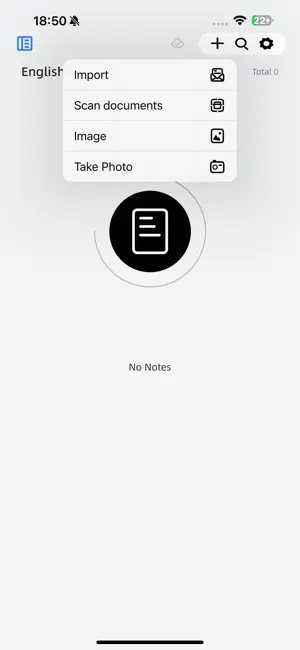
About Wellnote: AI Notes, PDF, Docs
Real Writing Experience -- Combined with a stylus pen, you can feel the real touch of writing on the iPad, achieving a natural writing sensation. -- Wellnote provides a smooth writing experience, accurately capturing your handwriting whether you're jotting down notes quickly or making detailed records. Categorize Notes -- The categorization feature allows you to organize your notes by project, course, or topic, keeping your notes tidy and orderly. -- With the search function, you can easily find the notes you need. -- The writing effects that used to require a stack of paper can now be easily achieved on the iPad. Import Documents for Annotation -- Log in to Baidu Cloud, and files in the cloud (PPT, Word, PDF) can be downloaded and imported at any time. -- Annotate, mark, and highlight directly on PDF files or by importing PPTs and Word documents as PDFs, making learning more interactive and vivid. -- Combining text and notes helps you better understand and remember the content of your studies. Study More Efficiently -- The split-screen feature allows you to view different books, materials, or apps simultaneously, efficiently taking notes. -- Using the split-screen feature in class allows you to record key points in real-time while viewing class materials, ensuring you don't miss any important information. -- The masking tape feature can cover and reveal content, allowing you to study and memorize more efficiently. Customize Templates -- Based on your personal learning and working style, custom templates let you create note formats that meet your needs. -- With preset templates, you can not only improve the efficiency of organizing notes but also study and review more effectively. Explanation of Automatic Subscription Service (1) Subscription Services: AI+VIP Continuous Monthly Subscription (1 month), AI+VIP Continuous Annual Subscription (12 months) (2) Subscription Price: For example, AI+VIP continuous monthly subscription (1 month) is US$1.99 per month, and the continuous annual subscription product is US$10.99/year. The specific price will be adjusted according to promotional activities during different periods, subject to the actual display within the application. (3) Payment: After the user confirms the purchase and makes the payment, it will be credited to the iTunes account. (4) Auto-renewal: The Apple iTunes account will be charged within 24 hours before expiration, and upon successful payment, the subscription period will be extended by one subscription cycle. (5) Cancel Service: You can go to "Settings" on your iPhone --> enter "iTunes Store & App Store" --> tap "Apple ID" and select "View Apple ID", enter the "Account Settings" page, tap "Subscriptions" to manage auto-renewal subscriptions. If you need to cancel, simply turn it off 24 hours before the end of each billing cycle, and no further charges will be incurred within 24 hours before expiration. Terms of Use and Privacy Policy: https://wellnote.meatmeet.top/app/privacy/index.html?language=en End User Licensing Agreement (EULA): https://www.apple.com/legal/internet-services/itunes/dev/stdeula/ If you have any questions, you can contact us via email for assistance: [email protected]
Ratings & reviews
4.7
935 ratings
What’s new
Version 1.6.18 · Updated October 13, 2026
Brand new version! 1. Added a password lock for notes, allowing you to lock your notes for more reliable privacy protection. 2. Added Apple Pencil writing optimization, which makes writing with the original stylus more stable after being enabled. 3. The UI of the cloud sync interface has been fully upgraded, supporting simultaneous downloads and long-press operations. 4. Added multi-select and sorting icons for more intuitive operations and more efficient organization. 5. Optimize the default settings of some gesture switches. 6. Optimized some known issues.
App privacy
The developer, MAXEYE US INC., reported these privacy practices to Apple.
Data Not Linked to You
The following data, which may be collected but is not linked to your identity, may be used for the following purposes:
- Location: Precise Location, Coarse Location
Used for: App Functionality
Alternatives to Wellnote: AI Notes, PDF, Docs
Looking for apps like Wellnote: AI Notes, PDF, Docs? Here are 6 similar apps on the App Store. The highest rated is Prodrafts - Infinite Notes (4.8/5), and all 6 are free to download.
-
 Prodrafts - Infinite Notes
4.8
-
 Feenote - Notes and lists
4.8
-
 Freenotes®: AI Notes Taking
4.7
-
 Element Note
4.6
-
 OrigNotes
4.7
-
 Noteshelf: AI Notes & PDF
4.6
| App | Rating | Price | Last updated | Compare |
|---|---|---|---|---|
| Wellnote: AI Notes, PDF, Docs | 4.7 / 5 (935 ratings) | Free | October 13, 2026 | |
| Prodrafts - Infinite Notes | 4.8 / 5 (3,878) | Free | Oct 17, 2026 | Compare |
| Feenote - Notes and lists | 4.8 / 5 (2,057) | Free | Oct 16, 2026 | Compare |
| Freenotes®: AI Notes Taking | 4.7 / 5 (63,409) | Free | Oct 12, 2026 | Compare |
| Element Note | 4.6 / 5 (2,616) | Free | Sep 24, 2026 | Compare |
| OrigNotes | 4.7 / 5 (359) | Free | Oct 14, 2026 | Compare |
| Noteshelf: AI Notes & PDF | 4.6 / 5 (7,046) | Free | Oct 18, 2026 | Compare |