

Tasmo:ToDoリスト・タスク管理
Masato Hayashi Productivity iPhoneiPadiPod touch
Tasmo:ToDoリスト・タスク管理 is a free Productivity app for iPhone and iPad by Masato Hayashi. Requires iOS 15.6. Updated August 31, 2026.
- Price
- Free
- on the App Store
- Size
- 31 MB
- Age 4+
- Updated
- Aug 31
- 2026 · v2.0.0
Screenshots


About Tasmo:ToDoリスト・タスク管理
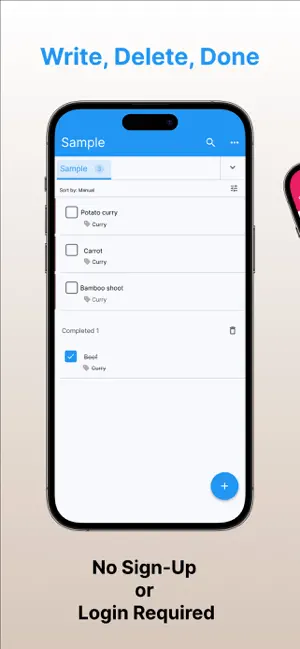
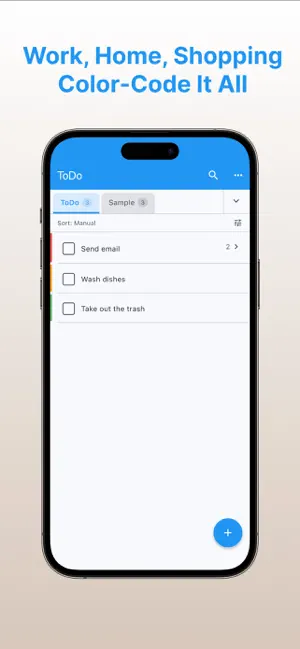
Write down what you have to do, so you stop forgetting it. That is all this app does. Tasmo is a to-do app you can write in the moment you think of something, and search later when you cannot remember the words. There is no account and no sign-in. Your tasks and memos stay on your device. ■ Fast to write Tap + at the bottom right and start typing. Every task has a memo field, so you can keep the detail you will need to remember next to the task itself. ■ Due dates and reminders Give a task a date and a time, and a notification arrives at that time. You can also be told early — 5 minutes before, an hour before, or the day before. You no longer have to remember today's list yourself. ■ Home Screen and Lock Screen widgets Keep your list on your Home Screen, or on your Lock Screen. You can tick tasks off in the widget itself, without opening the app. Each widget can show what you want: everything unfinished, or only tasks with a due date. ■ Folders and tags Work, chores, shopping, study. Make folders and keep them apart. There is no limit on how many. Tags cut across folders, so you can also group things as "urgent" or "this week". ■ Search when you only half remember Search task names, memos and tag names — across every folder at once, not just the one you are in. Matches are highlighted, so you can see why a task came up. ■ Subtasks Hang the individual steps under a bigger task. Nesting stops at one level, so a list can never get so deep that you lose track of it. ■ Recurring tasks Repeat on an interval ("every 3 days"), on days of the week ("every Tuesday", "weekdays only"), or on dates of the month ("the 1st", "end of month"). When the day comes around, the task is added for you. ■ Nothing is lost when you delete it Deleted tasks go to the trash. If you delete one by mistake, you can restore it. ■ Make it yours Switch between light and dark, and change the theme color. Sort by hand, by due date, by color, or by tag. Give individual tasks a color, so you can pick them out at a glance. ■ English and Japanese The app follows your device language, and you can also choose one in Settings. ■ iPhone and iPad Both are supported. ――― Your tasks and memos are stored on your device and are not sent to a server. Writing, searching and reminders all keep working in airplane mode. Note: ads and anonymous usage statistics do use the network. Tasmo is for you if - You are tired of switching between a notes app and a to-do app - You have tried a powerful task manager and never got the hang of it - You rebuild the same shopping or packing list every time - You want to start using something now, without signing up Free to use, supported by ads.
What’s new
Version 2.0.0 · Updated August 31, 2026
Version 2.0 rebuilds Tasmo, inside and out. - Home Screen and Lock Screen widgets. You can tick tasks off in the widget. - Subtasks. Hang the individual steps under a bigger task. - Recurring tasks. Repeat on an interval, on days of the week, or on dates of the month. - Rebuilt search. Look through task names, memos and tag names across every folder at once. - Reminders can now arrive early — 5 minutes before, or the day before. - Individual tasks can be given a color. - New sort orders: by due date, by color, and by tag. - Dark mode and a choice of theme color. - English is now supported, following your device language. - A short walkthrough the first time you open the app. - iPad support. Everything you already wrote carries over.
App privacy
The developer, Masato Hayashi, reported these privacy practices to Apple.
Data Used to Track You
The following data may be used to track you across apps and websites owned by other companies:
- Location: Coarse Location
- Identifiers: Device ID
- Usage Data: Product Interaction, Advertising Data
Data Not Linked to You
The following data, which may be collected but is not linked to your identity, may be used for the following purposes:
- Location: Coarse Location
- Identifiers: Device ID
- Usage Data: Product Interaction, Advertising Data
Used for: Third-Party Advertising, Analytics
Alternatives to Tasmo:ToDoリスト・タスク管理
Looking for apps like Tasmo:ToDoリスト・タスク管理? Here are 6 similar apps on the App Store.
-
 ぴよToDo - シンプルなタスク管理
-
 Simple Memo – Checklist
-
 Memo - Quick Notes
-
 ReadyLoop: Routine Checklists
-
 Stacky: Clipboard & Snippets
-
 マイタスク - とにかくシンプルToDoリスト
| App | Rating | Price | Last updated | Compare |
|---|---|---|---|---|
| Tasmo:ToDoリスト・タスク管理 | – | Free | August 31, 2026 | |
| ぴよToDo - シンプルなタスク管理 | – | Free | Sep 30, 2026 | Compare |
| Simple Memo – Checklist | – | Free | Aug 17, 2026 | Compare |
| Memo - Quick Notes | – | Free | Sep 21, 2026 | Compare |
| ReadyLoop: Routine Checklists | – | Free | Aug 15, 2026 | Compare |
| Stacky: Clipboard & Snippets | – | Free | Jul 26, 2026 | Compare |
| マイタスク - とにかくシンプルToDoリスト | – | Free | Feb 24, 2026 | Compare |