

Memo - Quick Notes
Takahiro Kimura Productivity iPhoneiPadiPod touch
Memo - Quick Notes is a free Productivity app for iPhone and iPad by Takahiro Kimura. Requires iOS 17.0. Updated September 21, 2026.
- Price
- Free
- on the App Store
- Size
- 5 MB
- Age 4+
- Updated
- Sep 21
- 2026 · v1.0.1
Screenshots
About Memo - Quick Notes
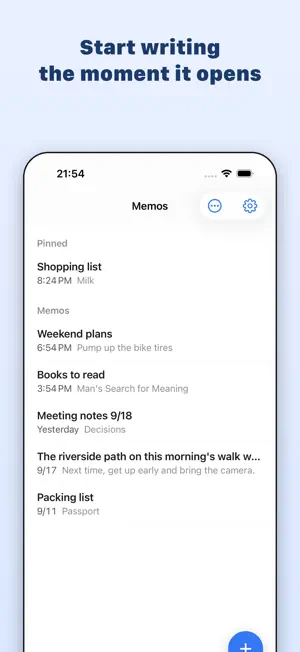
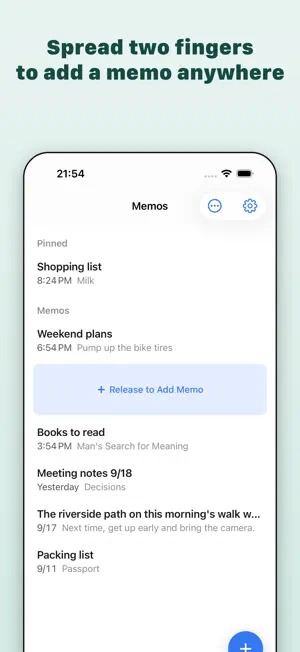
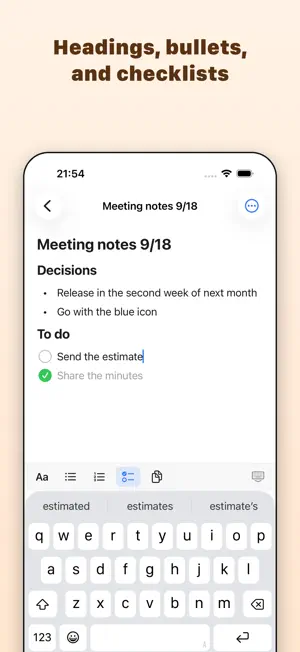
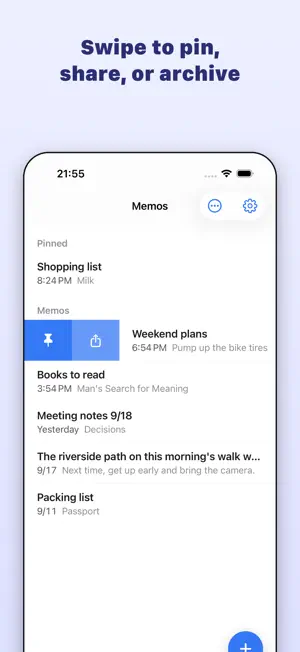
Memo - Quick Notes is a fast, lightweight notepad you can start writing in the moment it opens. No folders, no deep hierarchies. Jot something down, share it, and move on. ■ Add a memo exactly where you want it Spread two fingers apart between two memos and a new memo slides into that spot. Press and hold to reorder, swipe right to pin, swipe left to archive. Organize your list with your fingertips. ■ An editor that gets out of the way - Plain text, headings, and bold - Bulleted, numbered, and checklists - Completed items can move to the bottom automatically (optional) - Return continues a list; an empty line ends it ■ Powerful copy and share - Copy as plain text or with formatting (press and hold to reuse the last format) - Share as text to LINE, Messages, Mail, AirDrop, and more - Share as image: the whole memo rendered as one clean, tall image ■ 20 themes and flexible typography Snow, Linen, Ink, Nocturne, Lagoon, Honey, Ember, Blossom, and more. Choose from San Francisco, Rounded, Serif, or Monospaced, six text sizes, and adjustable line spacing. ■ Feels good to use Subtle sounds and haptic feedback the moment an action lands: checking an item, copying, archiving, adding a memo. Both are kept quiet and can be turned off in Settings. ■ Your list, your way - Group by date (Today, Yesterday, Previous 7 Days, Previous 30 Days…) - Sort by Date Edited, Date Created, Title, or Manual; newest or oldest first - Instant search - Press and hold the app icon to start a new memo right away ■ Your data stays yours - iCloud sync across devices signed in to the same Apple Account - Export and restore JSON backups - Archived memos can be restored at any time - Your memos are never sent to our own servers ■ Remove Ads (one-time purchase) Every feature is free. A single purchase hides the ads shown in Settings. Available in Japanese and English.
What’s new
Version 1.0.1 · Updated September 21, 2026
- Tap a date group to collapse it - New memos are highlighted where they were added - Bug fixes and polish
App privacy
The developer, Takahiro Kimura, reported these privacy practices to Apple.
Data Used to Track You
The following data may be used to track you across apps and websites owned by other companies:
- Identifiers: Device ID
- Usage Data: Advertising Data
Data Not Linked to You
The following data, which may be collected but is not linked to your identity, may be used for the following purposes:
- Identifiers: Device ID
- Usage Data: Product Interaction, Advertising Data
- Diagnostics: Crash Data
Used for: Third-Party Advertising, Analytics, App Functionality
Alternatives to Memo - Quick Notes
Looking for apps like Memo - Quick Notes? Here are 6 similar apps on the App Store.
-
 Solocord - チャット型メモアプリ
-
 ふとメモ | いつでも即書けるメモアプリ
-
 Fragments - Quick Notes
-
 すぐノート - ノート・メモ帳・日記
-
 シンプルメモ+
-
 EasyNote - Simple Notepad
| App | Rating | Price | Last updated | Compare |
|---|---|---|---|---|
| Memo - Quick Notes | – | Free | September 21, 2026 | |
| Solocord - チャット型メモアプリ | – | Free | Sep 3, 2026 | Compare |
| ふとメモ | いつでも即書けるメモアプリ | – | Free | Jul 4, 2026 | Compare |
| Fragments - Quick Notes | – | Free | Aug 3, 2026 | Compare |
| すぐノート - ノート・メモ帳・日記 | – | Free | Jan 15, 2024 | Compare |
| シンプルメモ+ | – | Free | Sep 23, 2026 | Compare |
| EasyNote - Simple Notepad | – | Free | May 21, 2026 | Compare |
Compare Memo - Quick Notes with the top alternatives: ratings, updates, ASO score and keyword gaps →