

SuperPlanner: Daily Planner
Gabriel Guarino Productivity iPhoneiPadiPod touchMacApple Watch
SuperPlanner: Daily Planner is a free Productivity app for iPhone and iPad by Gabriel Guarino. Rated 4.5/5 from 63 ratings. Requires iOS 17.0.
- Rating
- 4.5
- 63 ratings
- Price
- Free
- on the App Store
- Size
- 160 MB
- Age 4+
- Updated
- Sep 19
- 2026 · v3.0.2601
Screenshots
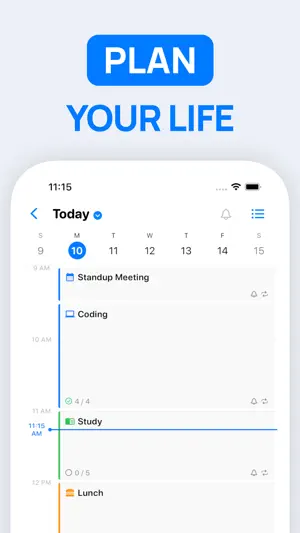


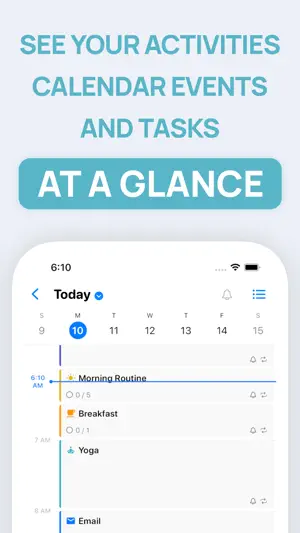
About SuperPlanner: Daily Planner
** Featured by Apple on "Best New Apps & Updates" and "Best Calendar Apps" ** Take control of your day and achieve your goals with SuperPlanner. SuperPlanner is a day planner that allows you to plan your day and focus using time blocking. With built-in calendar and task management features, you can easily organize your activities, calendar events, and tasks in one convenient daily planner. The user-friendly interface and powerful features make it easy to stay organized and on top of your schedule. As a schedule planner, it combines an agenda and organizer to help you boost your productivity and manage your routine. The visual timeline and time blocking features help you stay focused and avoid procrastination. You'll have the tools you need to stay organized and productive, no matter how busy your schedule may be. You can even set reminders for important activities, calendar events and tasks, so you never forget anything important. The app is perfect for people with ADHD, as it provides a comprehensive view of your entire day. You can see how your activities and appointments fit into your daily schedule, helping you avoid conflicts and manage your time more effectively. _____________________ FULLY FEATURED: SuperPlanner offers a comprehensive set of features to help you manage your day. It supports activities, calendar events, and tasks, as well as repetition rules and lists. You can also customize your digital planner with colors, icons, and themes to suit your preferences. Plus, it offers notifications, widgets and other helpful features to keep you organized and on track. _____________________ PRIVACY FOCUSED: SuperPlanner is designed with privacy in mind. No login or authentication is required, and your data is securely synced across all your devices using iCloud. _____________________ Take control of your day, focus and boost your productivity with SuperPlanner. Download the app today and start achieving your goals! _____________________ Privacy Policy: http://superplanner.app/privacy-policy Terms of Use: https://superplanner.app/terms
Ratings & reviews
4.5
63 ratings
What’s new
Version 3.0.2601 · Updated September 19, 2026
What's New in This Version Day Summary • New Day Summary view: see what is happening now, what is overdue, your anytime tasks and what is up next, all on one screen • Tasks are grouped by time of day and you can browse previous days • Choose which sections the summary shows and reschedule tasks without leaving it Tasks • Give tasks a colour and add up to three custom tags, with a tag manager, suggested tags and copy/paste of tags between tasks • Attach images to tasks from the camera, your photo library, Files or the clipboard, synced through iCloud Drive • New full-screen editor for long titles and notes • Duplicate tasks, move them to another list or to the Inbox, set or clear a parent task, and add a task directly above or below another • New reorder screen for tasks and sections with drag and drop • Quick reschedule suggestions: today, tomorrow, next weekday, or the next occurrence of the task's activity • Shake to undo a completion or a deletion Planning • Hide or collapse sections in any list • Control task archiving per activity or list Live Activities and Widgets • Live Activities can start automatically and now show a compact timer in the Dynamic Island • New widgets: Current Summary, Do Next recommended tasks (including Lock Screen), Task Quick Open and a day timeline Apple Watch • Redesigned watch app with Now, Next and Overdue views and haptic feedback • New circular, corner, inline and rectangular complications for current and upcoming activities Mac • Menu bar icon, global keyboard shortcut and a new Command Bar to search tasks, run commands or create a task from anywhere Calendar and Appearance • Exclude calendar events by title rule (contains, starts with, ends with, matches) • Text Formatting settings: colour or dim list markers, hashtags, times, amounts, durations, emails, phone numbers, code, arrows and more in task titles Also • Redesigned task list toolbar and add-task popover • Numerous performance, stability and sync improvements
App privacy
The developer, Gabriel Guarino, reported these privacy practices to Apple.
Data Not Linked to You
The following data, which may be collected but is not linked to your identity, may be used for the following purposes:
- Purchases: Purchase History
- Identifiers: Device ID
- Usage Data: Product Interaction
- Diagnostics: Crash Data, Performance Data
Used for: Analytics, App Functionality
Alternatives to SuperPlanner: Daily Planner
Looking for apps like SuperPlanner: Daily Planner? Here are 6 similar apps on the App Store. The highest rated is Vimcal: Calendar and Schedule (4.7/5), and all 6 are free to download.
-
 Vimcal: Calendar and Schedule
4.7
Vimcal: Calendar and Schedule
4.7
-
 24me: Calendar・Planner & To Do
4.5
24me: Calendar・Planner & To Do
4.5
-
 GoodTask: To Do List & Planner
4.6
GoodTask: To Do List & Planner
4.6
-
 Actions: To Do List Organizer
4.6
Actions: To Do List Organizer
4.6
-
 Sorted³ - Calendar Notes Tasks
4.7
Sorted³ - Calendar Notes Tasks
4.7
-
 Clear: To Dos & Reminders
4.6
Clear: To Dos & Reminders
4.6
| App | Rating | Price | Last updated | Compare |
|---|---|---|---|---|
| SuperPlanner: Daily Planner | 4.5 / 5 (63 ratings) | Free | September 19, 2026 | |
| Vimcal: Calendar and Schedule | 4.7 / 5 (467) | Free | Aug 28, 2026 | Compare |
| 24me: Calendar・Planner & To Do | 4.5 / 5 (6,773) | Free | Sep 11, 2026 | Compare |
| GoodTask: To Do List & Planner | 4.6 / 5 (2,020) | Free | Sep 26, 2026 | Compare |
| Actions: To Do List Organizer | 4.6 / 5 (9,751) | Free | Sep 13, 2026 | Compare |
| Sorted³ - Calendar Notes Tasks | 4.7 / 5 (4,054) | Free | Oct 15, 2024 | Compare |
| Clear: To Dos & Reminders | 4.6 / 5 (5,103) | Free | Sep 26, 2026 | Compare |