

Convert To Pinyin
The Rocket Studio Productivity iPhoneiPadiPod touch
Convert To Pinyin is a paid Productivity app for iPhone and iPad by The Rocket Studio. Rated 2.0/5 from 2 ratings. Requires iOS 11.0.
- Rating
- 2.0
- 2 ratings
- Price
- 0.99 USD
- on the App Store
- Size
- 1 MB
- Age 4+
- Updated
- Feb 15
- 2024 · v1.3
Screenshots
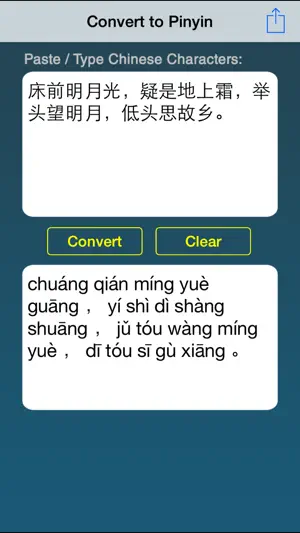

About Convert To Pinyin
Convert Chinese characters to pinyin in the quickest possible way. The converted pinyin text will have the tonal marks in all the right places (also called accent marks). After conversion, you can quickly copy the pinyin text to clipboard or even email it out! - Perfect for learners of the Chinese language who want to quickly check the pronunciations of Chinese sentences. - Just type or paste the Chinese text, and tap the Convert button. - Copy the pinyin text, or email it out.
What’s new
Version 1.3 · Updated February 15, 2024
Fixed layout and night mode issues.
App privacy
The developer, The Rocket Studio, reported these privacy practices to Apple.
Data Not Collected
The developer does not collect any data from this app.
Alternatives to Convert To Pinyin
Looking for apps like Convert To Pinyin? Here are 6 similar apps on the App Store. The highest rated is Copy 'Em + Paste Keyboard (4.7/5), and 5 of the 6 are free to download.
-
 TextOCR
-
 VoxSafe-Offline Transcription
1.0
VoxSafe-Offline Transcription
1.0
-
 JotPsych
3.2
JotPsych
3.2
-
 AI Image & Chat Hub: RocketKit
4.3
AI Image & Chat Hub: RocketKit
4.3
-
 Copy 'Em + Paste Keyboard
4.7
Copy 'Em + Paste Keyboard
4.7
-
 Paraphrase tool: Fluxkey
4.7
Paraphrase tool: Fluxkey
4.7
| App | Rating | Price | Last updated | Compare |
|---|---|---|---|---|
| Convert To Pinyin | 2.0 / 5 (2 ratings) | 0.99 USD | February 15, 2024 | |
| TextOCR | – | 0.99 USD | Jan 4, 2024 | Compare |
| VoxSafe-Offline Transcription | 1.0 / 5 (1) | Free | Oct 26, 2026 | Compare |
| JotPsych | 3.3 / 5 (12) | Free | May 12, 2026 | Compare |
| AI Image & Chat Hub: RocketKit | 4.3 / 5 (42) | Free | Oct 26, 2026 | Compare |
| Copy 'Em + Paste Keyboard | 4.7 / 5 (149) | Free | May 4, 2026 | Compare |
| Paraphrase tool: Fluxkey | 4.7 / 5 (226) | Free | Aug 30, 2026 | Compare |
Compare Convert To Pinyin with the top alternatives: ratings, updates, ASO score and keyword gaps →