

VoxSafe-Offline Transcription
涛 刘 Productivity iPhoneiPadiPod touch
VoxSafe-Offline Transcription is a free Productivity app for iPhone and iPad by 涛 刘. Rated 1.0/5 from 1 ratings. Requires iOS 17.0. Updated October 21, 2026.
- Rating
- 1.0
- 1 ratings
- Price
- Free
- on the App Store
- Size
- 107 MB
- Age 4+
- Updated
- Oct 21
- 2026 · v1.10.1
Screenshots


About VoxSafe-Offline Transcription
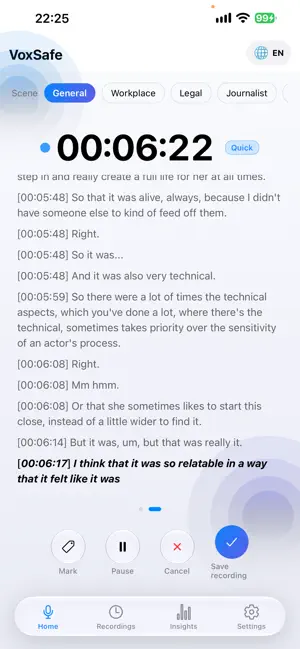
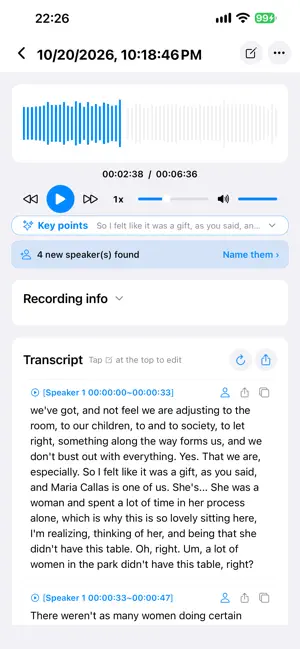
VoxSafe turns every recording into text and insight you can actually use. Meetings, interviews, lectures, evidence, ideas: tap to record, transcribe offline, separate speakers automatically, and let AI pull out the key points and minutes. All transcription and recognition run on your device - your audio never leaves your phone. [RECORDING · SIMPLE & RELIABLE] • One tap to record, with background recording, Lock Screen and headphone controls; Home Screen & Lock Screen widgets start a recording instantly • Mark key moments while recording; Pause / Cancel / Save always at hand • App quit unexpectedly? Everything already recorded is saved and restored, and transcription picks up where it stopped [TRANSCRIPTION · OFFLINE & ACCURATE] • Offline transcription: Chinese, Cantonese, English, Japanese, Korean and more - no internet needed • No-download Quick Mode: transcribe right after install (built-in system recognition); download the high-quality model anytime for even better accuracy • Auto segmentation + full-text refinement: long recordings stay coherent, never chopped into fragments • Scene glossary correction: six built-in vocabularies (General / Workplace / Legal / Journalist / Medical / Finance, 14,000+ terms) fix sound-alike errors automatically - and every fix can be reverted [ORGANIZE · WITH AI] • Speaker separation: voices are separated automatically; name a voice once and it is recognized in future recordings • Key points: key dialogue and speaker share extracted automatically - grasp long recordings at a glance • AI Minutes: on Apple Intelligence-capable iPhones, a coherent meeting summary is generated on device - nothing leaves your phone • Insights tab: weekly overview, top terms, speaking pace and habits - the more you use it, the more you learn [PLAYBACK & EXPORT · FLEXIBLE] • Tap the waveform to seek, playback speed (1x / 1.5x / 2x), volume control • Transcript export: PDF / Word / Markdown / TXT / SRT / CSV • Audio export: WAV / M4A, with lossless range trimming • Full-text search: find any recording or transcript by keyword [PRIVACY & SECURITY · BY DEFAULT] • All transcription, recognition and AI minute generation run on device - audio is never uploaded • Face ID / passcode app lock keeps sensitive content private [PURCHASE] • Free to download, 7 days of full-featured trial; after the trial you can still record once per day for free • One-time purchase to unlock everything - no subscription, no hidden charges [WHO IT'S FOR] • Professionals: meeting recording to minutes in one tap • Journalists & lawyers: interviews and evidence, transcribed as you speak • Students: lectures become revision notes, nothing missed • Creators: quick idea capture and interview drafts, half the cleanup time
What’s new
Version 1.10.1 · Updated October 21, 2026
New Features 1. Live captions, fully upgraded (iOS 26): powered by Apple's system-level on-device recognition engine - words appear as you speak, and text on screen is finalized instantly, never rolled back or lost. Real-time performance and accuracy are dramatically improved 2. Matching transcription quality: the final transcript produced after saving now uses the same engine as live captions (iOS 26), so the finished text matches what you saw live 3. Background task center: Settings → Advanced → Background tasks shows transcription and speaker-labeling progress at a glance - the current task, elapsed time, queue count and estimated time to finish 4. On-device model management: Chinese / English recognition models can be downloaded from Settings on demand (one-time, about 200MB) with live progress - everything stays on your device 5. More reliable consecutive recordings: every new recording starts with a clean caption slate; switching languages takes effect immediately Fixes & Changes 1. Fixed leftover captions from a previous recording appearing in the next one 2. Fixed live captions occasionally not showing during consecutive recordings 3. Fixed live captions still using the previous language after switching Note: live captions and same-engine transcription are exclusive to iOS 26. On earlier versions you can download the high-quality recognition models on demand - recording, offline transcription and all other features are unaffected. All live recognition, transcription and AI processing run entirely on your device. Audio never leaves your phone.
App privacy
The developer, 涛 刘, reported these privacy practices to Apple.
Data Linked to You
The following data, which may be collected and linked to your identity, may be used for the following purposes:
- Diagnostics: Crash Data, Performance Data, Other Diagnostic Data
Used for: Analytics
Alternatives to VoxSafe-Offline Transcription
Looking for apps like VoxSafe-Offline Transcription? Here are 6 similar apps on the App Store.
-
 Folio: Notes & Pins
-
 Swipfolio
-
 TeaManjur Image and PDF
-
 VoiceWise
-
 Avocadoc: Family Docs
-
 WorkHours Log Timesheet OT Pay
| App | Rating | Price | Last updated | Compare |
|---|---|---|---|---|
| VoxSafe-Offline Transcription | 1.0 / 5 (1 rating) | Free | October 21, 2026 | |
| Folio: Notes & Pins | – | Free | Oct 19, 2026 | Compare |
| Swipfolio | – | Free | Aug 19, 2026 | Compare |
| TeaManjur Image and PDF | – | Free | Aug 12, 2026 | Compare |
| VoiceWise | – | Free | May 15, 2025 | Compare |
| Avocadoc: Family Docs | – | Free | Aug 27, 2026 | Compare |
| WorkHours Log Timesheet OT Pay | – | 1.99 USD | Jul 14, 2026 | Compare |