

Microsoft Word
Microsoft Corporation Productivity iPhoneiPadiPod touch
Microsoft Word is a free Productivity app for iPhone and iPad by Microsoft Corporation. Rated 4.7/5 from 3,029,434 ratings. Requires iOS 26.0.
- Rating
- 4.7
- 3M ratings
- Price
- Free
- on the App Store
- Size
- 529 MB
- Age 4+
- Updated
- Oct 26
- 2026 · v2.115.1
Screenshots

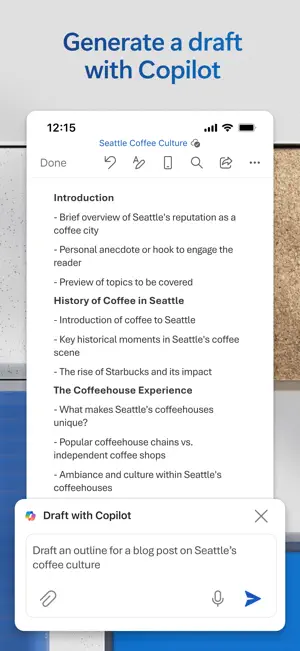
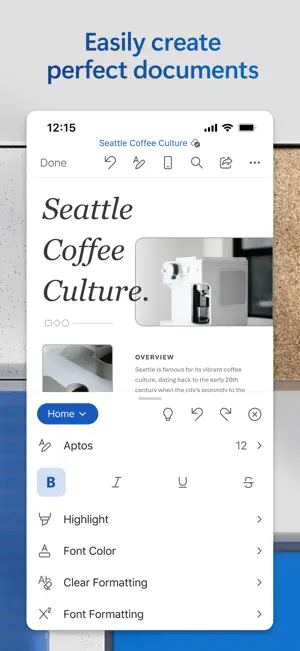

About Microsoft Word
Send, open and edit Office files from your mobile with the full power of Microsoft’s word-processing tools. Whether you're a writer, freelancer, student or project manager, Word moves with you. Enhance your writing with Copilot in Word when signed in with your Microsoft 365 subscription.* Draft, edit, collaborate, and share with confidence – anytime, anywhere. Create impactful blogs, proposals, CVs, branding materials and more. Customise every document with rich formatting options and professionally designed templates. Create Documents • Kick-start projects with templates for letters, CVs, scripts, proposals, invoices and more • Use robust formatting and layout tools to express ideas clearly • Maintain a polished look across all your devices Read, Write and Edit Anywhere • Edit long documents, letters and scripts on your device with familiar writing tools • Open attachments with the built in viewer • Convert PDFs to Word for quick editing Collaborate and Share • Leave comments directly next to relevant text • Work with others in real time and track layout or formatting changes • Use version history to view and restore previous drafts Simplified Sharing • Invite others to edit or view in just a few taps • Manage permissions and see who’s active in the document • Copy formatted content into emails or attach your files instantly AI Assistance with Copilot* • Draft CVs, polish proposals and organise ideas in seconds • Summarise, refine and format content instantly • Get intelligent suggestions to make your writing clear and compelling *Unlock the full Microsoft 365 experience with a qualifying subscription on phone, tablet, PC or Mac. Microsoft 365 subscriptions purchased in app will be charged to your App Store account and automatically renew unless auto renew is turned off 24 hours before the billing period ends. Manage your subscription in your App Store account settings. Subscriptions cannot be cancelled during the active period. This app may be provided by Microsoft or a third party publisher and is subject to its own privacy statement and terms. Data may be transferred to, stored and processed in the United States or other regions where Microsoft or its affiliates operate. EULA: http://aka.ms/eula
Ratings & reviews
4.7
3M ratings
What’s new
Version 2.115.1 · Updated October 26, 2026
• General quality and performance enhancements.
App privacy
The developer, Microsoft Corporation, reported these privacy practices to Apple.
Data Linked to You
The following data, which may be collected and linked to your identity, may be used for the following purposes:
- Location: Coarse Location
- Identifiers: User ID, Device ID
- Usage Data: Product Interaction
- Diagnostics: Crash Data, Performance Data, Other Diagnostic Data
- Contact Info: Email Address, Name, Phone Number
- Contacts: Contacts
- User Content: Other User Content
Used for: Analytics, App Functionality
Alternatives to Microsoft Word
Looking for apps like Microsoft Word? Here are 6 similar apps on the App Store. The highest rated is iLovePDF - PDF Editor & Scan (4.8/5), and all 6 are free to download.
-
 Office Word:Edit Word Document
4.6
Office Word:Edit Word Document
4.6
-
 Office Word: Edit Document
4.7
Office Word: Edit Document
4.7
-
 Word Editor: Edit Office Word
4.7
Word Editor: Edit Office Word
4.7
-
 Word Editor: Edit Documents®
4.3
Word Editor: Edit Documents®
4.3
-
 XLSX Sheets: Edit Spreadsheet
4.5
XLSX Sheets: Edit Spreadsheet
4.5
-
 iLovePDF - PDF Editor & Scan
4.8
iLovePDF - PDF Editor & Scan
4.8
| App | Rating | Price | Last updated | Compare |
|---|---|---|---|---|
| Microsoft Word | 4.7 / 5 (3,029,434 ratings) | Free | October 26, 2026 | |
| Office Word:Edit Word Document | 4.6 / 5 (9,706) | Free | Aug 15, 2024 | Compare |
| Office Word: Edit Document | 4.7 / 5 (1,517) | Free | Oct 5, 2026 | Compare |
| Word Editor: Edit Office Word | 4.7 / 5 (1,483) | Free | Oct 16, 2026 | Compare |
| Word Editor: Edit Documents® | 4.3 / 5 (766) | Free | Apr 16, 2026 | Compare |
| XLSX Sheets: Edit Spreadsheet | 4.5 / 5 (3,283) | Free | Oct 25, 2026 | Compare |
| iLovePDF - PDF Editor & Scan | 4.8 / 5 (52,199) | Free | Oct 22, 2026 | Compare |
Compare Microsoft Word with the top alternatives: ratings, updates, ASO score and keyword gaps →