

Many+
le4studio Productivity iPhoneiPadiPod touchApple Watch
Many+ is a free Productivity app for iPhone and iPad by le4studio. Rated 4.7/5 from 3 ratings. Requires iOS 18.0. Updated July 8, 2026.
- Rating
- 4.7
- 3 ratings
- Price
- Free
- on the App Store
- Size
- 7 MB
- Age 4+
- Updated
- Jul 8
- 2026 · v2.0.1
Screenshots


About Many+
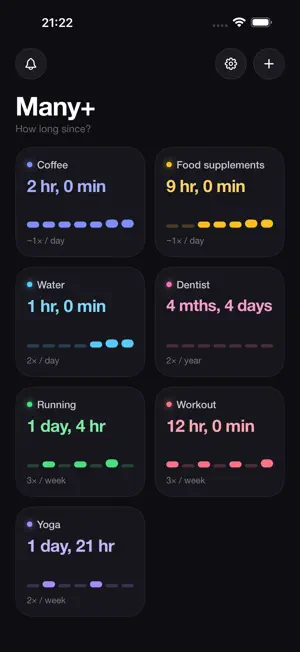
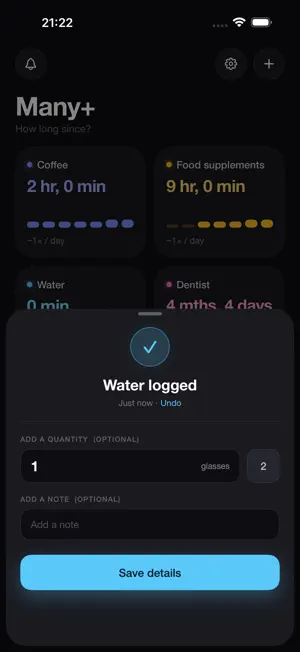
Coffee, runs, watering the plants, dentist visits… Many+ answers two simple questions: how many times, and how long since? ONE TAP AND IT'S LOGGED Tap a tile and it's recorded. Add a quantity (5 km, 2 coffees…) or a note when you want — never required. YOUR LIFE IN COLOR Every tracker gets its own pastel tile: elapsed time front and center, last 7 days of activity, your usual frequency. REMINDERS THAT (GENTLY) INSIST "Every week" means every week: Many+ reminds you at your chosen pace until it's done. Logging resets the clock. YOUR STATS, NO EFFORT Totals, averages, records, weekly chart: open any tracker and it's all there. YOUR WORKOUTS, AUTOMATICALLY Connect Apple Health and your runs, rides, and workouts log themselves — with distance or duration. You pick which types to import, and edits in Health follow along. ON YOUR HOME SCREEN AND WRIST Widgets with one-tap logging on the Home Screen and Lock Screen, no need to open the app. An Apple Watch app to log from your wrist. Works with Siri too: "Log coffee in Many+". YOUR DATA IS YOURS Private iCloud sync across iPhone, iPad, and Apple Watch. One-tap backup to Files, plus full export and import: your trackers and notes never leave your account.
What’s new
Version 2.0.1 · Updated July 8, 2026
What's New • Per-tracker insights — every tracker now shows analytics tailored to its nature: streaks and a heatmap for frequent habits, trend charts and averages for quantities (km, min…), and typical pace with a projected next occurrence for rare events. • Redesigned detail screen — insights now appear right on the tracker's page, with a preview of your latest entries and the full log just a tap away. • Smarter reminders — custom durations across two units (e.g. "1 day 12 hours", "1h30"), plus a global Quiet hours window: a reminder that would fire during quiet hours is pushed to the moment the window ends — nothing is lost. • Choose what a tap does — tapping a tracker can now either log it instantly or open its detail page (new setting in Settings). • More reliable Apple Watch sync — your watch now syncs directly with your iPhone. Entries made on the watch no longer get stuck and arrive reliably, even offline. • Swipe-back gesture throughout the app. • Apple Health — a clear message and a shortcut to Settings when access to your workout data has been denied. Bug fixes and translation improvements.
App privacy
The developer, le4studio, reported these privacy practices to Apple.
Data Not Linked to You
The following data, which may be collected but is not linked to your identity, may be used for the following purposes:
- Usage Data: Product Interaction
- Diagnostics: Performance Data, Other Diagnostic Data, Crash Data
Used for: Analytics, App Functionality
Alternatives to Many+
Looking for apps like Many+? Here are 6 similar apps on the App Store. The highest rated is Klippy - Clipboard Manager (4.0/5), and all 6 are free to download.


| App | Rating | Price | Last updated | Compare |
|---|---|---|---|---|
| Many+ | 4.7 / 5 (3 ratings) | Free | July 8, 2026 | |
| PureMarkdown | – | Free | May 28, 2026 | Compare |
| MemofyAI | – | Free | Jul 22, 2026 | Compare |
| Vault Notes by Hansson | – | Free | Jul 3, 2026 | Compare |
| Steno Notes | – | Free | Jul 11, 2026 | Compare |
| screenshat | – | Free | Jul 28, 2026 | Compare |
| Klippy - Clipboard Manager | 4.0 / 5 (5) | Free | Sep 2, 2026 | Compare |
Compare Many+ with the top alternatives: ratings, updates, ASO score and keyword gaps →