

NIR Color
JixiPix Software Photo & Video iPhoneiPadiPod touch
NIR Color is a paid Photo & Video app for iPhone and iPad by JixiPix Software. Rated 4.3/5 from 21 ratings. Requires iOS 15.0. Updated December 8, 2025.
- Rating
- 4.3
- 21 ratings
- Price
- 2.99 USD
- on the App Store
- Size
- 16 MB
- Age 4+
- Updated
- Dec 8
- 2025 · v1.19
Screenshots

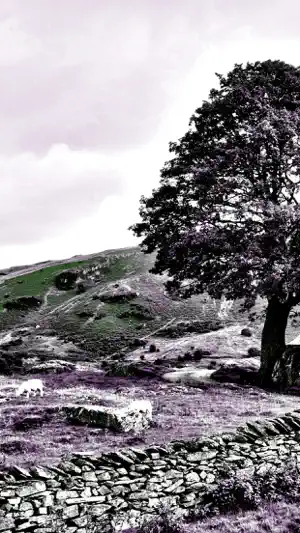
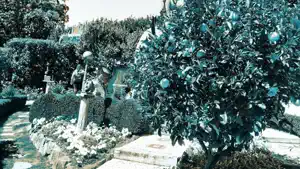
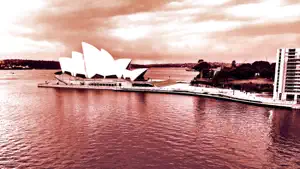
About NIR Color
Photography is the art of capturing light. Infrared photography, on the other hand, is the art of capturing invisible light. If your looking for something new and unique to add to your photography arsenal then you came to the right place NIR Color is truly beautiful, surreal and will transform ordinary landscapes into something magical and ethereal. NIR Color uses “near infrared” light technology, along with infrared “color” filters to add violet, blue, green, yellow, orange, and red colors, and all their combinations back into your image. The combination creates stunning imagery with otherworldly and mysteriously atmospheres. When using “NIR” everyday objects differ sharply from those of visible light. A blue sky can sometimes appear very dark, while foliage often turns light to create an amazing and chilling contrast. Not only will the contrast make your photo ‘pop’, it will also transform the original color to ones that are dreamy and surreal using our infrared “color” filters. The decision is in your hands to tone down the color to ones that are classy, clean, and contrasted. Or boost them to a dramatic color of your choosing taking your infrared photography to a completely different level. With NIR Color you can quickly see how incredibly beautiful the world can be in a different light. The world as seen using NIR Color is at once familiar and strange, using hues that are entirely different than those we actually see in reality. The eerie but seductive effects that NIR photographs bring to the table consist mostly of landscape shots, but on occasion portraits can be completely converted from what we recognize as normal into ones where skin tones turn pale and cold and eyes that go dark. This may lead you to shift gears from a normal pose into something that is wildly terrestrial. So give NIR Color a try and transcend your photo into a world where you and your viewer will be offered a chance to encounter a deeper connection to the story behind your photograph. NIR Color … • Works best on colorful landscape images • “Near Infrared” technology turns blue-sky dark and foliage light to make your image ‘pop’ • Infrared “Color” filters add violet, blue, green, yellow, orange, and red colors, and all their combinations back into the image to create a dreamy and surreal appearance. • Works with Hi-Res images and saves Hi-Res for top-quality results • Gets you started fast with a variety of presets • Creates personal-favorite custom presets using the "Save Preset" menu • Has the addictive JixiPix Randomizer – so much fun! • Easy-to-use slider controls to adjust light, contrast and texture just how you want it • Superfast preview mode to immediately see edit results, with large image rendered at save • You can save to the photo roll and/or email or post to Facebook. Share your masterpieces! •Superior customer support and updates – we're committed to your long-term satisfaction
Ratings & reviews
4.3
21 ratings
What’s new
Version 1.19 · Updated December 8, 2025
Optimization, bug fixes and performance improvements.
App privacy
The developer, JixiPix Software, reported these privacy practices to Apple.
Data Not Collected
The developer does not collect any data from this app.
Alternatives to NIR Color
Looking for apps like NIR Color? Here are 6 similar apps on the App Store. The highest rated is Distressed FX : Plus (4.8/5), and 4 of the 6 are free to download.
-
 Bluristic - Long Exposure
3.8
Bluristic - Long Exposure
3.8
-
 Distressed FX : Plus
4.8
Distressed FX : Plus
4.8
-
 KinoGlitch
4.7
KinoGlitch
4.7
-
 RNI Aero
4.7
RNI Aero
4.7
-
 MocaDeco - Be Creative
4.4
MocaDeco - Be Creative
4.4
-
 iColorama S
4.1
iColorama S
4.1
| App | Rating | Price | Last updated | Compare |
|---|---|---|---|---|
| NIR Color | 4.3 / 5 (21 ratings) | 2.99 USD | December 8, 2025 | |
| Bluristic - Long Exposure | 3.8 / 5 (27) | 4.99 USD | Jun 1, 2026 | Compare |
| Distressed FX : Plus | 4.8 / 5 (1,234) | 19.99 USD | Sep 16, 2026 | Compare |
| KinoGlitch | 4.7 / 5 (98) | Free | Oct 20, 2026 | Compare |
| RNI Aero | 4.7 / 5 (250) | Free | Oct 21, 2026 | Compare |
| MocaDeco - Be Creative | 4.4 / 5 (470) | Free | Oct 16, 2025 | Compare |
| iColorama S | 4.1 / 5 (178) | Free | Mar 23, 2025 | Compare |
Compare NIR Color with the top alternatives: ratings, updates, ASO score and keyword gaps →