

MocaDeco - Be Creative
Seohyeon Lee Photo & Video iPhoneiPadiPod touch
MocaDeco - Be Creative is a free Photo & Video app for iPhone and iPad by Seohyeon Lee. Rated 4.4/5 from 470 ratings. Requires iOS 17.1.
- Rating
- 4.4
- 470 ratings
- Price
- Free
- on the App Store
- Size
- 176 MB
- Age 4+
- Updated
- Oct 16
- 2025 · v3.7.2
Screenshots

About MocaDeco - Be Creative
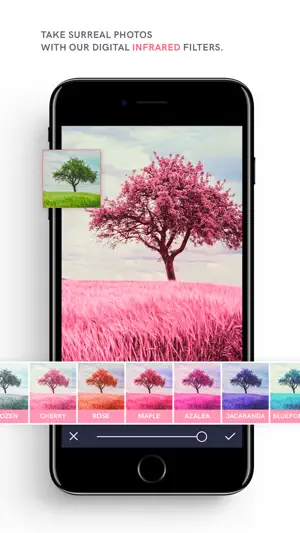
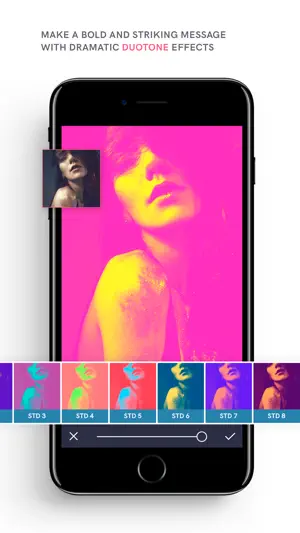
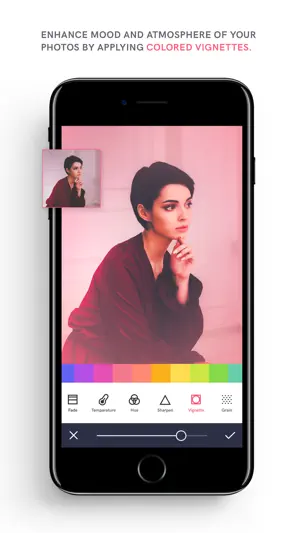
You can be creative with MocaDeco! Apply dramatic filters, cool effects, add eye-catching typography and artworks to your photos. Overlays • Over 200 overlays in 16 themes. • Make your ordinary photos look like vintage film with our various overlays. • Add a variety of overlays to your images, including rainbows, skies, analog light leaks, grainy film textures and emotional bokeh light effects. Filters • Over 140 unique filters in 12 themes. • Capture poetic and surreal photos with our 12 digital infrared filters. • Deliver bold and striking messages with 21 duotone filters. Artworks & Fonts • Select from over 700 artworks & over 150 fonts. • Fill with glitter and different lovely textures, including gold foils, holographic gradients, marbles and more. • Adjust the font size, color, line height, letter spacing, alignment and more. • Make it stand out with drop shadows. Image Adjustments & More • Enhance the mood & atmosphere of your photos by applying colored vignettes. • Brightness, Contrast, Highlight, Shadow, Saturation, Fade, Temperature, Hue, Color Fringe, Prism, Sharpen, Grain. • The HSL tool gives you control to adjust the Hue, Saturation and Lightness of a specific color in the image. • Blur images to convey feelings and apply tilt-shift to panoramic shots to make them look like miniatures. • Crop to 18 different ratios, flip or rotate your photo. • Correct horizontal and vertical lines as well lens distortions. Camera • Manual controls such as exposure, ISO, shutter speed, and white balance. • Apply all filters in live camera mode, allowing you to see your final product before you even tap the shutter button. • Shoot like a pro using 5 photo composition guide. Layer and Project Based Editing • Rearrange the order by long-tapping and dragging to the desired position. • Lock or hide layers for easier editing. • Save your work as an editable projects. Blank Canvas • Choose from 21 sizes of blank canvases optimized for social media images. • Add various textures or custom colors. Don't forget tag your gorgeous edits on Instagram with #mocadeco Have any questions? Contact us. We welcome your feedback. Email us at [email protected] or visit www.mocadeco.com/support
Ratings & reviews
4.4
470 ratings
What’s new
Version 3.7.2 · Updated October 16, 2025
• Improved overall stability and performance for a smoother editing experience. • Minor bug fixes and optimizations.
App privacy
The developer, Seohyeon Lee, reported these privacy practices to Apple.
Data Used to Track You
The following data may be used to track you across apps and websites owned by other companies:
- Identifiers: Device ID
- Usage Data: Advertising Data
Data Not Linked to You
The following data, which may be collected but is not linked to your identity, may be used for the following purposes:
- Identifiers: Device ID
- Usage Data: Advertising Data, Product Interaction
- Purchases: Purchase History
- Diagnostics: Crash Data, Performance Data, Other Diagnostic Data
Used for: Third-Party Advertising, Developer’s Advertising or Marketing, Analytics, Product Personalization, App Functionality
Alternatives to MocaDeco - Be Creative
Looking for apps like MocaDeco - Be Creative? Here are 6 similar apps on the App Store. The highest rated is RNI Aero (4.7/5), and all 6 are free to download.
-
 Pop Art filters and effects
4.0
Pop Art filters and effects
4.0
-
 RNI Aero
4.7
RNI Aero
4.7
-
 Red – Dark Filters
4.7
Red – Dark Filters
4.7
-
 Trigraphy: Photo to Art
4.6
Trigraphy: Photo to Art
4.6
-
 Tinge - Glow Cam
4.4
Tinge - Glow Cam
4.4
-
 Image Filters Photo Editor +
3.7
Image Filters Photo Editor +
3.7
| App | Rating | Price | Last updated | Compare |
|---|---|---|---|---|
| MocaDeco - Be Creative | 4.4 / 5 (470 ratings) | Free | October 16, 2025 | |
| Pop Art filters and effects | 4.0 / 5 (3) | Free | Jan 29, 2026 | Compare |
| RNI Aero | 4.7 / 5 (250) | Free | Sep 15, 2025 | Compare |
| Red – Dark Filters | 4.7 / 5 (213) | Free | Jan 14, 2026 | Compare |
| Trigraphy: Photo to Art | 4.6 / 5 (934) | Free | Oct 2, 2026 | Compare |
| Tinge - Glow Cam | 4.4 / 5 (112) | Free | Mar 1, 2026 | Compare |
| Image Filters Photo Editor + | 3.7 / 5 (32) | Free | Oct 24, 2025 | Compare |