

ClassTable: Lecture Notes AI
CHING FENG WANG Productivity iPhoneiPadiPod touch
ClassTable: Lecture Notes AI is a free Productivity app for iPhone and iPad by CHING FENG WANG. Requires iOS 18.0. Updated June 12, 2026.
- Price
- Free
- on the App Store
- Size
- 8 MB
- Age 4+
- Updated
- Jun 12
- 2026 · v2.0
Screenshots


About ClassTable: Lecture Notes AI
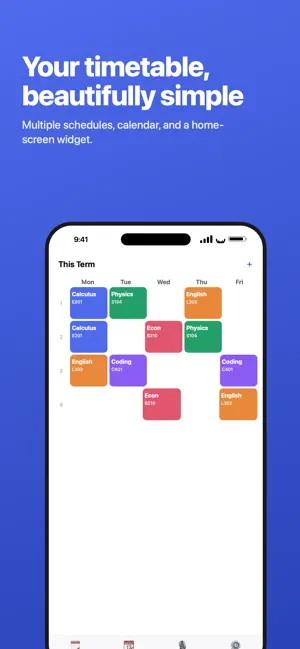
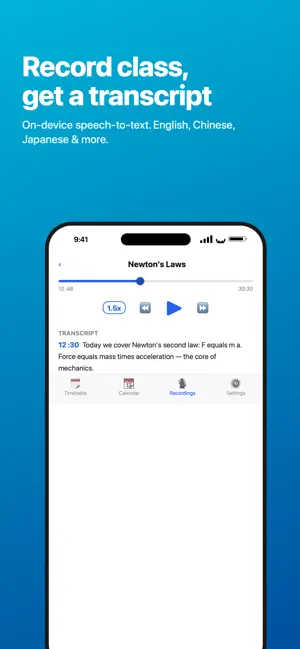
ClassTable is more than a timetable — it turns every lecture into notes you can actually review. Hit record in class. Afterwards it transcribes automatically, then AI helps you summarize key points, build flashcards, and generate quizzes. No more crawling through recordings before exams. FEATURES • Record → Transcript: on-device speech recognition, multilingual (incl. English, Chinese, Japanese) • AI lecture notes: summary, key points, key terms, to-dos • Ask AI: ask about this lecture; answers are grounded in the transcript, with on-topic extras clearly labeled • AI quizzes: one tap to generate multiple-choice questions • Timetable × recordings: each recording auto-links to the class you're in; name topics, browse by course • Import audio/video: turn existing lecture files into transcripts (video uses audio only) • Powerful player: 0.5–3x speed, scrub, skip 15s • Timetable / Calendar / Home-screen Widget • iCloud sync across devices FREE & PRO Free: full timetable, recording, transcription, and player; 10 AI uses per month (notes/Ask AI/quiz combined). Pro: unlimited AI notes, Ask AI, and quizzes — plus no ads. SUBSCRIPTION ClassTable Pro offers monthly, yearly, and one-time lifetime options; prices shown in-app. • Subscriptions auto-renew 24 hours before the period ends unless canceled. • Manage or turn off auto-renew in your App Store account settings. • Privacy Policy: https://www.momosoft.one/Privacy.html • Terms of Use (EULA): https://www.apple.com/legal/internet-services/itunes/dev/stdeula/
What’s new
Version 2.0 · Updated June 12, 2026
A full redesign that turns class recordings into exam-ready notes: • AI lecture notes: summary, key points, flashcards • Ask AI about this lecture • One-tap AI quizzes • On-device transcription (English, Chinese, Japanese & more) • Import audio/video, or share files in from other apps • Player with 0.5–3x speed and scrubbing • Name recording topics, browse by course • Timetable / Calendar / Widget / iCloud sync
App privacy
The developer, CHING FENG WANG, reported these privacy practices to Apple.
Data Used to Track You
The following data may be used to track you across apps and websites owned by other companies:
- Identifiers: Device ID
- Usage Data: Product Interaction, Advertising Data
Data Linked to You
The following data, which may be collected and linked to your identity, may be used for the following purposes:
- Purchases: Purchase History
Used for: App Functionality
Data Not Linked to You
The following data, which may be collected but is not linked to your identity, may be used for the following purposes:
- Identifiers: Device ID
- Usage Data: Product Interaction, Advertising Data
- Diagnostics: Crash Data, Performance Data
Used for: Third-Party Advertising, Analytics
Alternatives to ClassTable: Lecture Notes AI
Looking for apps like ClassTable: Lecture Notes AI? Here are 6 similar apps on the App Store. The highest rated is Loominote: Smart AI Note Taker (4.9/5), and all 6 are free to download.
-
 DokMind: AI Doc Scan & Search
-
 NotizAI: AI Lecture Note Taker
-
 QuickSchedule — Teacher Hub
-
 Loominote: Smart AI Note Taker
4.9
-
 iThinkAir - 思想白板、AI指令集、AI数据库
-
 IntelliMind - AI Chat Experts
4.8
| App | Rating | Price | Last updated | Compare |
|---|---|---|---|---|
| ClassTable: Lecture Notes AI | – | Free | June 12, 2026 | |
| DokMind: AI Doc Scan & Search | – | Free | Sep 25, 2026 | Compare |
| NotizAI: AI Lecture Note Taker | – | Free | Oct 5, 2026 | Compare |
| QuickSchedule — Teacher Hub | – | Free | Sep 18, 2026 | Compare |
| Loominote: Smart AI Note Taker | 4.9 / 5 (34) | Free | Oct 25, 2026 | Compare |
| iThinkAir - 思想白板、AI指令集、AI数据库 | – | Free | Jun 22, 2026 | Compare |
| IntelliMind - AI Chat Experts | 4.8 / 5 (110) | Free | Feb 11, 2024 | Compare |