

DokMind: AI Doc Scan & Search
Dennis Harrington Productivity iPhoneiPadiPod touchMac
DokMind: AI Doc Scan & Search is a free Productivity app for iPhone and iPad by Dennis Harrington. Requires iOS 17.0. Updated September 25, 2026.
- Price
- Free
- on the App Store
- Size
- 8 MB
- Age 4+
- Updated
- Sep 25
- 2026 · v2.0.1
Screenshots


About DokMind: AI Doc Scan & Search
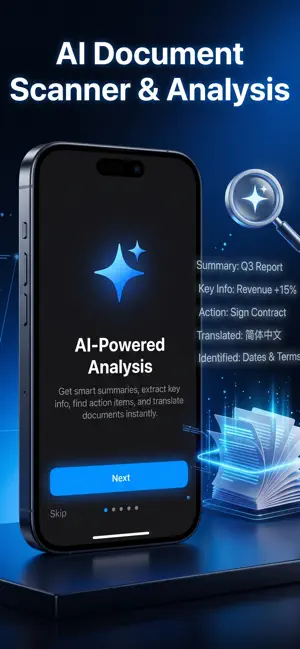
Chat with your scanned documents. DokMind's new Ask This Document feature lets you open any scan and ask questions in plain language, getting answers grounded in that document's own text. Scan paperwork with your camera, and DokMind reads it, organizes it, and turns it into something you can actually use. ASK THIS DOCUMENT (new) Open any scanned document and start a conversation. Ask "What's the total?", "When is this due?", "Who are the parties?", or "Summarize the obligations." Every answer comes straight from the document you scanned, not from the open web. POWERFUL SCANNING AND OCR - Crisp, auto-cropped scans with VisionKit. - Accurate text recognition so your documents are searchable. - Multi-page support for longer paperwork. AI TOOLS FOR EVERY DOCUMENT - Smart Summary: the key points at a glance. - Action Items: what you need to do, pulled out for you. - Plain English: dense or technical text, explained simply. - Translate: read documents in your language. - Extract: pull out totals, dates, names, and other details. ORGANIZED AND PRIVATE - Your documents and chat history are stored on your device. - No account or login required. - Search across everything you have scanned. WORKS ON IPHONE, IPAD, AND MAC - A single app across your devices. - On Mac, import documents by file instead of the camera. DOKMIND PRO Upgrade to DokMind Pro for full access to AI summaries, translations, extractions, and Ask This Document questions. Free users get a monthly AI allotment to try everything out. - Monthly and yearly subscription options. - Payment is charged to your Apple ID at confirmation of purchase. - Subscriptions renew automatically unless auto-renew is turned off at least 24 hours before the end of the current period. - Manage or cancel anytime in your Apple ID account settings. Privacy Policy: https://pub-3970a22e7da04af9ba2fa4ec1f1ad7b3.r2.dev/dokmind/privacy-policy.html Terms of Use (Apple Standard EULA): https://www.apple.com/legal/internet-services/itunes/dev/stdeula/ Support: https://pub-3970a22e7da04af9ba2fa4ec1f1ad7b3.r2.dev/dokmind/support.html
What’s new
Version 2.0.1 · Updated September 25, 2026
What's new in 2.0.1: - A security update that keeps DokMind's AI features working reliably. - Your saved data is better protected: updating never clears it. - After your first document analysis, DokMind may ask once if you'd like to rate it. You can dismiss it anytime. - Clearer wording about what Pro includes.
App privacy
The developer, Dennis Harrington, reported these privacy practices to Apple.
Data Not Linked to You
The following data, which may be collected but is not linked to your identity, may be used for the following purposes:
- User Content: Photos or Videos
- Usage Data: Other Usage Data
Used for: App Functionality
Alternatives to DokMind: AI Doc Scan & Search
Looking for apps like DokMind: AI Doc Scan & Search? Here are 6 similar apps on the App Store. The highest rated is Hedy: AI Meeting Coach & Notes (4.9/5), and all 6 are free to download.
-
 Hedy: AI Meeting Coach & Notes
4.9
-
 Transcriber • Speech to Text
3.6
-
 Transcribe Voice to Text Notes
4.4
-
 i2VPN - Secure VPN Proxy
4.6
-
 PDF it All Document Converter
4.8
-
 QuickScan:PDF OCR Text Scanner
4.9
| App | Rating | Price | Last updated | Compare |
|---|---|---|---|---|
| DokMind: AI Doc Scan & Search | – | Free | September 25, 2026 | |
| Hedy: AI Meeting Coach & Notes | 4.9 / 5 (198) | Free | Oct 30, 2026 | Compare |
| Transcriber • Speech to Text | 3.6 / 5 (20) | Free | Nov 19, 2025 | Compare |
| Transcribe Voice to Text Notes | 4.4 / 5 (52) | Free | Feb 11, 2025 | Compare |
| i2VPN - Secure VPN Proxy | 4.6 / 5 (3,652) | Free | Oct 7, 2026 | Compare |
| PDF it All Document Converter | 4.8 / 5 (8,167) | Free | Oct 20, 2026 | Compare |
| QuickScan:PDF OCR Text Scanner | 4.9 / 5 (4,083) | Free | Oct 29, 2026 | Compare |