

Cloud Contacts: All-in-One
一 王 Utilities iPhoneiPadiPod touchMac
Cloud Contacts: All-in-One is a free Utilities app for iPhone and iPad by 一 王. Rated 4.0/5 from 3 ratings. Requires iOS 18.6. Updated September 19, 2026.
- Rating
- 4.0
- 3 ratings
- Price
- Free
- on the App Store
- Size
- 79 MB
- Age 4+
- Updated
- Sep 19
- 2026 · v26.4.6
Screenshots

About Cloud Contacts: All-in-One
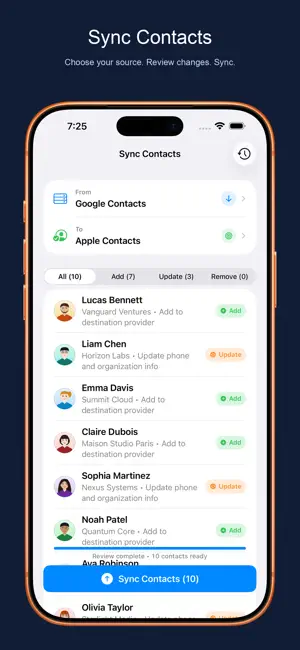
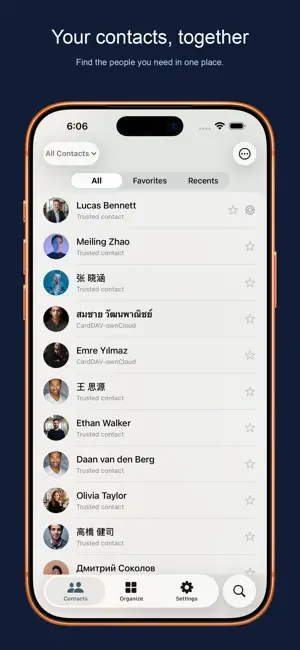
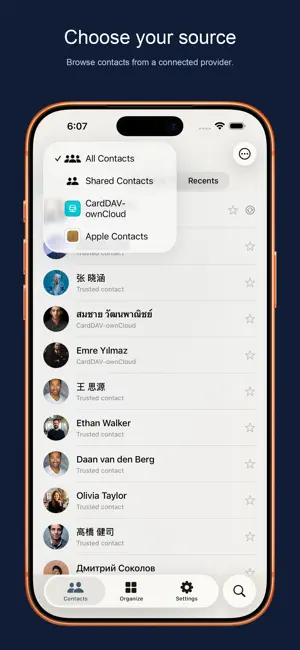
Your contacts should be where you need them. Cloud Contacts brings scattered address books together on iPhone, iPad and Mac, and helps you save selected contacts to Apple Contacts or another supported provider. SAVE TO APPLE CONTACTS Have contacts in Google, Outlook or a custom server that are missing from your device's Contacts app? 1. Connect your contact account. 2. Open Sync Contacts, choose your source, and select Apple Contacts as the destination. 3. Review the proposed changes, then confirm the sync. This creates or updates editable system contacts, available to apps with Contacts permission. Connecting a provider alone does not save its contacts to Apple Contacts. Saving requires permission and uses your device's default Contacts account, which may be iCloud depending on your settings. SYNC BETWEEN CONTACT ACCOUNTS • Connect Google, Microsoft, iCloud, and compatible CardDAV or JMAP services. • Choose source providers, groups or individual contacts, then one writable destination. • Review additions, updates and any proposed removals before confirming. Removal is off by default. • Each reviewed transfer is one-way, not continuous two-way mirroring. Provider support and writable fields vary; cloud write-back requires Sync PRO. Moving from Android to iPhone? Bring contacts from your Google account into Apple Contacts. Changing providers? Transfer selected contacts to a supported destination without moving your entire address book. CLEAN UP AND BACK UP • Find duplicate contacts, compare details and review merges, including in large libraries. • Fix repeated details and incomplete cards. • Back up and restore contacts, or export vCard files. Automatic cloud backup requires an eligible subscription and can be disabled. EVERYDAY TOOLS, YOUR CONTROL • Edit contact details, organize groups and share contact cards or QR codes. • Set birthday and important-date reminders. Optional relationship notes and follow-up tools are available when you need them. • Use App Lock and private-contact tools to protect sensitive information. FEATURE ACCESS & SUBSCRIPTIONS Availability depends on your plan, provider, permissions and device. Some tools require a one-time purchase or subscription; check the in-app plan details before purchasing. • Cloud Contacts offers auto-renewable subscriptions for Sync PRO features. • Payment is charged to your Apple ID account when you confirm the purchase. • Subscriptions renew automatically unless auto-renew is turned off at least 24 hours before the current period ends. • Your account is charged for renewal within 24 hours before the current period ends. • Manage or turn off auto-renew in your Apple ID Account Settings after purchase. Terms of Use (EULA): https://www.apple.com/legal/internet-services/itunes/dev/stdeula/ Privacy Policy: https://cloudcontacts.app/privacy Terms of Service: https://cloudcontacts.app/terms
What’s new
Version 26.4.6 · Updated September 19, 2026
Smoother Mac navigation, safer contact sync, and clearer account actions across iPhone, iPad, and Mac. • Mac Window Toolbar: Quick search (⌘F), direct contact scope selection, and streamlined navigation directly in the native Mac toolbar. • Resilient Background Sync: Contact syncing gracefully handles app backgrounding and system suspension without stalling or losing progress. • Safer Contact Deletions: Clear confirmation prompts when removing contacts with pending cloud changes prevent accidental data loss. • Refined Operation Progress: Updated progress dialogs with clearer action headers and responsive controls during long-running tasks. • Authentication & Account Polish: Consistent icons for all sign-in options, an expandable provider summary, and a cleaner account picker.
App privacy
The developer, 一 王, reported these privacy practices to Apple.
Data Used to Track You
The following data may be used to track you across apps and websites owned by other companies:
- Identifiers: Device ID
Data Not Linked to You
The following data, which may be collected but is not linked to your identity, may be used for the following purposes:
- Identifiers: Device ID
- Usage Data: Advertising Data
- Diagnostics: Crash Data
Used for: Third-Party Advertising, Developer’s Advertising or Marketing, Analytics
Alternatives to Cloud Contacts: All-in-One
Looking for apps like Cloud Contacts: All-in-One? Here are 6 similar apps on the App Store. The highest rated is Sync for Google Contacts (4.6/5), and all 6 are free to download.
-
 Contacts Sync-for Google Gmail
4.5
Contacts Sync-for Google Gmail
4.5
-
 Contact.s Back Up
4.5
Contact.s Back Up
4.5
-
 Contacts Sync, Backup & Clean
3.6
Contacts Sync, Backup & Clean
3.6
-
 Sync for Google Contacts
4.6
Sync for Google Contacts
4.6
-
 Caller id - who's calling me
4.4
Caller id - who's calling me
4.4
-
 iContacts: Contact Group Tool
4.4
iContacts: Contact Group Tool
4.4
| App | Rating | Price | Last updated | Compare |
|---|---|---|---|---|
| Cloud Contacts: All-in-One | 4.0 / 5 (3 ratings) | Free | September 19, 2026 | |
| Contacts Sync-for Google Gmail | 4.5 / 5 (24) | Free | Feb 18, 2026 | Compare |
| Contact.s Back Up | 4.5 / 5 (1,250) | Free | Aug 3, 2026 | Compare |
| Contacts Sync, Backup & Clean | 3.6 / 5 (77) | Free | Sep 1, 2026 | Compare |
| Sync for Google Contacts | 4.6 / 5 (120) | Free | Aug 5, 2026 | Compare |
| Caller id - who's calling me | 4.4 / 5 (7) | Free | Apr 22, 2025 | Compare |
| iContacts: Contact Group Tool | 4.4 / 5 (289) | Free | Sep 19, 2026 | Compare |