

Contacts Sync-for Google Gmail
Haresh Purbiya Utilities iPhoneiPadiPod touch
Contacts Sync-for Google Gmail is a free Utilities app for iPhone and iPad by Haresh Purbiya. Rated 4.5/5 from 25 ratings. Requires iOS 15.0.
- Rating
- 4.5
- 25 ratings
- Price
- Free
- on the App Store
- Size
- 92 MB
- Age 4+
- Updated
- Feb 18
- 2026 · v1.0.9
Screenshots


About Contacts Sync-for Google Gmail
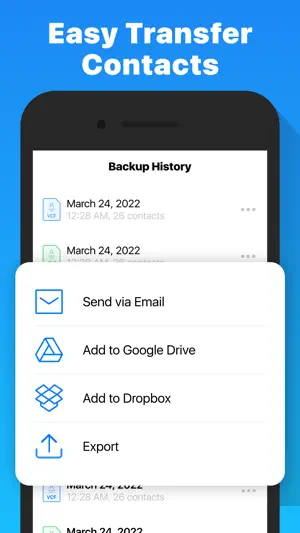
Contacts Backup App is the easiest way to backup your contacts all from your phone without needing a computer. Also you can find duplicate contacts and merge by allocating contacts with similar names or identical phone numbers and email addresses. You can backup the contacts from the address book in 3 different file formats in no time: VCF, XLS and CSV. ** Backup: Allow Easy Backup to access your contacts and choose the Backup option in the app. That’s it! All your contacts are safe on our secure cloud storage. You can turn automatic backup ON and choose between daily, weekly and monthly backup frequency. ** Export: Export your VCF, XLS and CSV backups via third party apps like WhatsApp, iMessage, Email, and Airdrop. At any time, you can access and restore previous backups. You can also export your backup to Google Drive and Dropbox. ** Merge Duplicate Contacts: Users can view the contacts which have duplicate/missing phone numbers, emails, or names. Find & Merge duplicate contacts, phones, emails, and similar names. Also, you can remove contacts without names or phone number. ** Restore: No need to use any app to restore the backup files. Just tap on the .vcf backup file in the iPhone, iPod Touch or iPad Mail client and restore your contacts. Contact Backup is 100% safe for your contacts. The backup and export are done on our secure servers or Google Drive and Dropbox. If you have any questions about the app, please do not hesitate to contact us at [email protected], we’ll be happy to help! IMPORTANT NOTE: After sending backup file (*.vcf) to yourself, please check your inbox to see if message arrived and contains attachment (backup file). Sometimes email providers block attachments if attachment size is too large. Try with another mail account if possible, to send your backup file. We also offer Tera Backup Pro, a set of premium features to keep your contacts secure at all times while accessible from all places. This service includes the following features: • Automatic backups of your contacts • Secure cloud storage of your backups • Military-grade AES-256 encryption of your cloud backups This service is offered as an auto-renewable subscription for Week: $1.99 per week Month: $4.99 per month (3 Days Free Trial) Year: $19.99 per year ------------------------ Please see the subscription details below: - The subscription price is automatically renewed every month until cancelled. - Your payment will be charged to your iTunes Account as soon as you confirm your purchase. - You can manage your subscriptions and turn off auto-renewal from your Apple ID account settings after the purchase. - Your subscription will renew automatically, unless you turn off auto-renew at least 24 hours before the end of the current period. - The cost of renewal will be charged to your account in the 24 hours prior to the end of the current period. - When canceling a subscription, your subscription will stay active until the end of the period. Auto-renewal will be disabled, but the current subscription will not be refunded. - Any features requiring an active subscription (including Cloud Storage) may, at any time without notice, be turned off or removed after the subscription has ended. Privacy Policy: https://backup.contact/privacy-policy.html Terms of Use: https://backup.contact/term-condition.html
Ratings & reviews
4.5
25 ratings
What’s new
Version 1.0.9 · Updated February 18, 2026
We are delighted to inform you that we are continuously working on enhancing your user experience. In our latest update, we have focused on resolving minor bugs and implementing various improvements. We kindly request your support in our endeavor to grow further. If you have found our app helpful and enjoyable, please take a moment to leave a rating and review on the App Store. Your feedback makes a significant impact on our progress. We sincerely appreciate your choice in using the Contacts Sync app. Thank you for your ongoing support!
App privacy
The developer, Haresh Purbiya, reported these privacy practices to Apple.
Data Used to Track You
The following data may be used to track you across apps and websites owned by other companies:
- Identifiers: Device ID
Data Not Linked to You
The following data, which may be collected but is not linked to your identity, may be used for the following purposes:
- Usage Data: Advertising Data, Product Interaction, Other Usage Data
- Purchases: Purchase History
- Contact Info: Physical Address, Email Address, Name, Phone Number, Other User Contact Info
- Contacts: Contacts
- Search History: Search History
- Browsing History: Browsing History
- Identifiers: User ID, Device ID
- Diagnostics: Crash Data, Performance Data, Other Diagnostic Data
Used for: Developer’s Advertising or Marketing, Analytics, App Functionality
Alternatives to Contacts Sync-for Google Gmail
Looking for apps like Contacts Sync-for Google Gmail? Here are 6 similar apps on the App Store. The highest rated is Contacts Sync & Transfer App (4.7/5), and all 6 are free to download.
-
 Contacts+ Sync for Google
4.6
Contacts+ Sync for Google
4.6
-
 Contact.s Back Up
4.5
Contact.s Back Up
4.5
-
 Contacts Sync, Backup & Clean
3.6
Contacts Sync, Backup & Clean
3.6
-
 Cloud Contacts: All-in-One
4.0
Cloud Contacts: All-in-One
4.0
-
 Contacts Sync & Transfer App
4.7
Contacts Sync & Transfer App
4.7
-
 Contacts For Call
3.0
Contacts For Call
3.0
| App | Rating | Price | Last updated | Compare |
|---|---|---|---|---|
| Contacts Sync-for Google Gmail | 4.5 / 5 (25 ratings) | Free | February 18, 2026 | |
| Contacts+ Sync for Google | 4.6 / 5 (127) | Free | Oct 5, 2026 | Compare |
| Contact.s Back Up | 4.5 / 5 (1,250) | Free | Aug 3, 2026 | Compare |
| Contacts Sync, Backup & Clean | 3.6 / 5 (77) | Free | Oct 7, 2026 | Compare |
| Cloud Contacts: All-in-One | 4.0 / 5 (3) | Free | Oct 3, 2026 | Compare |
| Contacts Sync & Transfer App | 4.7 / 5 (13) | Free | Jul 5, 2024 | Compare |
| Contacts For Call | 3.0 / 5 (2) | Free | Sep 10, 2026 | Compare |