

Finger Focus
bbcddc Photo & Video iPhoneiPadiPod touch
Finger Focus is a paid Photo & Video app for iPhone and iPad by bbcddc. Rated 3.3/5 from 4 ratings. Requires iOS 17. Updated June 3, 2026.
- Rating
- 3.3
- 4 ratings
- Price
- 0.99 USD
- on the App Store
- Size
- 4 MB
- Age 4+
- Updated
- Jun 3
- 2026 · v1.3.3
Screenshots



About Finger Focus
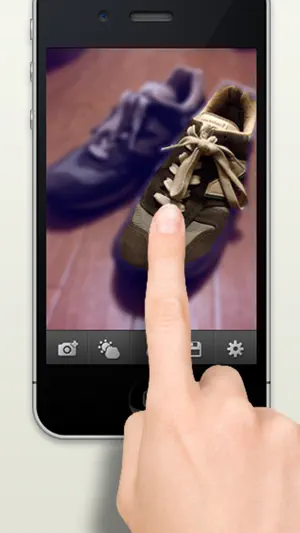
Finger Focus lets you create photos with beautiful blur effects by simply tracing over the image with your fingertip. You can add depth, perspective, and atmosphere that cannot always be captured with the iPhone camera alone. Even if you trace broadly, the blur boundary is automatically adjusted, making it easy to achieve a natural-looking effect. With pinch gestures, you can seamlessly zoom in down to the pixel level, allowing you to carefully bring out subjects with detailed or complex shapes. You can check the result in real time as you trace. ■ How to Use Trace: Trace over the area you want to keep in focus. Pinch with two fingers: Zoom in, zoom out, and move the image. Double tap: Return to 100% view. ■ Main Features - Adjust the blur effect strength (BLUR) - Adjust the blur effect boundary (BORDER) - Adjust brightness, contrast, and saturation - Seamless zoom in and zoom out with pinch gestures - Adjustable brush size - Undo and eraser tools - Save the original image when taking photos with the camera Please feel free to send us your requests or feedback. X (Twitter): bbcddc Mail: [email protected]
What’s new
Version 1.3.3 · Updated June 3, 2026
Bug fixes
App privacy
The developer, bbcddc, reported these privacy practices to Apple.
Data Not Collected
The developer does not collect any data from this app.
Alternatives to Finger Focus
Looking for apps like Finger Focus? Here are 6 similar apps on the App Store.
-
 Convert My Photo
-
 Pixel Art Focus
-
 GIFカット - 動画をGIFに変換
-
 HEIC to JPG & JPEG Converter
-
 Video to Photo FrameCutter
-
 Two-Tone Video Camera
| App | Rating | Price | Last updated | Compare |
|---|---|---|---|---|
| Finger Focus | 3.3 / 5 (4 ratings) | 0.99 USD | June 3, 2026 | |
| Convert My Photo | – | 0.99 USD | Apr 1, 2026 | Compare |
| Pixel Art Focus | – | 0.99 USD | Dec 1, 2024 | Compare |
| GIFカット - 動画をGIFに変換 | – | 1.99 USD | Jul 21, 2026 | Compare |
| HEIC to JPG & JPEG Converter | – | 1.99 USD | Aug 11, 2026 | Compare |
| Video to Photo FrameCutter | – | 1.99 USD | Jul 25, 2026 | Compare |
| Two-Tone Video Camera | – | 0.99 USD | Apr 7, 2026 | Compare |
Compare Finger Focus with the top alternatives: ratings, updates, ASO score and keyword gaps →