

Video to Photo FrameCutter
Tomohiko Saitoh Photo & Video iPhoneiPadiPod touch
Video to Photo FrameCutter is a paid Photo & Video app for iPhone and iPad by Tomohiko Saitoh. Requires iOS 17.0. Updated July 25, 2026.
- Price
- 1.99 USD
- on the App Store
- Size
- 4 MB
- Age 4+
- Updated
- Jul 25
- 2026 · v1.0.6
Screenshots


About Video to Photo FrameCutter
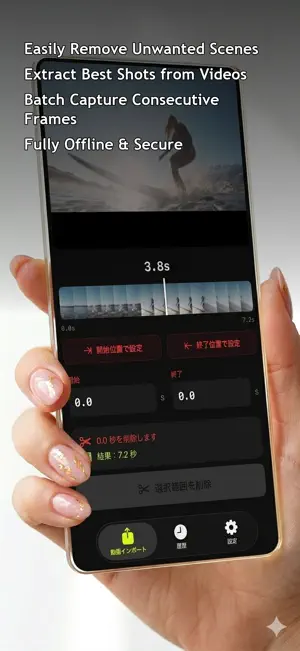
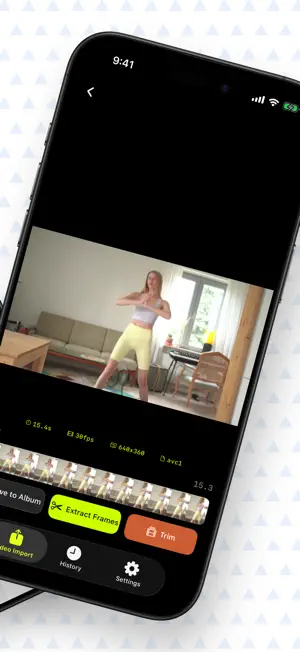
Frame Cutter transforms your videos into stunning still images with frame-level precision. Whether you are a content creator, athlete, designer, or just someone who wants to capture the perfect moment from a video, Frame Cutter gives you complete control over frame extraction. EXTRACT SINGLE FRAMES Scrub through your video using an intuitive thumbnail slider inspired by the native iOS video editor. Find exactly the right moment, then save it as a high-quality photo with a single tap. The full-screen video preview ensures you never miss a detail. BATCH FRAME EXTRACTION Need multiple frames at once? Choose your extraction interval from 0.1 seconds to 5 seconds, set the number of frames up to 20, and let Frame Cutter do the work. Perfect for creating step-by-step tutorials, analyzing sports techniques, or building visual storyboards from your footage. PARTIAL VIDEO DELETION Remove unwanted sections from your videos with precision. Set the start and end points using the visual slider or enter exact timestamps manually. Preview the result and save the trimmed video directly to your device. Great for cleaning up recordings before sharing. ORGANIZED HISTORY Every extraction session is automatically saved and organized by date. Browse your history with thumbnail previews, view frames in a clean two-column grid, and swipe through them in full-screen mode with pinch-to-zoom support. Each frame displays its exact timestamp for easy reference. SAVE AND SHARE Save individual frames or entire sessions to your Camera Roll with one tap. GPS location data from the original video is preserved in your extracted photos, keeping your memories geographically tagged. Share your favorite frames directly from the app. BUILT FOR PRIVACY Frame Cutter works completely offline. Your videos and photos never leave your device. No accounts, no cloud uploads, no tracking. What happens on your device stays on your device. KEY FEATURES - Full-screen video playback with thumbnail scrubber - Single frame capture at any position - Batch extraction with customizable intervals - Partial video deletion with precise timestamp control - Automatic session history with date organization - Two-column grid gallery and full-screen slideshow - Pinch-to-zoom for detailed frame inspection - GPS metadata preservation from original video - Save to Camera Roll individually or in bulk - Interactive onboarding tutorial for new users - iTunes File Sharing support for easy computer access - Dark theme designed for comfortable viewing SUPPORTED FORMATS Import videos from your Camera Roll in all standard formats including MOV, MP4, and M4V. Works with videos recorded on iPhone, iPad, or imported from any source. LANGUAGE SUPPORT Available in 11 languages: English, Japanese, Simplified Chinese, Traditional Chinese, Korean, Spanish, French, German, Portuguese, Hindi, and Arabic with full right-to-left support. Frame Cutter is designed for everyone, from professional video editors who need quick frame grabs to parents who want to capture their child's best smile from a home video. Download now and never miss the perfect frame again.
What’s new
Version 1.0.6 · Updated July 25, 2026
Improved the Partial Cut screen: the start and end time fields now begin empty with placeholder text instead of a pre-filled "0.0", so you can type your value right away without deleting anything first.
App privacy
The developer, Tomohiko Saitoh, reported these privacy practices to Apple.
Data Not Collected
The developer does not collect any data from this app.
Alternatives to Video to Photo FrameCutter
Looking for apps like Video to Photo FrameCutter? Here are 6 similar apps on the App Store. The highest rated is GIFmaker: GIF Maker & Editor (5.0/5).
-
 Convert My Photo
-
 GIFカット - 動画をGIFに変換
-
 HEIC to JPG & JPEG Converter
-
 Two-Tone Video Camera
-
 PhotoFix - Magic Photo Restore
-
 GIFmaker: GIF Maker & Editor
5.0
| App | Rating | Price | Last updated | Compare |
|---|---|---|---|---|
| Video to Photo FrameCutter | – | 1.99 USD | July 25, 2026 | |
| Convert My Photo | – | 0.99 USD | Apr 1, 2026 | Compare |
| GIFカット - 動画をGIFに変換 | – | 1.99 USD | Jul 21, 2026 | Compare |
| HEIC to JPG & JPEG Converter | – | 1.99 USD | Aug 11, 2026 | Compare |
| Two-Tone Video Camera | – | 0.99 USD | Apr 7, 2026 | Compare |
| PhotoFix - Magic Photo Restore | – | 0.49 USD | Dec 3, 2025 | Compare |
| GIFmaker: GIF Maker & Editor | 5.0 / 5 (1) | 0.99 USD | Oct 14, 2026 | Compare |