

Kalculator
Koombea, Inc. Utilities iPhoneiPadiPod touchMac
Kalculator is a free Utilities app for iPhone and iPad by Koombea, Inc. Rated 4.2/5 from 19 ratings. Requires iOS 18.6. Updated November 14, 2026.
- Rating
- 4.2
- 19 ratings
- Price
- Free
- on the App Store
- Size
- 3 MB
- Age 4+
- Updated
- Nov 14
- 2026 · v5.3.1
Screenshots

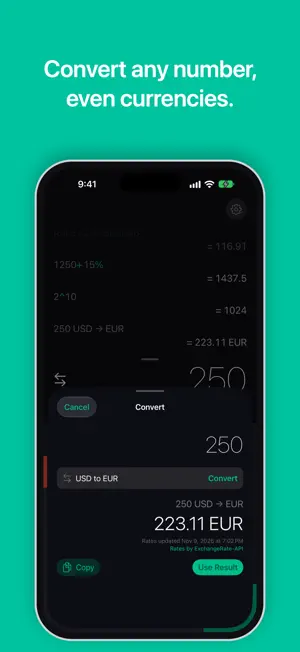


About Kalculator
Kalculator is the calculator for the math you actually do. Type (80×200)÷29+56 the way you'd write it, see the answer as you go, and keep every result. MADE FOR iPhone Duo Open iPhone Duo and Kalculator lays itself out around the fold, so no key ever sits on the crease. Opened like a book, your history fills the left page and the calculator the right. Turn it so the fold runs across, and the history and answer sit above it while the keypad fills the lower half. Closed, the outer display works like any iPhone. TYPE IT LIKE YOU WRITE IT Enter whole expressions with brackets. Tap to place the cursor, double-tap to select a number, and fix a mistake without starting over. Paste prices like $1,234.56 or 1.234,56 € straight into a calculation. PERCENT, POWERS AND ROOTS % works like a pocket calculator: 200 + 10% is 220. Raise to a power with x^y, take a square root with √, and flip a sign with ±. CONVERT ANY NUMBER Tap the Convert button next to the result, or hold any number (the result, a digit key or a past answer), and say what you need: "lb to kg", "°F to °C", "USD to EUR", "cups to mL", "15% tip", "20% off", "split 4 ways". Or tap one of the examples. Kalculator shows how it read your request next to the answer, does the math exactly, and saves the conversion to your history with its units. Common requests work on every device; on devices with Apple Intelligence you can also ask in your own words. What you type stays on your device; for currencies, Kalculator downloads the day's exchange rates and keeps them for when you're offline. EXACT ANSWERS Kalculator uses exact decimal arithmetic, so 0.1 + 0.2 is 0.3, and long numbers stay exact from one calculation to the next. YOUR HISTORY, EVERYWHERE Every calculation is saved, dated and synced with iCloud across your iPhone, iPad, Mac and Apple TV. Swipe down to see it, search it, tap a row to use its result, or edit, copy, share or delete it, with Undo if you change your mind. Export your whole history as text. 49 THEMES, ALL INCLUDED From Gold to Retro to Citrus Punch, with app icons to match. Every theme is free. WIDGETS, CONTROLS AND SIRI Keep your latest result on the Home Screen or Lock Screen, start a calculation in a widget and continue it in the app, or add Kalculator and Convert to Control Center. Ask Siri: "Calculate with Kalculator". MADE FOR EVERYONE Clear contrast in every theme, with support for VoiceOver, larger text and Reduce Motion. In English and Spanish. On iPad, history stays in a sidebar and a hardware keyboard works for typing and editing.
Ratings & reviews
4.2
19 ratings
What’s new
Version 5.3.1 · Updated November 14, 2026
Bug fixes and stability improvements.
App privacy
The developer, Koombea, Inc., reported these privacy practices to Apple.
Data Not Collected
The developer does not collect any data from this app.
Alternatives to Kalculator
Looking for apps like Kalculator? Here are 6 similar apps on the App Store. The highest rated is Calculator Smart (4.7/5), and all 6 are free to download.
-
 SentriX
-
 Forum Blanchissserie
-
 Text Looper: Transform Text
-
 Calculator Smart
4.7
-
 Calculi: Scientific Calculator
4.4
-
 WisNode TrackIt
1.0
| App | Rating | Price | Last updated | Compare |
|---|---|---|---|---|
| Kalculator | 4.2 / 5 (19 ratings) | Free | November 14, 2026 | |
| SentriX | – | Free | Apr 26, 2026 | Compare |
| Forum Blanchissserie | – | Free | Jun 24, 2026 | Compare |
| Text Looper: Transform Text | – | Free | Jul 29, 2025 | Compare |
| Calculator Smart | 4.7 / 5 (498) | Free | Mar 16, 2026 | Compare |
| Calculi: Scientific Calculator | 4.4 / 5 (383) | Free | Mar 4, 2025 | Compare |
| WisNode TrackIt | 1.0 / 5 (1) | Free | Sep 4, 2026 | Compare |
Compare Kalculator with the top alternatives: ratings, updates, ASO score and keyword gaps →