

Calculi: Scientific Calculator
Michael Natole, Jr. Utilities iPhoneiPadiPod touchApple Watch
Calculi: Scientific Calculator is a free Utilities app for iPhone and iPad by Michael Natole, Jr. Rated 4.4/5 from 383 ratings. Requires iOS 17.6.
- Rating
- 4.4
- 383 ratings
- Price
- Free
- on the App Store
- Size
- 43 MB
- Age 4+
- Updated
- Mar 4
- 2025 · v4.4.1
Screenshots

About Calculi: Scientific Calculator
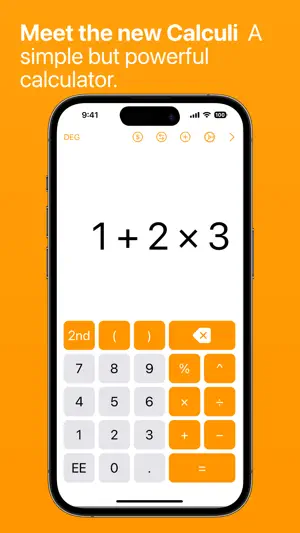
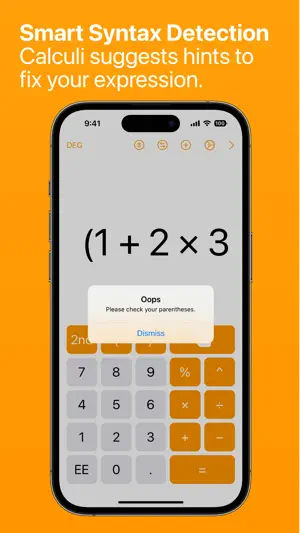
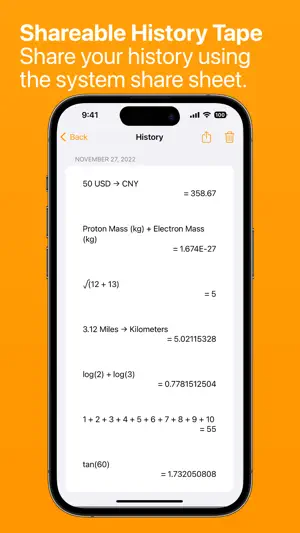
Calculators can be hard to use. Calculi plans to change all that. SIMPLE BUT POWERFUL Calculi is a smart calculator that is simple and easy to use, but with advanced features for power users. Whether you are trying to balance your checkbook or taking an advanced math class, this app will help you with all of your calculating needs. CALCULATE ANYTHING Calculi doesn’t just add two numbers together but can solve complex expressions using the order of operations. The multi-line display allows for small or large expressions. So go ahead and calculate anything and everything! Press the 2nd button to reveal more scientific functions. UNIT CONVERSION You can easily convert any of your calculations to a different unit across 17 categories such as length, area, and volume. Unit conversions are saved to your calculation history for easy review. A Calculi Pro subscription is required for this feature. CURRENCY CONVERSION Traveling abroad? Not sure how much your lunch costs? Calculi has you covered with support for over 30 different currencies around the globe (data is updated daily from the European Central Bank). A Calculi Pro subscription is required for this feature. CONSTANTS Common constants from both mathematical and scientific fields (astronomical, chemical, electromagnetic, etc.) are included for use in calculations. DESIGNED WITH iOS 18 AND iPadOS 18 IN MIND Calculi adapts to all the latest iOS and iPadOS devices. Even better, multitasking and multi-window support is available in all orientations on the iPad. Interactive widgets are included for calculations on your home screen, and Control Center widgets provide quick access. You can have Calculi wherever you need it. GESTURES Gestures are fun. So why not? - Long press the delete button to clear the display - Long press the equals button to use the previous result or expression - Long press the display to copy, paste, or share - Long press any calculation item to reuse the expression or result SUPERCHARGED HISTORY TAPE Calculations from the history tape can be bookmarked for later and notes can be added for additional context. You can search across notes, expressions, and answers to find the calculation that you are looking for. GET SHARING Don’t be selfish. This history tape can be shared either as a single thread or the entire tape using numerous methods such as email, messaging, or print. There is also an iMessage app so you can easily send calculations. CALCULATE ON YOUR WRIST Calculi is also available on Apple Watch! Besides a four-function calculator, you will also find a tip calculator and counter. EXTERNAL KEYBOARD AND TRACKPAD SUPPORT Pair an external keyboard or trackpad to gain access to powerful shortcuts and full cursor support. You can hold down the command key on your keyboard to view all the available shortcuts. Finally, if you enjoyed Calculi, please take some time to leave a review. Feedback is always appreciated for future updates. CALCULI PRO This yearly subscription grants you access to the following: - Unit Conversions - Currency Conversions - App Themes - Colorful custom icons TIP JAR If you enjoy using the app and want to support an independent app developer, please consider sending a tip. Subscription Details – Payment will be charged to iTunes Account at confirmation of purchase – Subscription automatically renews unless auto-renew is turned off at least 24-hours before the end of the current period – Account will be charged for renewal within 24-hours prior to the end of the current period, and identify the cost of the renewal – Subscriptions may be managed by the user and auto-renewal may be turned off by going to the user’s Account Settings after purchase Terms of Use: https://www.calculiapp.com/terms.html Privacy Policy: https://www.calculiapp.com/privacy-policy.html
Ratings & reviews
4.4
383 ratings
What’s new
Version 4.4.1 · Updated March 4, 2025
This app has been updated by Apple to prepare for watchOS 27 compatibility. No new features are included. This update includes a customer center to manage your Calculi Pro subscription.
App privacy
The developer, Michael Natole, Jr., reported these privacy practices to Apple.
Data Not Linked to You
The following data, which may be collected but is not linked to your identity, may be used for the following purposes:
- Diagnostics: Other Diagnostic Data
- Purchases: Purchase History
Used for: Analytics, App Functionality
Alternatives to Calculi: Scientific Calculator
Looking for apps like Calculi: Scientific Calculator? Here are 6 similar apps on the App Store. The highest rated is Converter and Calculator Lite (4.8/5), and 5 of the 6 are free to download.
-
 Unitio: Unit Converter
-
 Calculator Smart
4.7
Calculator Smart
4.7
-
 Omega Calculator
4.7
Omega Calculator
4.7
-
 Scientific Calc
3.7
Scientific Calc
3.7
-
 Converter and Calculator Lite
4.8
Converter and Calculator Lite
4.8
-
 Calculator ×
4.5
Calculator ×
4.5
| App | Rating | Price | Last updated | Compare |
|---|---|---|---|---|
| Calculi: Scientific Calculator | 4.4 / 5 (383 ratings) | Free | March 4, 2025 | |
| Unitio: Unit Converter | – | Free | Mar 25, 2026 | Compare |
| Calculator Smart | 4.7 / 5 (498) | Free | Mar 16, 2026 | Compare |
| Omega Calculator | 4.7 / 5 (44) | Free | May 24, 2024 | Compare |
| Scientific Calc | 3.7 / 5 (3) | 1.99 USD | Jun 11, 2026 | Compare |
| Converter and Calculator Lite | 4.8 / 5 (88) | Free | Aug 16, 2024 | Compare |
| Calculator × | 4.5 / 5 (143) | Free | Oct 19, 2026 | Compare |