

WavePad Music and Audio Editor
NCH Software Music iPhoneiPadiPod touch
WavePad Music and Audio Editor is a free Music app for iPhone and iPad by NCH Software. Rated 4.6/5 from 4,456 ratings. Requires iOS 12.0.
- Rating
- 4.6
- 4.4K ratings
- Price
- Free
- on the App Store
- Size
- 25 MB
- Age 4+
- Updated
- Aug 28
- 2025 · v20.38
Screenshots

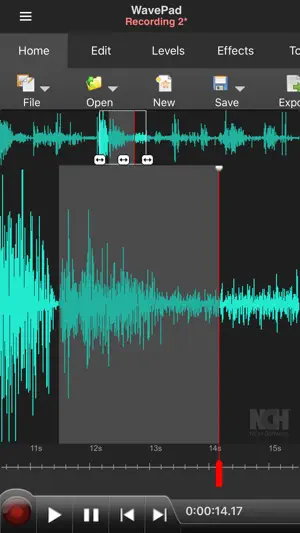
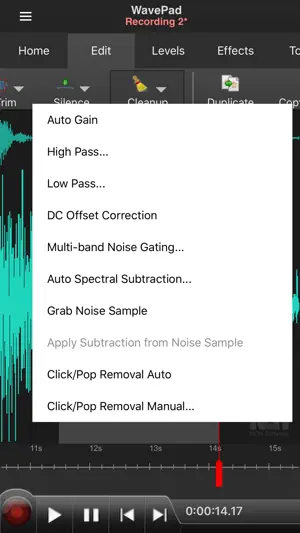
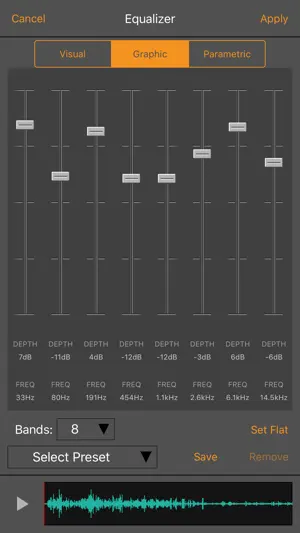
About WavePad Music and Audio Editor
WavePad Music and Audio Editor is a full-featured professional audio and music editor. With WavePad you can edit and record music, voice, and other audio recordings. You can edit audio files with tools like cut, copy, paste. You can also add audio effects including echo, amplify, and noise reduction. WavePad Audio Editor supports a number of formats including vox, gsm, and more! Whether you are a professional or an at-home enthusiast, WavePad has all of the tools you need to edit audio files. Typical applications include ringtones, voice-overs, trim sound bits, and many more! WavePad features: • Supports a number of file formats including wave and aiff • Editing capabilities include cut, copy, paste, insert, trim and more • Effects include amplify, normalize, echo and more • Work with multiple files • Supports auto-trim and voice activated recording • Select sample rates from 8000-44100hz, 8-32 bits • Recording runs in the background and when the screen turns off • Upload to and download from your Google Drive and Dropbox account WavePad contains optional in-app purchases and subscriptions. • Subscriptions are billed monthly while purchases are one time payments (these are not subscriptions) • Your subscription will automatically renew unless auto-renew is turned off at least 24-hours before the end of the current period, • Account will be charged for renewal within 24-hours prior to the end of the current period, and cost depends on your chosen package • Payments will be charged to your iTunes Account at confirmation of purchase • Auto-renewal may be turned off by going to the user's Account Settings after purchase • Any unused portion of a free trial period, if offered, will be forfeited when the user purchases a subscription to that publication, where applicable For assistance using WavePad: http://www.nch.com.au/support/supportcontact.html?software=WavePad Terms of service: https://www.nch.com.au/general/legal.html Privacy Policy: https://www.nch.com.au/general/privacy.html
Ratings & reviews
4.6
4.4K ratings
What’s new
Version 20.38 · Updated August 28, 2025
Minor improvements including bug fixes and with support for existing paid users
App privacy
The developer, NCH Software, reported these privacy practices to Apple.
Data Not Linked to You
The following data, which may be collected but is not linked to your identity, may be used for the following purposes:
- Usage Data: Product Interaction
- Diagnostics: Crash Data
Used for: Analytics, App Functionality
Alternatives to WavePad Music and Audio Editor
Looking for apps like WavePad Music and Audio Editor? Here are 6 similar apps on the App Store. The highest rated is EZAudioCut - Audio Editor Lite (4.9/5), and all 6 are free to download.
-
 EZAudioCut - Audio Editor Lite
4.9
EZAudioCut - Audio Editor Lite
4.9
-
 Audio Editor : Audiolab
4.4
Audio Editor : Audiolab
4.4
-
 Audio Editor - Music editor
4.5
Audio Editor - Music editor
4.5
-
 SoundLab - Audio Editor
4.6
SoundLab - Audio Editor
4.6
-
 Audio Editor & Tool
4.1
Audio Editor & Tool
4.1
-
 Sound Editor: Audio Changer
3.1
Sound Editor: Audio Changer
3.1
| App | Rating | Price | Last updated | Compare |
|---|---|---|---|---|
| WavePad Music and Audio Editor | 4.6 / 5 (4,456 ratings) | Free | August 28, 2025 | |
| EZAudioCut - Audio Editor Lite | 4.9 / 5 (7,780) | Free | Oct 21, 2026 | Compare |
| Audio Editor : Audiolab | 4.4 / 5 (3,931) | Free | Sep 29, 2026 | Compare |
| Audio Editor - Music editor | 4.5 / 5 (30,640) | Free | Oct 18, 2026 | Compare |
| SoundLab - Audio Editor | 4.6 / 5 (14,643) | Free | Sep 3, 2026 | Compare |
| Audio Editor & Tool | 4.1 / 5 (88) | Free | Apr 10, 2026 | Compare |
| Sound Editor: Audio Changer | 3.1 / 5 (771) | Free | Oct 15, 2026 | Compare |