

Tremor: AI DJ Mixer & Stems
MindArray Labs LLC Music iPhoneiPadiPod touchMac
Tremor: AI DJ Mixer & Stems is a free Music app for iPhone and iPad by MindArray Labs LLC. Rated 5.0/5 from 3 ratings. Requires iOS 17.0.
- Rating
- 5.0
- 3 ratings
- Price
- Free
- on the App Store
- Size
- 364 MB
- Age 4+
- Updated
- Sep 23
- 2026 · v3.3.1
Screenshots
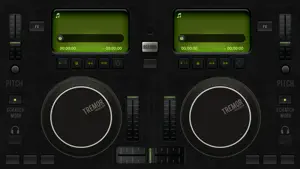

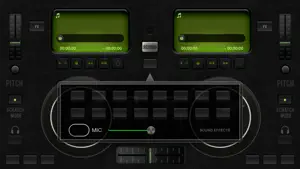

About Tremor: AI DJ Mixer & Stems
Tremor — Professional DJ Mixer Mix, scratch, and perform with a real DJ engine — not a wrapper around a phone music player. Tremor runs on a custom audio core, hand-tuned neural models on-device, and a hardware-verified controller path — now native on Mac, iPhone, and iPad. WHY TREMOR • A custom low-latency audio engine built for DJ work — not adapted from a music player • On-device AI — stem separation, beat, key, and song-structure detection run locally. Your music and listening data never leave your device • Hardware-verified controller support — what we list, we test • Pro-grade routing and effects usually reserved for desktop software, now on all your devices 2-DECK & 4-DECK MIXING 2- and 4-deck modes with independent 3-band EQ, filters, trim, and effects. Smooth crossfading with multiple curve types, plus an orbital fader for 4-deck blending. AI AUDIO INTELLIGENCE • Real-time stem separation — isolate vocals, drums, bass, and other instruments live • Neural beat detection with automatic BPM and downbeat tracking • Musical key detection + Camelot for harmonic mixing • Mood, energy, and genre classification • Song-structure analysis — intro, verse, chorus, drop, outro YOUR AI CAN DJ (MAC) Turn on AI Agent Access and AI assistants on your Mac — Claude Code, Claude Desktop, Copilot, Codex, Antigravity, VS Code, or Cursor — take the decks: plan a set with a quick interview, dig your library or SoundCloud, mix with beat-locked transitions, scratch with real fader choreography, and drum live on a built-in instrument kit. All local — loopback-only, off by default, one toggle to revoke. VINYL FEEL & SCRATCHING Touch the platter to scratch with realistic physics — adjustable motor speed, platter feel, smooth inertia, vinyl character (wow & flutter, needle click), and authentic pause/resume. PERFORM • 16 hot-cue pads per deck • Beat loops, manual loops, and rekordbox-style loop resize • Beat jump, key shift, keyboard mode • 16-slot sampler with custom samples, per-pad gain, and per-pad sequencing — loop or one-shot, beat-quantized launches, latched rolls • Three built-in DJ drops — including one voiced by Tremor's own AI • Beat FX and Sound Color FX • Host third-party Audio Unit (AU) effects — bring your favorite plug-ins to the decks BEAT SYNC & HARMONIC MIXING One tap locks tempo and phase between decks. Find Compatible Tracks surfaces songs in key and tempo so every transition lands. LOUDNESS DONE RIGHT Per-track LUFS normalization (EBU R128) levels every track automatically — no more riding the trim between songs. DJ CONTROLLER SUPPORT Hardware-verified support for Pioneer DDJ-FLX2, FLX4, and FLX10, plus Numark Mixtrack Platinum FX and DJ2GO2. Remap any control in the built-in MIDI settings. MULTI-ROUTE AUDIO Send master and headphone cue to separate channels on a 4-channel USB interface — full PFL pre-listening while your master plays to the speakers. VIDEO & STREAMING • Live video mixing with reactive visualizers • Play music videos on the turntable platter • Record your mix (audio + video) • RTMP live streaming to YouTube, Twitch, and Facebook • AirPlay video to an external display SOURCES • Apple Music, Tidal, SoundCloud, and your local library • Shazam song identification and synced lyrics with word-level highlighting, in a dedicated Lyrics window TREMOR PRO One subscription unlocks Pro on Mac, iPhone, and iPad: DJ controller support, Multi-Route Split Output, AI stem separation, AU effect hosting, video mixing, and more. Start with a 7-day free trial. • Monthly: $5.99 • Annual: $39.99 (save 44%) Payment is charged to your Apple ID at confirmation of purchase. Subscriptions auto-renew unless cancelled at least 24 hours before the period ends. Manage in Settings → Apple ID → Subscriptions. Privacy Policy: https://mindarray.io/tremor/privacy/ Terms of Use: https://www.apple.com/legal/internet-services/itunes/dev/stdeula/
What’s new
Version 3.3.1 · Updated September 23, 2026
FIXES • The video mix preview shows right away instead of staying black until the crossfader moves • Untagged files get a clean title and artist instead of a raw filename, and identified names and cover art stick without re-probing • Rate Tremor from Settings
App privacy
The developer, MindArray Labs LLC, reported these privacy practices to Apple.
Data Not Collected
The developer does not collect any data from this app.
Alternatives to Tremor: AI DJ Mixer & Stems
Looking for apps like Tremor: AI DJ Mixer & Stems? Here are 6 similar apps on the App Store. The highest rated is DJ Mixer Studio (5.0/5), and all 6 are free to download.
-
 DJ Mixer - Mix Music & Remix
-
 Club DJ Pro: Virtual Mixer App
4.0
Club DJ Pro: Virtual Mixer App
4.0
-
 DJ Mixer Studio
5.0
DJ Mixer Studio
5.0
-
 DJ Mixer Music - Audio Remix
3.7
DJ Mixer Music - Audio Remix
3.7
-
 AI DJ Studio: Stems & Mixer
-
 Harmovio - AI Copilot for DJs
4.8
Harmovio - AI Copilot for DJs
4.8
| App | Rating | Price | Last updated | Compare |
|---|---|---|---|---|
| Tremor: AI DJ Mixer & Stems | 5.0 / 5 (3 ratings) | Free | September 23, 2026 | |
| DJ Mixer - Mix Music & Remix | – | Free | Sep 27, 2026 | Compare |
| Club DJ Pro: Virtual Mixer App | 4.0 / 5 (29) | Free | Sep 24, 2026 | Compare |
| DJ Mixer Studio | 5.0 / 5 (2) | Free | Aug 30, 2026 | Compare |
| DJ Mixer Music - Audio Remix | 3.7 / 5 (3) | Free | Nov 6, 2025 | Compare |
| AI DJ Studio: Stems & Mixer | – | Free | Sep 3, 2026 | Compare |
| Harmovio - AI Copilot for DJs | 4.8 / 5 (4) | Free | Nov 25, 2025 | Compare |