

PDF Only - PDF editor
Juan Camilo Marin Ochoa Utilities iPhoneiPadiPod touch
PDF Only - PDF editor is a paid Utilities app for iPhone and iPad by Juan Camilo Marin Ochoa. Rated 1.0/5 from 1 ratings. Requires iOS 16.6.
- Rating
- 1.0
- 1 ratings
- Price
- 1.99 USD
- on the App Store
- Size
- 4 MB
- Age 4+
- Updated
- Jun 2
- 2026 · v12.0.0
Screenshots

About PDF Only - PDF editor
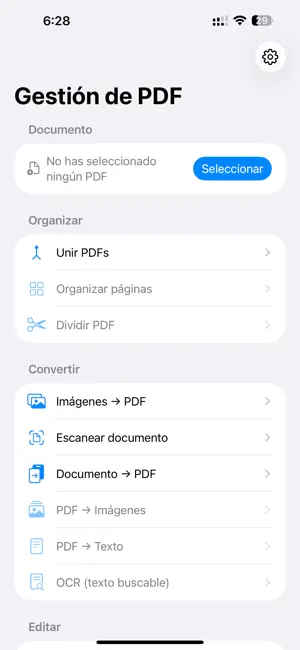
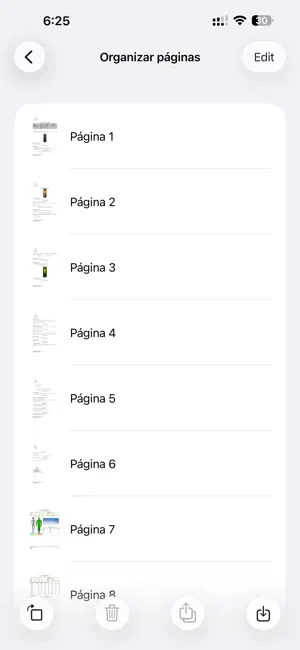
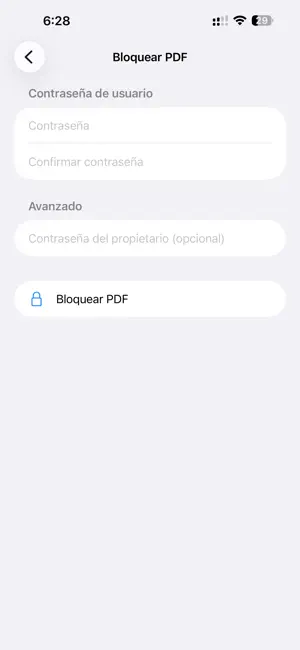
PDF Only is the all‑in‑one PDF toolkit for iPhone and iPad. Everything happens on your device — your documents never leave it, and the tools work offline. Whether you need to scan a contract, sign a form, merge reports, shrink a file for email, or pull the text out of a scanned page, PDF Only has a simple, dedicated tool for it. VIEW & ORGANIZE - Built‑in PDF viewer - Merge multiple PDFs into one - Reorder, rotate and delete pages - Split a PDF into separate files CONVERT - Images → PDF - Scan documents with your camera - Convert documents to PDF - PDF → Images - PDF → Text - OCR — make scanned PDFs searchable EDIT & MARKUP - Sign PDFs with your finger or Apple Pencil - Annotate: draw, highlight, add shapes and erase — with a full color palette - Add watermarks OPTIMIZE - Compress PDFs to reduce file size SECURITY - Lock PDFs with a password - Unlock password‑protected PDFs SHARE FROM ANYWHERE - Open PDFs and images straight from Mail, Files, Photos and other apps with the share sheet. PRIVATE BY DESIGN Your files are processed locally on your device. No accounts, and no uploads to a server just to edit a file. Terms of Use (EULA): https://faacil.com/terms-conditions Questions or feedback? Visit faacil.com/support
What’s new
Version 12.0.0 · Updated June 2, 2026
Version 12 is our biggest update yet. PDF Only grows from a signing and password tool into a complete PDF toolkit: NEW TOOLS - Merge, split, and organize pages (reorder, rotate, delete) - Images → PDF and a built‑in document scanner - Convert documents to PDF, PDF → Images, and PDF → Text - OCR to make scanned PDFs searchable - Annotate & markup: draw, highlight, shapes, and eraser — now with a full color palette - Add watermarks - Compress PDFs - Built‑in PDF viewer - Share Extension: open PDFs and images directly from other apps IMPROVEMENTS & FIXES - Annotation: you can now draw along the left edge without triggering the iOS back gesture - Highlight and eraser now work reliably - Pick any color from the palette while drawing Thanks for using PDF Only!
App privacy
The developer, Juan Camilo Marin Ochoa, reported these privacy practices to Apple.
Data Not Collected
The developer does not collect any data from this app.
Alternatives to PDF Only - PDF editor
Looking for apps like PDF Only - PDF editor? Here are 6 similar apps on the App Store. The highest rated is Watermark PDF & Photo: Marklio (4.7/5), and all 6 are free to download.
-
 Watermark PDF & Photo: Marklio
4.7
Watermark PDF & Photo: Marklio
4.7
-
 PDF Merge - Document Sign PDF
4.6
PDF Merge - Document Sign PDF
4.6
-
 PDF Editor: Edit Text
4.7
PDF Editor: Edit Text
4.7
-
 Simple PDF Editor
4.6
Simple PDF Editor
4.6
-
 Merge files PDF
4.6
Merge files PDF
4.6
-
 PDF Editor - Read & Edit PDF
4.3
PDF Editor - Read & Edit PDF
4.3
| App | Rating | Price | Last updated | Compare |
|---|---|---|---|---|
| PDF Only - PDF editor | 1.0 / 5 (1 rating) | 1.99 USD | June 2, 2026 | |
| Watermark PDF & Photo: Marklio | 4.7 / 5 (30) | Free | Aug 11, 2026 | Compare |
| PDF Merge - Document Sign PDF | 4.6 / 5 (11) | Free | Sep 8, 2026 | Compare |
| PDF Editor: Edit Text | 4.7 / 5 (67) | Free | Jun 18, 2026 | Compare |
| Simple PDF Editor | 4.6 / 5 (17) | Free | Sep 12, 2026 | Compare |
| Merge files PDF | 4.6 / 5 (347) | Free | Apr 30, 2024 | Compare |
| PDF Editor - Read & Edit PDF | 4.3 / 5 (189) | Free | Sep 11, 2026 | Compare |