

PDF Easy Combiner: Merge Files
培强 郝 Productivity iPhoneiPadiPod touchMac
PDF Easy Combiner: Merge Files is a free Productivity app for iPhone and iPad by 培强 郝. Requires iOS 16.2. Updated October 27, 2026.
- Price
- Free
- on the App Store
- Size
- 4 MB
- Age 4+
- Updated
- Oct 27
- 2026 · v1.03
Screenshots
Save to Pinterest


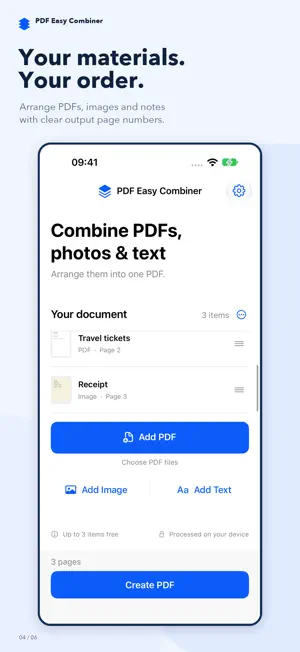
About PDF Easy Combiner: Merge Files
Merge PDF files, photos and text into one organized document with PDF Easy Combiner. Put your materials in the right order, preview the result, and save or share a single PDF. COMBINE MORE THAN PDFS - Join multiple PDF files into one document, including PDFs created by a scanner. - Turn a single photo or several images into a PDF. - Combine PDF and JPG or PNG images in the same document. - Type or paste text to add a cover, a note or an explanation between files. PUT EVERYTHING IN ORDER Arrange your materials before creating your PDF. Each item shows its output page range, so you can see where it belongs in the finished document. Open an item to preview it or adjust its layout. PAGES THAT FIT YOUR MATERIALS PDF pages retain their original sizes. Images fit on the page without cropping, with automatic landscape or portrait layout. Choose A4 or US Letter paper, adjust image margins, and rotate images. Text flows onto additional pages automatically, with an optional title and adjustable font size. MADE FOR EVERYDAY PAPERWORK Combine an expense report with receipt photos. Add supporting documents to an application. Bring class handouts, images and your own notes together. This PDF merger helps you turn separate materials into one file that is ready to send. PREVIEW, NAME AND SHARE Name your document, review the combined PDF, then save it to Files or share it with another app. A single image or text note can also become a PDF on its own. ON IPHONE, IPAD AND MAC Use the same focused workflow on your preferred device. Wide-screen layouts show materials alongside a document preview. On Mac, add files with drag and drop, use keyboard shortcuts, and open or save documents through native file dialogs. ON-DEVICE PROCESSING, NO ADS Your documents are combined on your device. No account or document upload is required. No ads interrupt your work. FREE ACCESS AND PREMIUM Create PDFs with up to 3 materials per document for free. Each PDF file, image or text note counts as one material; a multi-page PDF still counts as one. Upgrade to Premium to combine more materials in a single PDF.
What’s new
Version 1.03 · Updated October 27, 2026
PDF Easy Combiner now brings more of your materials together. - Combine PDF files, photos and text in one PDF. - Create a PDF from a single image or text note. - Add titles and text with automatic pagination. - Adjust image rotation, margins and paper size. - See the output page range for each material. - Enjoy a refreshed interface with clear import, preview and save actions. - Work on Mac with a two-column preview, file drag and drop, keyboard shortcuts, and native file dialogs.
App privacy
The developer, 培强 郝, reported these privacy practices to Apple.
Data Not Collected
The developer does not collect any data from this app.
Alternatives to PDF Easy Combiner: Merge Files
Looking for apps like PDF Easy Combiner: Merge Files? Here are 6 similar apps on the App Store. The highest rated is Argus-AI (5.0/5), and all 6 are free to download.
-
 PDF Combiner – Merge Files
-
 Merge Pdf-Split, Combine Files
-
 PDF Combine & Split
-
 GlossVox:AI Voice Keyboard
-
 Argus-AI
5.0
-
 PDF Merge X: PDF Merger
4.1
| App | Rating | Price | Last updated | Compare |
|---|---|---|---|---|
| PDF Easy Combiner: Merge Files | – | Free | October 27, 2026 | |
| PDF Combiner – Merge Files | – | Free | Nov 7, 2025 | Compare |
| Merge Pdf-Split, Combine Files | – | Free | Aug 25, 2026 | Compare |
| PDF Combine & Split | – | Free | Aug 17, 2026 | Compare |
| GlossVox:AI Voice Keyboard | – | Free | Apr 26, 2026 | Compare |
| Argus-AI | 5.0 / 5 (7) | Free | Oct 14, 2025 | Compare |
| PDF Merge X: PDF Merger | 4.1 / 5 (92) | Free | Oct 24, 2026 | Compare |