

Unlock PDF - Password Remover
Ashvin Ajadiya Productivity iPhoneiPadiPod touchMac
Unlock PDF - Password Remover is a free Productivity app for iPhone and iPad by Ashvin Ajadiya. Rated 5.0/5 from 2 ratings. Requires iOS 16.0.
- Rating
- 5.0
- 2 ratings
- Price
- Free
- on the App Store
- Size
- 33 MB
- Age 4+
- Updated
- Apr 16
- 2026 · v1.1.2
Screenshots

About Unlock PDF - Password Remover
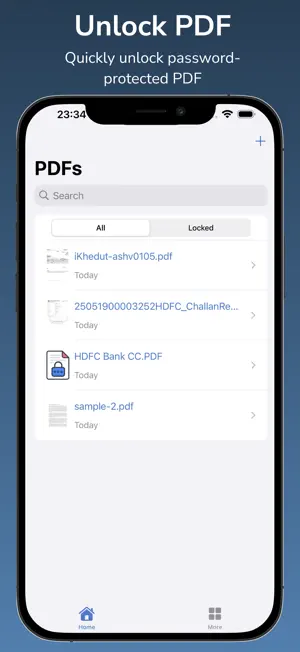
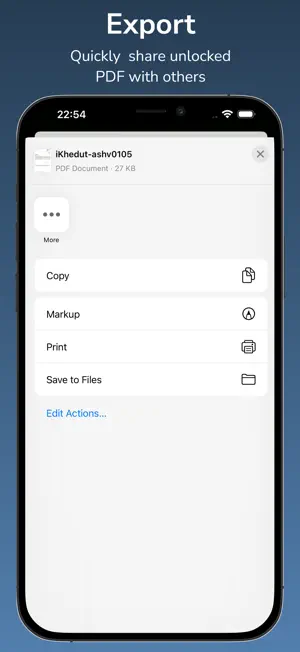
Welcome to Unlock PDF - Password Remover, the simple and secure way to access your locked documents. With Easily Open Encrypted PDFs, you can unlock password-protected files instantly, remove restrictions, and save time by skipping repeated password input. Whether you need to view, edit, or share important files, Unlock PDF - Password Remover makes PDF decryption fast and reliable. KEY FEATURES • PDF unlocker, remover, decryption tool, and secure solution in one app • Open password-protected or encrypted PDF files in just a few taps • Export and share unlocked PDF documents quickly • Manage the history of imported and opened PDFs • Works offline for privacy and security • Clean, user-friendly interface with full Dark Mode support • Lightweight app size under 100MB HOW IT WORKS • Launch the app and import a locked or encrypted PDF • Import from cloud drives using the native Files app • Unlock and export your PDF instantly • Share unlocked files with colleagues, friends, or across devices AUTO-RENEW SUBSCRIPTION TERMS • Subscription auto-renews unless canceled, charged via your Apple ID • Pricing may vary based on your region • No commitment; cancel anytime • Payment will be charged to your iTunes Account at confirmation of purchase • Subscription durations: 1 week and 1 year • Renewal is charged within 24 hours prior to the end of the current period • Manage or cancel via Account Settings on the App Store • Unused portion of a free trial (if offered) will be forfeited when a subscription is purchased POLICY & TERMS • Privacy Policy: https://www.envisiontechnolabs.com/privacy_policy.html?utm_source=unlock_pdf_ios&utm_medium=app_store_connect&utm_campaign=policy_url • Terms of Service: https://www.envisiontechnolabs.com/terms.html?utm_source=unlock_pdf_ios&utm_medium=app_store_connect&utm_campaign=term_url SUPPORT We’re continuously improving Unlock PDF - Password Remover to give you a faster and more secure way to open encrypted files. Your feedback helps us build a better tool for managing PDFs. If you have any questions or suggestions, contact us at: [email protected]
What’s new
Version 1.1.2 · Updated April 16, 2026
We’ve made updates to improve your app experience: • Added full support for iOS 28, including the new Glass Effect • Faster and more reliable PDF unlocking • Performance optimizations for smoother use • Bug fixes and overall stability improvements Thank you for using Unlock PDF - Password Remover! Your feedback helps us keep making the app better.
App privacy
The developer, Ashvin Ajadiya, reported these privacy practices to Apple.
Data Not Linked to You
The following data, which may be collected but is not linked to your identity, may be used for the following purposes:
- Diagnostics: Crash Data
Used for: Analytics
Alternatives to Unlock PDF - Password Remover
Looking for apps like Unlock PDF - Password Remover? Here are 6 similar apps on the App Store. The highest rated is Merge PDF Files-Split PDF Docs (4.9/5), and all 6 are free to download.
-
 PDF Unlock: Offline PDF Tools
4.5
-
 PDF to Word App
3.0
-
 Merge PDF - Combine PDF
4.8
-
 PDF Export: Editor & Converter
4.7
-
 PDF it All Document Converter
4.8
-
 Merge PDF Files-Split PDF Docs
4.9
| App | Rating | Price | Last updated | Compare |
|---|---|---|---|---|
| Unlock PDF - Password Remover | 5.0 / 5 (2 ratings) | Free | April 16, 2026 | |
| PDF Unlock: Offline PDF Tools | 4.5 / 5 (2) | Free | Aug 23, 2026 | Compare |
| PDF to Word App | 3.0 / 5 (2) | Free | Jul 19, 2026 | Compare |
| Merge PDF - Combine PDF | 4.8 / 5 (350) | Free | Oct 12, 2026 | Compare |
| PDF Export: Editor & Converter | 4.7 / 5 (1,748) | Free | Sep 15, 2026 | Compare |
| PDF it All Document Converter | 4.8 / 5 (8,148) | Free | Oct 3, 2026 | Compare |
| Merge PDF Files-Split PDF Docs | 4.9 / 5 (41) | Free | Sep 8, 2026 | Compare |