

Lock Launcher Widgets LockFlow
Andres Piza Buckmann Graphics & Design iPhoneiPadiPod touch
Lock Launcher Widgets LockFlow is a free Graphics & Design app for iPhone and iPad by Andres Piza Buckmann. Rated 4.7/5 from 1,023 ratings.
- Rating
- 4.7
- 1K ratings
- Price
- Free
- on the App Store
- Size
- 70 MB
- Age 4+
- Updated
- Oct 7
- 2026 · v3.1.18
Screenshots

About Lock Launcher Widgets LockFlow
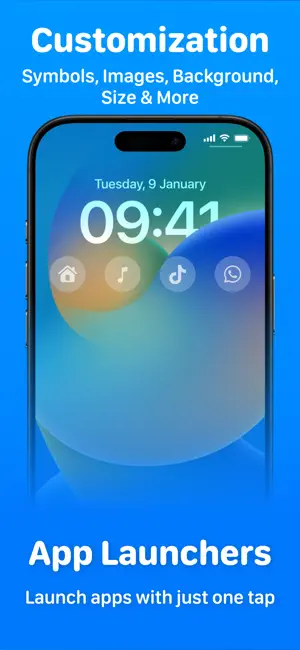
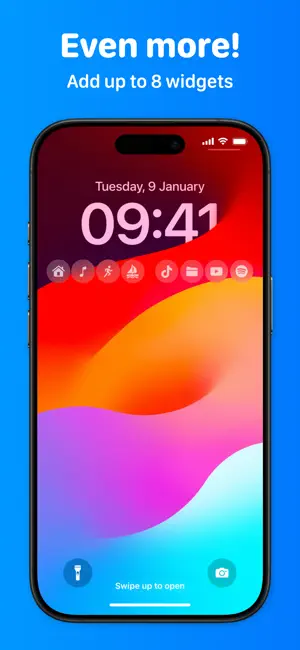
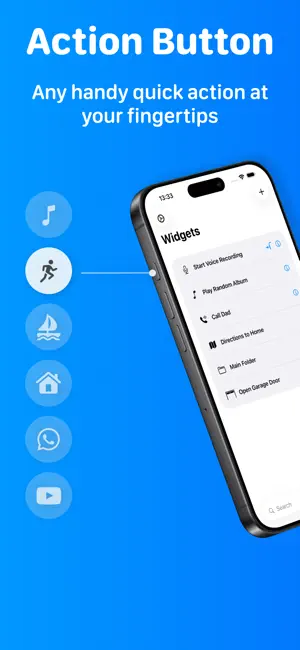
Your shortcuts on your Lock Screen. LockFlow is an app that allows you to set quick actions always available with one tap from your Lock Screen. You can execute shortcuts from the Shortcuts app, open apps with App Launchers, open custom URL Schemes or create folders. You can have up to 8 widgets in the Lock Screen thanks to interactive widgets. Run any Siri Shortcuts you created in the Shortcuts app. Being able to set shortcuts on your Lock Screen is super useful: ⁃ Run home automations with one tap ⁃ Open an alternative camera app ⁃ Get directions to a specific place ⁃ Send a message to someone you frequently text ⁃ Start playing your latest favorite podcast ⁃ Leverage all your existing shortcuts by making them easily accessible - Support for the Action Button on iPhone 15 models - Control widgets work in Control Center and on the Lock Screen Configuring LockFlow is a super simple 3 step process. 1. Just set the exact name of the shortcut you want to run. 2. Add a symbol that will be visible on the Lock Screen 3. Add that widget in the Lock Screen Do it from the Lock Screen, Do it with LockFlow FOCUS WIDGETS Focus Widgets allows you to have more than four widgets in the Lock Screen. By using Focus Modes you can change the widgets of your Lock Screen automatically when you set a Focus Mode or when you don't have one active. Note: The app is free to download and use, but some features may require premium access. Terms and Conditions: https://www.andrespiza.com/apps/lockflow/terms-of-use/ Privacy Policy: https://www.andrespiza.com/apps/lockflow/privacy-policy/
Ratings & reviews
4.7
1K ratings
What’s new
Version 3.1.18 · Updated October 7, 2026
This update includes full support for iOS 26 and iPadOS 26, ensuring smooth performance on the latest systems. LockFlow also adopts the new Liquid Glass design for a clearer, more fluid look across the app. This release also has bug fixes and minor improvements to enhance your experience. Liking the app? Leave a rating or review in the App Store – your feedback helps us improve!
App privacy
The developer, Andres Piza Buckmann, reported these privacy practices to Apple.
Data Not Linked to You
The following data, which may be collected but is not linked to your identity, may be used for the following purposes:
- Purchases: Purchase History
- Usage Data: Product Interaction
- Diagnostics: Performance Data, Crash Data, Other Diagnostic Data
Used for: Analytics, App Functionality
Alternatives to Lock Launcher Widgets LockFlow
Looking for apps like Lock Launcher Widgets LockFlow? Here are 6 similar apps on the App Store. The highest rated is SizeSnap: Dimensions on Photos (4.9/5), and 4 of the 6 are free to download.
-
 Lock Launcher - Launch Apps
4.7
Lock Launcher - Launch Apps
4.7
-
 Launcher x – App Launcher
4.4
Launcher x – App Launcher
4.4
-
 Blur Video·
4.5
Blur Video·
4.5
-
 Video Stabilizer.
4.2
Video Stabilizer.
4.2
-
 Resume Maker: CV Maker
4.8
Resume Maker: CV Maker
4.8
-
 SizeSnap: Dimensions on Photos
4.9
SizeSnap: Dimensions on Photos
4.9
| App | Rating | Price | Last updated | Compare |
|---|---|---|---|---|
| Lock Launcher Widgets LockFlow | 4.7 / 5 (1,023 ratings) | Free | October 7, 2026 | |
| Lock Launcher - Launch Apps | 4.7 / 5 (3,955) | Free | Oct 21, 2026 | Compare |
| Launcher x – App Launcher | 4.4 / 5 (192) | Free | Oct 18, 2026 | Compare |
| Blur Video· | 4.5 / 5 (128) | Free | Jun 18, 2026 | Compare |
| Video Stabilizer. | 4.2 / 5 (121) | 4.99 USD | Oct 5, 2026 | Compare |
| Resume Maker: CV Maker | 4.8 / 5 (226) | 4.99 USD | Feb 16, 2025 | Compare |
| SizeSnap: Dimensions on Photos | 4.9 / 5 (103) | Free | Oct 4, 2026 | Compare |