

SizeSnap: Dimensions on Photos
丽佩 章 Graphics & Design iPhoneiPadiPod touch
SizeSnap: Dimensions on Photos is a free Graphics & Design app for iPhone and iPad by 丽佩 章. Rated 4.9/5 from 102 ratings. Requires iOS 15.
- Rating
- 4.9
- 102 ratings
- Price
- Free
- on the App Store
- Size
- 74 MB
- Age 4+
- Updated
- Oct 4
- 2026 · v2.11.12
Screenshots

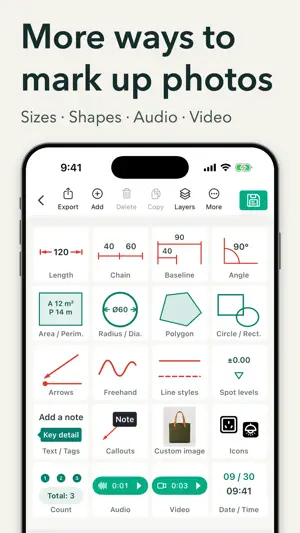


About SizeSnap: Dimensions on Photos
Put the measurements you take right on the photos you share. SizeSnap helps contractors, cabinetmakers, interior designers, and installers turn site photos and PDF pages into clear measurement records. Add measured dimensions, show installation details, and share JPGs or PDFs that clients and crews can follow. MARK DIMENSIONS WHERE THEY BELONG Take a photo or import images and PDFs. Draw dimension lines, enter your measurements, and add arrows or text to explain each location. Use shapes and freehand drawing to highlight details. Keep the numbers beside the objects they describe instead of matching separate notes to photos later. CONTROL THE SMALL DETAILS Add dimensions with slide markup, then fine-tune placement with the magnifier, horizontal and vertical snapping, endpoint snapping, guides, and grids. Use the virtual cursor for small targets and layers to select and arrange annotations. Adjust colors, line widths, fonts, and labels for readable results. SHOW CABINETRY AND INSTALLATION DETAILS Use chain dimensions for cabinet sections and baseline dimensions for positions measured from a shared reference point. Add detail magnifiers, arrows, and notes to explain joints, access openings, or installation requirements. Keep the overall dimensions and close-up details in one visual record. WORK IN YOUR UNITS Convert between millimeters, centimeters, meters, inches, and feet. Choose metric, imperial, or combined results to suit your job. Keep measurements readable for the people who need them. KEEP EACH JOB TOGETHER Organize projects by folders, documents, and pages. Move photos between records, regroup your work, and recover recently deleted items from Trash. Sync projects and markups between your own iPhone and iPad with iCloud. Use edit history to review and restore earlier annotation versions. SHARE RESULTS IN THE RIGHT FORMAT • Export annotated JPGs for clients, colleagues, and installers • Bring multiple photo records together in a PDF • Batch import and export files, or preserve project structure in ZIP archives • Combine photos from one document into a single long image • Share editable SizeSnap project files for compatible workflows and later changes ADD CONTEXT BEYOND THE PHOTO Record audio or video annotations of up to 30 seconds for details that need an explanation. Share playable media in compatible SizeSnap project files. JPG and PDF exports contain static markers, not playable recordings. SizeSnap records and presents measurements you enter. It does not automatically measure physical objects from a photo. Some advanced features are available through optional auto-renewing subscriptions, including iCloud Sync, watermark-free saves, edit history restoration, and audio/video annotations. Available features, subscription periods, local pricing, and any applicable trial terms are shown before purchase. Terms of Use (EULA): https://www.apple.com/legal/internet-services/itunes/dev/stdeula/ Privacy Policy: https://zzsoftservice.github.io/sizesnap/static/privacy_policy.html Subscription Terms: https://zzsoftservice.github.io/sizesnap/static/SubscriptionTerms_AppStore.html
Ratings & reviews
4.9
102 ratings
What’s new
Version 2.11.12 · Updated October 4, 2026
-Bug fixes and performance improvements
App privacy
The developer, 丽佩 章, reported these privacy practices to Apple.
Data Not Linked to You
The following data, which may be collected but is not linked to your identity, may be used for the following purposes:
- Identifiers: Device ID
- Usage Data: Advertising Data, Product Interaction
- Diagnostics: Crash Data, Performance Data, Other Diagnostic Data
Used for: Third-Party Advertising, Analytics
Alternatives to SizeSnap: Dimensions on Photos
Looking for apps like SizeSnap: Dimensions on Photos? Here are 6 similar apps on the App Store. The highest rated is Resize Video (4.8/5), and 1 of the 6 are free to download.
-
 Blur Video·
4.5
Blur Video·
4.5
-
 Video Stabilizer.
4.2
Video Stabilizer.
4.2
-
 Resize Video
4.8
Resize Video
4.8
-
 Image Resizer.
4.7
Image Resizer.
4.7
-
 Resume Maker: CV Maker
4.8
Resume Maker: CV Maker
4.8
-
 Speed Up Video
4.7
Speed Up Video
4.7
| App | Rating | Price | Last updated | Compare |
|---|---|---|---|---|
| SizeSnap: Dimensions on Photos | 4.9 / 5 (102 ratings) | Free | October 4, 2026 | |
| Blur Video· | 4.5 / 5 (128) | Free | Jun 18, 2026 | Compare |
| Video Stabilizer. | 4.2 / 5 (121) | 4.99 USD | Oct 5, 2026 | Compare |
| Resize Video | 4.8 / 5 (75) | 2.99 USD | Jun 19, 2026 | Compare |
| Image Resizer. | 4.7 / 5 (91) | 2.99 USD | May 6, 2026 | Compare |
| Resume Maker: CV Maker | 4.8 / 5 (226) | 4.99 USD | Feb 16, 2025 | Compare |
| Speed Up Video | 4.7 / 5 (91) | 4.99 USD | Jul 15, 2026 | Compare |