

OCR Scanner Multi Image
ZESTSOL TECHNOLOGIES (SMC-PRIVATE) LIMITED Productivity iPhoneiPadiPod touch
OCR Scanner Multi Image is a free Productivity app for iPhone and iPad by ZESTSOL TECHNOLOGIES (SMC-PRIVATE) LIMITED. Rated 4.5/5 from 2 ratings.
- Rating
- 4.5
- 2 ratings
- Price
- Free
- on the App Store
- Size
- 85 MB
- Age 4+
- Updated
- Oct 19
- 2025 · v1.5.36
Screenshots



About OCR Scanner Multi Image
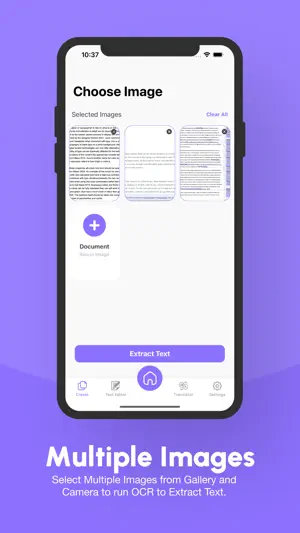
OCR Scanner Multi Image : Your Ultimate Text Extraction and Conversion Tool Unlock the power of efficient text extraction with OCR Scanner & PDF Converter, a free and comprehensive OCR app designed for iOS. Seamlessly convert multiple images to text with our robust machine learning technology. Our app’s standout feature, Multi-Image OCR, supports exporting text from all Latin-based languages, ensuring you can handle documents in various languages effortlessly. Transform PNG to TXT, JPG to TXT, and more with our advanced Image to Text capabilities. Our Text Scanner feature is perfect for processing multiple images simultaneously, making it easy to manage large volumes of text extraction efficiently. Enhance your productivity with our versatile Rich Text Editor, which allows you to format, edit, and organize your extracted text with ease. From adjusting fonts and colors to adding bullet points and hyperlinks, the editor provides all the tools you need to polish your documents. Break down language barriers with our integrated Translation feature. Instantly translate extracted text into a wide array of languages, facilitating smoother communication and understanding across different linguistic backgrounds. Additionally, our Real-Time Speech-to-Text functionality converts spoken words into written text on the fly, making note-taking and transcription more efficient than ever. Whether you’re dictating notes or converting conversations, this feature ensures you capture every word accurately. With OCR Scanner & PDF Converter, experience the ultimate convenience in text extraction and conversion, designed to meet all your document handling needs. Key Features: • Image to Text Conversion: Leverage advanced OCR to extract text from multiple photos simultaneously. • Multi-Language Support: Extract and translate text from various languages using Latin characters. • Rich Text Editor: Edit extracted text with customizable styling, fonts, links, and images. • Real-Time Translation: Convert speech to text and translate in real-time using your camera. • PDF Conversion: Convert extracted text or hard copy documents into single PDF files. • Secure Storage: Use App Lock to keep your scanned documents secure. • Easy Sharing: Share extracted text and PDF files directly from the app. Supported Languages: English, German, Dutch, Turkish, Spanish, Italian, French, Portuguese, Swedish, Romanian, Catalan, Romansh, Norwegian, Urdu, Danish, and many more. How to Use: 1 Launch the App: Open OCR Scanner on your iPhone. 2 Create Document: Tap the Create button and select multiple images from your camera or gallery. 3 Extract Text: Press "Extract Text" and let OCR Scanner do the rest. 4 Edit and Save: Proofread and edit text, and export as PDF directly or customize in the Rich Text Editor, then export as a PDF. 5 Translate and Use: Translate extracted text and use it in your documents. 6 Share and Manage: Share extracted text or PDF files, and manage your documents directly from the home screen. For the best results, use clear pictures. Privacy Policy: "https://docs.google.com/document/d/1L2mYq73UtiuX95jQzvkECG5Q0Jd0fGPBCHursJasfL8" Terms of Use: "https://docs.google.com/document/d/1L2mYq73UtiuX95jQzvkECG5Q0Jd0fGPBCHursJasfL8"
What’s new
Version 1.5.36 · Updated October 19, 2025
Improvements and Bug Fixes, Advance Features in Rich Text Editor
App privacy
The developer, ZESTSOL TECHNOLOGIES (SMC-PRIVATE) LIMITED, reported these privacy practices to Apple.
Data Used to Track You
The following data may be used to track you across apps and websites owned by other companies:
- Usage Data: Advertising Data
Data Not Linked to You
The following data, which may be collected but is not linked to your identity, may be used for the following purposes:
- Usage Data: Advertising Data
Used for: Third-Party Advertising, Analytics
Alternatives to OCR Scanner Multi Image
Looking for apps like OCR Scanner Multi Image? Here are 6 similar apps on the App Store. The highest rated is QuickScan:PDF OCR Text Scanner (4.9/5), and all 6 are free to download.
-
 PDF File Translator App
3.6
PDF File Translator App
3.6
-
 PDF Translator: Document & OCR
4.2
PDF Translator: Document & OCR
4.2
-
 PDF Translate Pro
4.1
PDF Translate Pro
4.1
-
 Text Scanner OCR App: OCR Scan
4.4
Text Scanner OCR App: OCR Scan
4.4
-
 QuickScan:PDF OCR Text Scanner
4.9
QuickScan:PDF OCR Text Scanner
4.9
-
 PDF Export: Editor & Converter
4.7
PDF Export: Editor & Converter
4.7
| App | Rating | Price | Last updated | Compare |
|---|---|---|---|---|
| OCR Scanner Multi Image | 4.5 / 5 (2 ratings) | Free | October 19, 2025 | |
| PDF File Translator App | 3.6 / 5 (9) | Free | Oct 8, 2026 | Compare |
| PDF Translator: Document & OCR | 4.2 / 5 (477) | Free | Aug 24, 2026 | Compare |
| PDF Translate Pro | 4.1 / 5 (291) | Free | Mar 25, 2026 | Compare |
| Text Scanner OCR App: OCR Scan | 4.4 / 5 (116) | Free | Sep 8, 2026 | Compare |
| QuickScan:PDF OCR Text Scanner | 4.9 / 5 (4,076) | Free | Oct 20, 2026 | Compare |
| PDF Export: Editor & Converter | 4.7 / 5 (1,755) | Free | Sep 15, 2026 | Compare |