

Pull Ups: Workout & Counter
Yuriy Dehtyaruk Health & Fitness iPhoneiPadiPod touch
Pull Ups: Workout & Counter is a free Health & Fitness app for iPhone and iPad by Yuriy Dehtyaruk. Rated 5.0/5 from 1 ratings. Requires iOS 16.0.
- Rating
- 5.0
- 1 ratings
- Price
- Free
- on the App Store
- Size
- 57 MB
- Age 4+
- Updated
- Oct 18
- 2026 · v4.0.3
Screenshots

About Pull Ups: Workout & Counter
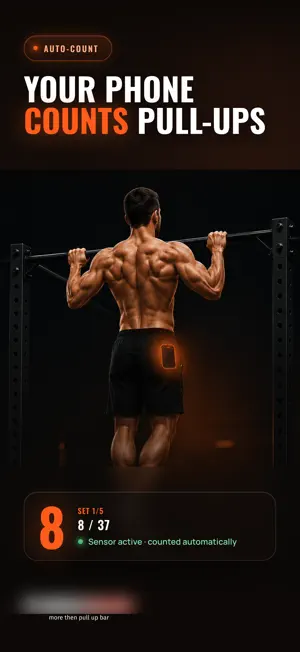
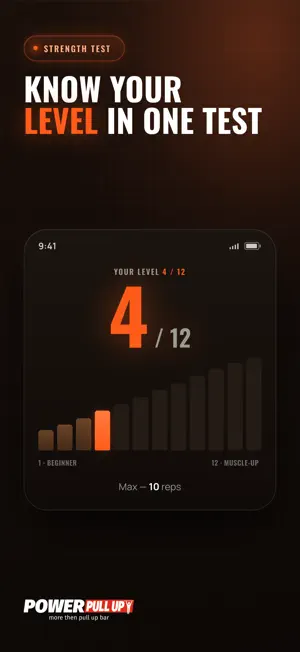
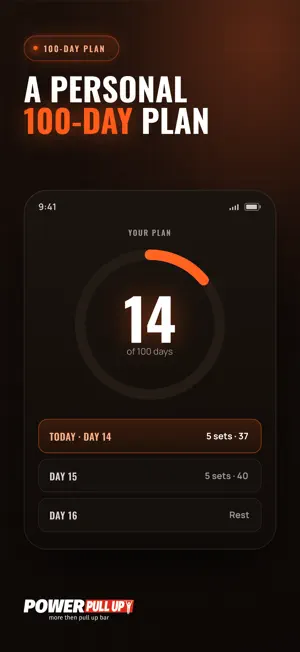
Do more pull-ups with PowerPullUp — a pull-up workout plan and a pull-up counter in one app. Take a max test, get a 100-day training program for your level, and let the phone in your pocket count the reps. HOW THE PROGRAM WORKS 1. A max test shows how many pull-ups you can do now. 2. The app builds a 100-day plan for your level: training days and recovery days. 3. Every workout is ready: sets, target reps and a rest timer. No need to invent your workload at the bar — open today's workout and follow it. YOUR PHONE COUNTS YOUR PULL-UPS The automatic pull-up counter uses your phone's motion sensors — no camera and no tapping between reps. 1. Tap Start. 2. Put your phone upright in a snug pocket. 3. Hang still for 1–2 seconds and wait for the long signal. 4. Do your set — the app counts the reps. If a rep is missed, you can correct the count after the set. WHAT'S INSIDE • 100-day pull-up program based on your max test • Sets, target reps and rest timer for every workout • Automatic pull-up counter with count correction • Workout history, total reps and progress statistics • Training streaks and achievements • Freestyle mode for workouts outside the program PROGRESS IN NUMBERS Every workout is saved. See how many sets and reps you've done and how your pull-ups change over time. FAQ How do I increase my pull-ups? Train regularly, with proper rest between sets and between training days. PowerPullUp calculates sets and reps for your level, so you don't have to guess the workload. Do I need a gym? No. A pull-up bar at home, in the park, on a street workout ground or at the gym is enough. Where should I keep my phone? Upright in a snug pocket — the counter is more accurate that way. I can only do 1–2 pull-ups. Is it for me? Yes. The main program starts from one pull-up in the max test. WHO POWERPULLUP IS FOR For anyone who wants to do more pull-ups, train consistently or bring structure to pull-up bar training, street workout and calisthenics. PowerPullUp is focused on pull-ups — it is not a full-body exercise library. Take your max test and start your first workout with a plan. Terms of Use (EULA): https://powerpullup.pro/terms.html Privacy Policy: https://powerpullup.pro/privacy.html
What’s new
Version 4.0.3 · Updated October 18, 2026
• "Road to your first pull-up": no motion-sensor screen before a session — it is led by timer and voice. • "Road to your first pull-up": start the next exercise right from the result screen. • A workout without a single rep no longer counts toward your stage. • Fixes and improvements.
App privacy
The developer, Yuriy Dehtyaruk, reported these privacy practices to Apple.
Data Linked to You
The following data, which may be collected and linked to your identity, may be used for the following purposes:
- Health & Fitness: Fitness
- Identifiers: User ID, Device ID
- Usage Data: Product Interaction, Other Usage Data
- Diagnostics: Performance Data, Crash Data
- Purchases: Purchase History
Used for: Analytics, Product Personalization, App Functionality
Alternatives to Pull Ups: Workout & Counter
Looking for apps like Pull Ups: Workout & Counter? Here are 6 similar apps on the App Store. The highest rated is Pull-Up Tracker (5.0/5), and all 6 are free to download.
-
 Pull-Up Tracker
5.0
Pull-Up Tracker
5.0
-
 100 Pull-Ups Challenge
-
 My Coach: Pull-Ups
-
 PushUps — 100 Push-Up Trainer
-
 Pull Ups Hero: Workout Plan
-
 Need to pump up
5.0
Need to pump up
5.0
| App | Rating | Price | Last updated | Compare |
|---|---|---|---|---|
| Pull Ups: Workout & Counter | 5.0 / 5 (1 rating) | Free | October 18, 2026 | |
| Pull-Up Tracker | 5.0 / 5 (3) | Free | Oct 18, 2026 | Compare |
| 100 Pull-Ups Challenge | – | Free | Oct 23, 2026 | Compare |
| My Coach: Pull-Ups | – | Free | Oct 24, 2025 | Compare |
| PushUps — 100 Push-Up Trainer | – | Free | Oct 1, 2026 | Compare |
| Pull Ups Hero: Workout Plan | – | Free | Oct 9, 2026 | Compare |
| Need to pump up | 5.0 / 5 (1) | Free | Apr 9, 2024 | Compare |