

Photo Vault: Hide Photo, Video
COOLDEV CO., LTD Utilities iPhoneiPadiPod touch
Photo Vault: Hide Photo, Video is a free Utilities app for iPhone and iPad by COOLDEV CO., LTD. Rated 4.0/5 from 4 ratings. Requires iOS 15.6.
- Rating
- 4.0
- 4 ratings
- Price
- Free
- on the App Store
- Size
- 85 MB
- Age 4+
- Updated
- Mar 5
- 2026 · v1.0.11
Screenshots


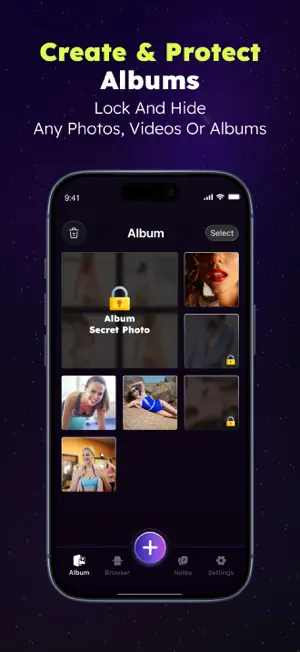

About Photo Vault: Hide Photo, Video
Your Privacy is Our Priority. Keep Your Personal Memories Truly Personal. Have you ever felt a surge of anxiety when handing your phone to a friend, fearing they might swipe too far in your gallery? Your phone is a digital diary—containing family moments, private videos, and sensitive documents like ID cards or credit card scans. It shouldn't be an open book. KeepLock is your ultimate privacy shield. It is a high-security, encrypted vault that acts as a fortress for your digital life. With KeepLock, you can lock away your most private assets behind a secure wall that only YOU can unlock. WHY KEEPLOCK IS THE GOLD STANDARD IN PRIVACY In an era of digital threats, KeepLock provides a multi-layered defense system. We combine ease of use with military-grade security concepts to ensure your "hidden" files stay truly hidden. 1. Iron-Clad Security Options Control how you access your data with multiple locking mechanisms: Numeric Passcode: Set a traditional, high-strength PIN. Biometric Access: Seamlessly integrate with FaceID or TouchID. Experience the convenience of instant unlocking with the highest level of security. 2. App Camouflage (Icon Customization) The best way to protect a secret is to make sure no one knows it exists. KeepLock’s Icon Changer allows you to disguise the app on your Home Screen. You can choose to make KeepLock look like a harmless Calculator, Weather, or News app. It blends perfectly into your iOS interface, making it invisible to snooping eyes. 3. Decoy Mode: The Ultimate Misdirection What if you are forced to open the app? KeepLock includes a revolutionary Decoy Passcode feature. By entering a secondary, pre-set PIN, the app opens a completely separate "Fake Vault." This decoy gallery can be filled with harmless photos, ensuring your real private data remains untouched and undiscovered even under pressure. 4. Panic Switch (Flip-to-Lock) Privacy needs to be instantaneous. If someone suddenly walks into the room while you are viewing sensitive content, our Flip-to-Lock technology has you covered. Simply turn your phone face down, and KeepLock will instantly close and lock itself. Your privacy is secured in a split second. 5. Intruder Detection & Break-in Alerts Know exactly who tried to peek into your business. If an unauthorized user attempts to open the app with an incorrect passcode, KeepLock’s Intruder Selfie feature activates. The app silently captures a photo of the person and logs the time, providing you with a full report of any security breaches. POWERFUL FEATURES DESIGNED FOR YOU Seamless Media Import: Move photos and videos from your system gallery to KeepLock with a few taps. Once imported, you can delete them from the public gallery to ensure they only exist in your vault. Secure Notes Organizer: Beyond media, KeepLock features a built-in private notepad. Store passwords, secret codes, or personal thoughts safely behind your encryption wall. Full-Screen Private Viewer: Our integrated player supports HD video playback and a smooth photo-viewing experience. You never have to export files back to the public gallery just to view them. Organized Albums: Create custom folders and sub-folders to categorize your media. Keep "Work Documents" and "Private Videos" perfectly separated. No Hidden Clouds: We value your data sovereignty. KeepLock is designed for local storage security, ensuring your files aren't sitting on unmonitored external servers. WHO IS KEEPLOCK FOR? Privacy-Conscious Individuals: Those who want total control over their digital footprint. Professionals: Safeguard photos of contracts, NDAs, or sensitive business communications. Families: Keep personal content safe from children who use your phone for games. Security Seekers: A reliable way to store digital backups of passports and insurance cards. Don't leave your privacy to chance. Download KeepLock today and lock your secrets away for good.
What’s new
Version 1.0.11 · Updated March 5, 2026
Fix bugs
App privacy
The developer, COOLDEV CO., LTD, reported these privacy practices to Apple.
Data Used to Track You
The following data may be used to track you across apps and websites owned by other companies:
- Identifiers: User ID
- Usage Data: Advertising Data
- Diagnostics: Crash Data, Performance Data, Other Diagnostic Data
Data Not Linked to You
The following data, which may be collected but is not linked to your identity, may be used for the following purposes:
- Identifiers: User ID
- Usage Data: Advertising Data
- Diagnostics: Crash Data, Performance Data, Other Diagnostic Data
Used for: Third-Party Advertising, Developer’s Advertising or Marketing, Analytics
Alternatives to Photo Vault: Hide Photo, Video
Looking for apps like Photo Vault: Hide Photo, Video? Here are 6 similar apps on the App Store. The highest rated is Photo vault + password manager (5.0/5), and all 6 are free to download.
-
 Secret Vault: Photo Locker
-
 Private Photo Vault: Secret
-
 Photo vault + password manager
5.0
Photo vault + password manager
5.0
-
 Photo Vault With Lock
5.0
Photo Vault With Lock
5.0
-
 KeepLock - Photo Lock
-
 LockerX - Safe Photo Vault
5.0
LockerX - Safe Photo Vault
5.0
| App | Rating | Price | Last updated | Compare |
|---|---|---|---|---|
| Photo Vault: Hide Photo, Video | 4.0 / 5 (4 ratings) | Free | March 5, 2026 | |
| Secret Vault: Photo Locker | – | Free | Jul 28, 2026 | Compare |
| Private Photo Vault: Secret | – | Free | Aug 24, 2026 | Compare |
| Photo vault + password manager | 5.0 / 5 (2) | Free | Nov 8, 2023 | Compare |
| Photo Vault With Lock | 5.0 / 5 (2) | Free | Jul 20, 2026 | Compare |
| KeepLock - Photo Lock | – | Free | Jul 9, 2026 | Compare |
| LockerX - Safe Photo Vault | 5.0 / 5 (2) | Free | Jul 7, 2026 | Compare |