

LockerX - Safe Photo Vault
Pic Slideshow Maker Limited Utilities iPhoneiPadiPod touch
LockerX - Safe Photo Vault is a free Utilities app for iPhone and iPad by Pic Slideshow Maker Limited. Rated 5.0/5 from 2 ratings. Requires iOS 18.
- Rating
- 5.0
- 2 ratings
- Price
- Free
- on the App Store
- Size
- 11 MB
- Age 4+
- Updated
- Jul 7
- 2026 · v1.1
Screenshots

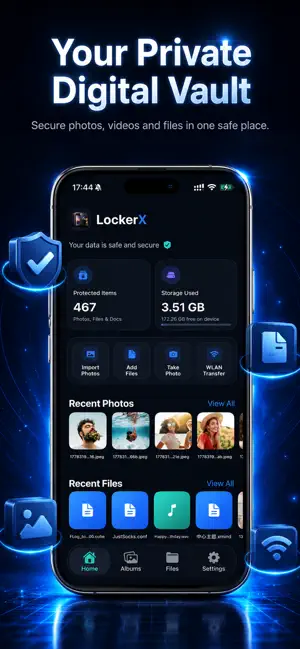


About LockerX - Safe Photo Vault
LockerX is a private photo and file vault designed for the things you want to keep separate from everyday browsing: personal photos, videos, documents, receipts, IDs, notes, audio files and more. Set a 6-digit PIN before entering the app, unlock faster with Face ID, and let Auto Lock protect the vault again when you leave. LockerX gives you a focused private space where your imported media and files are easier to organize, view and manage. Key Features Private Vault Access Protect app entry with a 6-digit PIN. Enable Face ID for quick unlocking, and choose when LockerX should lock again after the app goes to the background. Decoy Password Create a second PIN that opens an empty vault. It is a practical privacy layer for moments when you need to open the app without showing your real content. Albums for Photos and Videos Import from Photos, capture with the camera, create albums, rename albums, delete albums and browse media in a clean grid. Open photos full screen, swipe between items, zoom in, and play videos with familiar controls. Files Vault Import images, videos, audio, PDFs, documents, archives and other files. LockerX shows useful thumbnails where possible, supports renaming, sharing and deleting, and lets you preview common file types inside the app. WLAN Transfer Move files from your computer to LockerX over the same Wi-Fi network. Open the transfer page in a desktop browser, choose local files, and send them directly into the app’s Files area. Recent Photos and Recent Files Quickly return to the newest items you added, right from the Home page. Made for Everyday Privacy LockerX is built for simple private organization. Your imported vault content is kept inside the app’s private storage on your device, and you decide what to import, view, share or delete. Use LockerX to create a cleaner private space for the personal files and memories you do not want mixed into the rest of your phone.
What’s new
Version 1.1 · Updated July 7, 2026
1. Added full support for Light and Dark UI themes to match system preferences. 2. Optimized minor features and polished overall UI details. 3. Fixed known bugs to improve app stability and performance.
App privacy
The developer, Pic Slideshow Maker Limited, reported these privacy practices to Apple.
Data Not Collected
The developer does not collect any data from this app.
Alternatives to LockerX - Safe Photo Vault
Looking for apps like LockerX - Safe Photo Vault? Here are 6 similar apps on the App Store. The highest rated is CryptVault: Secure Files (5.0/5), and all 6 are free to download.
-
 Photo Vault - Shh
4.7
Photo Vault - Shh
4.7
-
 CryptVault: Secure Files
5.0
CryptVault: Secure Files
5.0
-
 LinkShelf - Your Link Hub
-
 PassNote: Password Vault
-
 Peak-Peek
5.0
Peak-Peek
5.0
-
 Vault - Private File Vault
| App | Rating | Price | Last updated | Compare |
|---|---|---|---|---|
| LockerX - Safe Photo Vault | 5.0 / 5 (2 ratings) | Free | July 7, 2026 | |
| Photo Vault - Shh | 4.7 / 5 (3) | Free | Feb 20, 2026 | Compare |
| CryptVault: Secure Files | 5.0 / 5 (1) | Free | Jul 7, 2026 | Compare |
| LinkShelf - Your Link Hub | – | Free | Apr 5, 2026 | Compare |
| PassNote: Password Vault | – | Free | Oct 1, 2026 | Compare |
| Peak-Peek | 5.0 / 5 (1) | Free | Sep 3, 2026 | Compare |
| Vault - Private File Vault | – | Free | May 8, 2026 | Compare |