

ReactCam: Reaction Videos
Axis SA Photo & Video iPhoneiPadiPod touch
ReactCam: Reaction Videos is a free Photo & Video app for iPhone and iPad by Axis SA. Rated 4.6/5 from 18 ratings. Requires iOS 15.0.
- Rating
- 4.6
- 18 ratings
- Price
- Free
- on the App Store
- Size
- 30 MB
- Age 4+
- Updated
- Oct 16
- 2026 · v2.1.3
Screenshots


About ReactCam: Reaction Videos
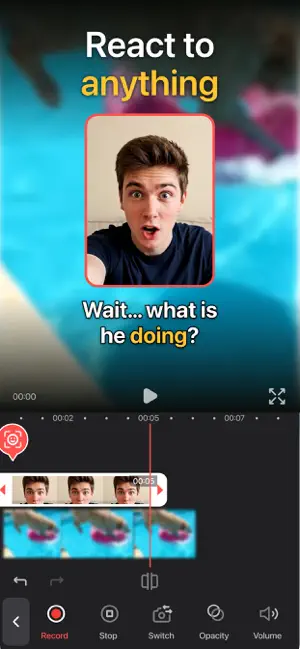
ReactCam is the all-in-one facecam recorder and reaction video editor for iPhone — now with AI characters and voices. Record your screen or import any video from your library, add multiple facecam reactions, generate subtitles automatically from your voice, and export polished videos in 4K — ready for YouTube, TikTok, Instagram, and beyond. Then react as anyone: turn your facecam into a pirate, a robot, a cartoon cat or a character you design, and give it a voice to match. KEY FEATURES • AI Characters — Transform any facecam take into a character. Start from 10 ready-made characters, describe your own, or turn a photo into one. Your original take is always one tap away. • AI Voice Changer — Give any take a new voice: your character's, a ready-made one, or one you describe in a few words. • Screen Recording — Capture any app, game, or content on your iPhone with one tap. • Video Library Reactions — React to any video from your photo library, or use a video you already have as a facecam. • FaceCam Overlay — Add multiple face reactions as picture-in-picture overlays. • FaceCam Subtitles — Generate subtitles from recorded FaceCam audio, then style, edit, and remove them right inside your project. • FaceCam Controls — Set up your shot before recording: size, shape, position, front or back camera. Mirror it, adjust opacity and volume, round the corners from square to circle. • Framing — Rotate anything with a snap at every right angle, pinch to zoom and reframe inside a facecam, and give every clip its own fill or fit. • No Black Bars — Clips that don't fill a vertical frame get their own blurred copy, a color or an image behind them. • Background Effects — Remove or blur your facecam background using person segmentation. No green screen needed. • Trim, Merge & Transitions — Trim every clip, combine them into one video, and choose a cut or a crossfade at every join. • Playback Speed — Play any clip from 0.5x to 2x. Voices keep their natural pitch, so sped-up commentary still sounds like you. • Blur Box — Hide a name, a message or a face with a soft blur or a mosaic. It covers facecams too, and exports exactly as previewed. • Animated Stickers — Browse thousands of GIPHY stickers, add them to your video, and watch them animate in preview and export. • Text Overlays — Add captions, titles, and callouts directly onto your recordings. • Video Filters — Apply filters to clips, facecam overlays, or your full project. • Audio Mixing — Control the volume of your screen recording, facecam, and commentary tracks independently. • 4K Export — Export your final video in crisp 4K resolution for maximum quality on any platform. WHO IT’S FOR • Reaction creators making react videos for YouTube, TikTok, and Instagram • Gamers recording gameplay with facecam commentary and highlight clips • Educators and tutorial makers producing walkthroughs and how-tos • Sports fans, music and movie reviewers building commentary content • Social media creators responding to trends, memes, and news • Anyone who wants to react as someone else — a pirate, a robot, or their own character PURCHASE OPTIONS • Free — Record, react, edit, caption and export with a small watermark. • Pro — One-time purchase with lifetime access. Removes the watermark and unlocks all export qualities. Includes 30 AI credits. • ReactCam AI — Everything in Pro, plus credits for AI characters and voices: 60 credits every week on the weekly plan, or every month on the yearly plan. The weekly plan starts with a 3-day free trial that includes 20 credits. • Credit Packs — 60 or 200 credits that never expire. Subscriptions renew automatically unless cancelled at least 24 hours before the end of the current period. Payment is charged to your Apple Account. Manage or cancel anytime in your App Store account settings. Plan credits don’t roll over to the next period. Privacy Policy: https://reactcam.app/privacy.html Terms of Use: https://reactcam.app/terms.html Support: [email protected]
Ratings & reviews
4.6
18 ratings
What’s new
Version 2.1.3 · Updated October 16, 2026
• ReactCam is now on TikTok and Instagram: @reactcam.app. Tag us when you post and we'll repost our favorites. • Tapping your finished video now just pauses it, wherever you tap. • Small fixes and improvements.
App privacy
The developer, Axis SA, reported these privacy practices to Apple.
Data Not Linked to You
The following data, which may be collected but is not linked to your identity, may be used for the following purposes:
- Usage Data: Product Interaction
- Diagnostics: Crash Data, Other Diagnostic Data
Used for: Analytics
Alternatives to ReactCam: Reaction Videos
Looking for apps like ReactCam: Reaction Videos? Here are 6 similar apps on the App Store. The highest rated is Facecam Screen Recorder: PIP (5.0/5), and all 6 are free to download.
-
 Reacts: Reaction Video Maker
4.8
-
 React - make reaction content
4.4
-
 Reaction Cam: Video Duet Maker
-
 EZReact
3.3
-
 Facecam Screen Recorder: PIP
5.0
-
 Face Cam: Camera Recorder
3.5
| App | Rating | Price | Last updated | Compare |
|---|---|---|---|---|
| ReactCam: Reaction Videos | 4.6 / 5 (18 ratings) | Free | October 16, 2026 | |
| Reacts: Reaction Video Maker | 4.8 / 5 (20) | Free | Oct 23, 2026 | Compare |
| React - make reaction content | 4.4 / 5 (7) | Free | Apr 15, 2025 | Compare |
| Reaction Cam: Video Duet Maker | – | Free | Sep 6, 2026 | Compare |
| EZReact | 3.3 / 5 (3) | Free | Jun 5, 2026 | Compare |
| Facecam Screen Recorder: PIP | 5.0 / 5 (1) | Free | Sep 16, 2026 | Compare |
| Face Cam: Camera Recorder | 3.5 / 5 (4) | Free | May 7, 2026 | Compare |