

PicText - Picture To Text
YACINE EL HADDAD Utilities iPhoneiPadiPod touch
PicText - Picture To Text is a free Utilities app for iPhone and iPad by YACINE EL HADDAD. Rated 4.8/5 from 5 ratings. Requires iOS 17.0.
- Rating
- 4.8
- 5 ratings
- Price
- Free
- on the App Store
- Size
- 26 MB
- Age 4+
- Updated
- Sep 9
- 2026 · v3.5.0
Screenshots


About PicText - Picture To Text
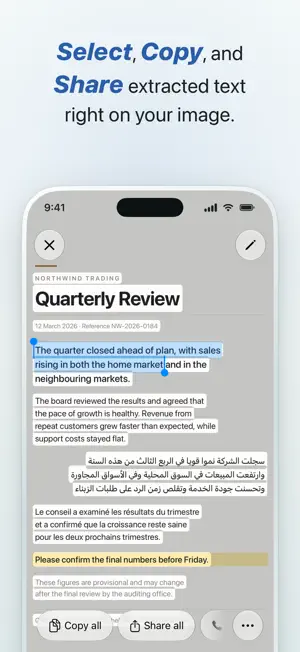
Turn any picture or PDF into text in seconds. Point PicText at a page, a receipt, a sign or a screenshot: you get clean text you can copy and edit, read it in 100+ languages, and ask questions about it. No account, no sign-up. FIVE TOOLS IN ONE APP • EXTRACT TEXT Get the text from any picture: the camera, your photo library, or pages out of a PDF. On Image draws every word back onto the photo, so you select a line right where it sits. Text Only gives you plain text in a sheet, ready to copy. • TRANSLATE Read anything in your language, 100+ of them. On Image paints the translation onto the page itself, in the page's own ink and paper. Tap a paragraph to see the printed words next to their full translation, or hold a button to compare with the original. Text Only gives you the translated page as plain text. • AI COMMANDS Ask anything about a picture. Sum it up, pull out the numbers, list the key points, or rewrite it your way. Use a built-in command or save your own, on one picture or several at once. The answer writes itself in as it arrives. • PDF TO TEXT Open any PDF and get its text page by page. A faded scan or a photo of a page has an Enhance button: tap it for our most accurate reading of that page. • PDF SCANNER Pages in, one PDF out. Scan with the camera, add photos, or take pages out of a PDF. Reorder them, turn them, drop the ones you do not need. The result is a searchable PDF: its words can be found and copied like typed text. CLEAN NOTES, OR EXACTLY AS WRITTEN Text Only results come back as tidy notes with headings and bullet points. One tap gives you the exact text instead, word for word, handwriting included. Flip between the two whenever you like. EVERY RESULT COMES WITH MORE • Copy, edit, share, or have it read out loud • Phone numbers, emails, links, addresses and dates become one-tap actions: call, write, open, map it, or add it to your calendar • Export as plain text, rich text, notes, or a clean PDF. A translated page also exports as a translated PDF, a side-by-side PDF with the original, or a picture of the page • History keeps your recent results. Switch it off or clear it any time in Settings MADE FOR Students, travelers, and anyone who works with paper: a textbook page turned into notes, a menu read in your language, the numbers off a receipt, a long PDF turned into text. WHY PICTEXT • Five tools, one app, one clean screen • Translations you read on the page, not in a wall of text • Read any PDF, and turn paper into a searchable PDF • Share a picture from any app, start from Control Center, ask Siri or use a shortcut • Light and dark, in your language, built for iPhone and iPad HOW IT WORKS 1. Pick a tool: Extract Text, Translate, AI Commands, PDF to Text, or PDF Scanner 2. Add a picture or a PDF: camera, photo library, or a file you already have 3. Get your result: drawn on the picture, or as plain text 4. Use it: copy, edit, share, export, or keep it PICTEXT PRO You get one credit to try PicText. After that, PicText Pro unlocks every tool, weekly or yearly, at the price shown in the app. PRIVACY Your pictures and PDFs are processed securely and never stored. Your results stay on your device. Privacy Policy: https://pictextios.netlify.app/privacy-policy.html Terms of Use: https://pictextios.netlify.app/terms-conditions.html
Ratings & reviews
4.8
5 ratings
What’s new
Version 3.5.0 · Updated September 9, 2026
PicText 3.5 is rebuilt around five tools on a new Home screen. • Extract Text and Translate: see the words drawn back onto your picture, or get clean text. Translations are painted onto the page itself. • AI Commands: ask anything about one picture or several, with built-in commands or your own. • PDF to Text: read any PDF page by page, with Enhance for the hard pages. • PDF Scanner: turn pages from your camera, your photos or a PDF into one searchable PDF. • Every result can be copied, edited, shared, read aloud, and exported as text, rich text, notes or PDF. • A History tab, light and dark themes, sharing from other apps, Control Center and Siri. Thank you for using PicText. Your reviews help us improve.
App privacy
The developer, YACINE EL HADDAD, reported these privacy practices to Apple.
Data Not Linked to You
The following data, which may be collected but is not linked to your identity, may be used for the following purposes:
- Usage Data: Product Interaction
- Diagnostics: Crash Data, Performance Data, Other Diagnostic Data
- Purchases: Purchase History
- User Content: Photos or Videos
Used for: Analytics, App Functionality
Alternatives to PicText - Picture To Text
Looking for apps like PicText - Picture To Text? Here are 6 similar apps on the App Store. The highest rated is Photo to Text: Photex AI (5.0/5), and all 6 are free to download.
-
 Image to Text: AI Text Scanner
4.5
Image to Text: AI Text Scanner
4.5
-
 CamScan: Image to Text
-
 Image to Text - Scanora OCR
-
 Picture to Text: OCR Scanner
4.4
Picture to Text: OCR Scanner
4.4
-
 Extract Text from Image
-
 Photo to Text: Photex AI
5.0
Photo to Text: Photex AI
5.0
| App | Rating | Price | Last updated | Compare |
|---|---|---|---|---|
| PicText - Picture To Text | 4.8 / 5 (5 ratings) | Free | September 9, 2026 | |
| Image to Text: AI Text Scanner | 4.5 / 5 (35) | Free | Sep 8, 2026 | Compare |
| CamScan: Image to Text | – | Free | Dec 3, 2025 | Compare |
| Image to Text - Scanora OCR | – | Free | Apr 24, 2026 | Compare |
| Picture to Text: OCR Scanner | 4.4 / 5 (136) | Free | Aug 25, 2026 | Compare |
| Extract Text from Image | – | Free | Jul 28, 2026 | Compare |
| Photo to Text: Photex AI | 5.0 / 5 (3) | Free | Nov 17, 2025 | Compare |