

PDF Air - Editor and Converter
Air Apps Systems Utilities iPhoneiPadiPod touch
PDF Air - Editor and Converter is a free Utilities app for iPhone and iPad by Air Apps Systems. Rated 5.0/5 from 1 ratings. Requires iOS 15.0.
- Rating
- 5.0
- 1 ratings
- Price
- Free
- on the App Store
- Size
- 131 MB
- Age 4+
- Updated
- Oct 13
- 2025 · v2025.9.5
Screenshots


About PDF Air - Editor and Converter
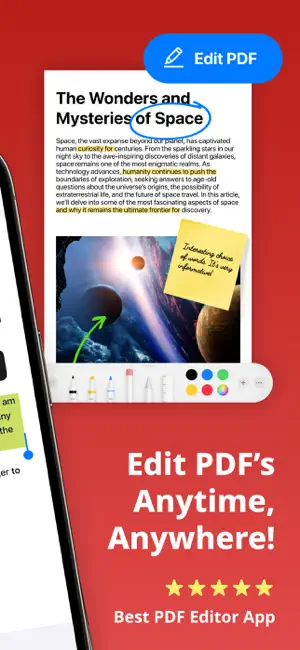
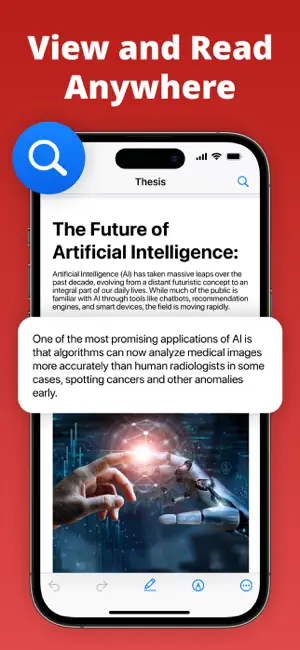
Edit, sign, convert, and manage PDF files instantly with PDF Air – a powerful PDF editor and document manager. PDF Air is a PDF creator and file converter that gives you full control over your documents. Whether you need to open, edit PDF files, eSign, convert to PDF, or scan to PDF, PDF Air simplifies every step. Use it as your PDF reader, PDF editor, PDF converter, or PDF maker – all in one app. ▶ How does PDF Air work? PDF Air allows you to open and edit PDF documents, apply your digital signature, convert images or scans into PDFs, and manage files effortlessly. You can highlight, annotate, and fill forms without leaving the app. ▶ How do I edit a PDF on my device? To edit PDF files, simply import them. You can add text, erase content, fill out PDF forms, highlight text, and eSign in seconds. No printing required – just quick, paperless editing with your PDF editor. ▶ Can I convert files to PDF? PDF Air functions as a complete file converter. You can convert a photo to PDF, JPG to PDF, picture to PDF, or multiple photos to PDF instantly. It's perfect for anyone needing a reliable way to create PDF documents on the go. ▶ How do I sign documents? Use the eSign feature to add your signature directly onto any document. Whether signing contracts, agreements, or forms, the digital signature tool makes it fast and secure. Your eSign is reusable, customizable, and easy to place anywhere on the page. ▶ Where can I use PDF Air? Use PDF Air across email, messaging apps, and cloud platforms. Edit PDF files, create PDF from scans, or convert image to PDF from anywhere. Export documents to Google Drive, Dropbox, or share directly via email, Slack, or WhatsApp. Enhance your productivity with Air Apps One – a subscription to 30+ essential apps. A subscription to PDF Air unlocks tools for productivity, learning, wellness, and more. Access apps like Translate Now, Water Tracker, and Scanner Air under one affordable plan. Simplify your daily routine with unlimited access and exclusive features in one seamless experience. Subscription options include: 1-week 1-month 1-year Manage your subscription easily: Payments are charged to your iTunes account at purchase confirmation and renewed automatically unless canceled at least 24 hours before the end of the current period. Free trials convert to paid subscriptions unless canceled in time. Unused portions of any free trial are forfeited once a subscription begins. All subscriptions are managed via your Apple ID. For changes, cancellations, or refunds, please use your iTunes account settings or contact Apple Support. EU Residents: You may cancel within 14 days via Apple’s process. Refunds are not available if you have downloaded and started using the app. Connect with us: Web: https://airapps.co LinkedIn: https://www.linkedin.com/company/airapps Instagram: https://www.instagram.com/airappsco Privacy Policy: https://airapps.co/privacy Terms of Use: https://airapps.co/terms Support: [email protected]
What’s new
Version 2025.9.5 · Updated October 13, 2025
What’s New in This Update: • UX Enhancements: We’ve polished up the user interface to give you a cleaner and more intuitive experience. • Bug Fixes: We’ve tackled some annoying bugs to make sure your app experience is smoother and more stable. Download it now to enjoy all these great improvements!
App privacy
The developer, Air Apps Systems, reported these privacy practices to Apple.
Data Used to Track You
The following data may be used to track you across apps and websites owned by other companies:
- Identifiers: User ID, Device ID
- Usage Data: Product Interaction, Other Usage Data
Data Not Linked to You
The following data, which may be collected but is not linked to your identity, may be used for the following purposes:
- User Content: Other User Content
- Identifiers: User ID, Device ID
- Usage Data: Product Interaction, Other Usage Data
- Diagnostics: Other Diagnostic Data, Crash Data, Performance Data
Used for: Developer’s Advertising or Marketing, Analytics, Product Personalization, App Functionality
Alternatives to PDF Air - Editor and Converter
Looking for apps like PDF Air - Editor and Converter? Here are 6 similar apps on the App Store. The highest rated is PDF Scanner AI Note text files (5.0/5), and all 6 are free to download.
-
 PDF Editor: Edit Text
4.7
PDF Editor: Edit Text
4.7
-
 PDF Reader: Editor & Converter
4.4
PDF Reader: Editor & Converter
4.4
-
 PDF Editor - Read & Edit PDF
4.3
PDF Editor - Read & Edit PDF
4.3
-
 PDF Scanner AI Note text files
5.0
PDF Scanner AI Note text files
5.0
-
 PDF Converter and Editor + AI
4.0
PDF Converter and Editor + AI
4.0
-
 Simple PDF Editor
4.6
Simple PDF Editor
4.6
| App | Rating | Price | Last updated | Compare |
|---|---|---|---|---|
| PDF Air - Editor and Converter | 5.0 / 5 (1 rating) | Free | October 13, 2025 | |
| PDF Editor: Edit Text | 4.7 / 5 (67) | Free | Jun 18, 2026 | Compare |
| PDF Reader: Editor & Converter | 4.4 / 5 (18) | Free | Oct 6, 2026 | Compare |
| PDF Editor - Read & Edit PDF | 4.3 / 5 (189) | Free | Sep 11, 2026 | Compare |
| PDF Scanner AI Note text files | 5.0 / 5 (4) | Free | Jun 23, 2026 | Compare |
| PDF Converter and Editor + AI | 4.0 / 5 (62) | Free | Feb 6, 2025 | Compare |
| Simple PDF Editor | 4.6 / 5 (16) | Free | Sep 12, 2026 | Compare |