

PDF Converter and Editor + AI
OFFIWIZ, S.L. Utilities iPhoneiPadiPod touch
PDF Converter and Editor + AI is a free Utilities app for iPhone and iPad by OFFIWIZ, S.L. Rated 4.0/5 from 62 ratings. Requires iOS 14.0.
- Rating
- 4.0
- 62 ratings
- Price
- Free
- on the App Store
- Size
- 15 MB
- Age 4+
- Updated
- Feb 6
- 2025 · v5.3.7
Screenshots



About PDF Converter and Editor + AI
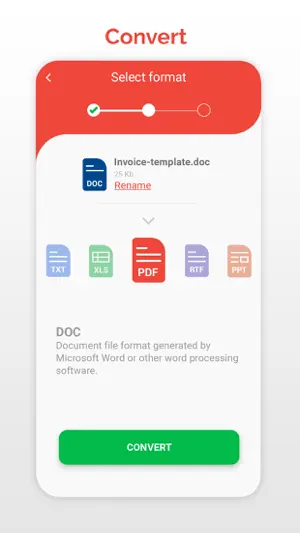
PDF Converter allows you to convert and create files and documents to other extensions like PDF, DOC, RTF, ODT, PPT, XLS and many more Converts Doc to PDF, PPT to PDF, PPT to PDF, PDF to Doc, XLS to PDF, XLS to Doc PDF to ODT, PDF to RTF… PDF Converter (doc ppt xls txt word png jpg wps..) is a document converter that allows you to transform files to other extensions: convert PDF to DOC, TXT, PPT, WORD, JPG, PNG, XLS, ODT, RTF and many more. PDF Converter (doc ppt xls ...) is also a PDF Reader and a PDF Editor. Choose the extension, an output format and convert any document, perfect for creating PowerPoint and PDF presentations. PDF Converter (doc ppt xls txt word png jpg wps odt rtf..) - PDF Reader & PDF Editor: - PDF Converter performs the following conversions: Word to PDF, Word to TXT, PowerPoint to PDF, PPT to TXT, PDF to Doc, PDF to PowerPoint, PDF to XLS, PDF to TXT, XLS to PDF, XLS to TXT, TXT to PDF, TXT to Word, JPG to PDF, JPG to PNG, JPG to PPT, PNG to PDF, PNG to PPT, PNG to JPG, PDF to JPG, PDF to PNG PPT to JPG, PPT to PNG, PDF to ODT, PDF to RTF - PDF Reader, PDF Creator and PDF Editor Use the built-in PDF Reader document viewer or any other document viewer you already have installed. Modify your files with the connection to the Scanner Application and its PDF editor. Now creating customized PDFs and share them in the format of your choosing, is a reality. - Document Scanner Scan documents with the help of the Camera and Scanner application, which connects directly to the document converter, shares your files from the scanner and converts them to any format. - Text recognition and document translator Use the direct function to share your documents with the Camera Translator and Scanner application, in this way you can recognize the text of the documents or translate the text to any language in the world. More than 100 languages are compatible with the translator function. - Ideal for work Scans, copy, translate and convert any photo, image, table or excel graph. Also, modify and convert your photos and change the extension to the desired format, send the finished documents directly from the file converter. - Share your files with other tools and applications Share the documents you have converted with any other messaging, mail or social network application. Link your work with the Camera Scanner and the Camera Translator and complete the application with the best tools. Converting documents to other formats, creating files from others, transforming files and creating new documents in other formats is easy and fast. Converting files, converting DOC to PDF, converting PDF to DOC, PDF to JPG, JPG to PDF, PPT to PDF, PPT to DOC and more combinations are possible thanks to PDF Converter, file converter and image converter. Finish your office work with conversions like Word to PDF, DOC to PDF, PDF to DOC XLS to PDF, PDF to XLS, DOC to XLS, XLS to DOC, PPT to PDF, DOC to PPT, PDF to ODT, PDF to RTF. Including projects and studies with graphics and images, JPG to PDF, PNG to PDF, and PNG to JPG or JPG to PNG. Subscription information: - Length of Subscription: 1 month ( 3 day free trial) or 1 year. - Price: $5.99 per month billed monthly. $59.99 per year billed yearly. - Subscription automatically renews unless auto-renew is turned off at least 24-hours before the end of the current period. - Payment will be charged to iTunes Account at confirmation of purchase. - Account will be charged for renewal within 24-hours prior to the end of the current period, and identify the cost of the renewal. - Subscriptions may be managed by the user and auto-renewal may be turned off by going to the user's Account Settings after purchase. - Any unused portion of a free trial period, if offered, will be forfeited when the user purchases a subscription to that publication, where applicable. Privacy Policy: http://www.ticktalksoft.com/policy Terms of Use: https://www.ticktalksoft.com/terms_of_use
Ratings & reviews
4.0
62 ratings
What’s new
Version 5.3.7 · Updated February 6, 2025
-Stability improved - New formats: HEIC , AZW3 , EPUB , MOBI - Minor bugs fixed - Now PDF Converter is faster than ever Thank you for using PDF Converter and Editor + AI. We post updates periodically.
App privacy
The developer, OFFIWIZ, S.L., reported these privacy practices to Apple.
Data Not Linked to You
The following data, which may be collected but is not linked to your identity, may be used for the following purposes:
- Usage Data: Advertising Data, Product Interaction
- Diagnostics: Crash Data
Used for: Third-Party Advertising, App Functionality
Alternatives to PDF Converter and Editor + AI
Looking for apps like PDF Converter and Editor + AI? Here are 6 similar apps on the App Store. The highest rated is The Document Converter (4.7/5), and all 6 are free to download.
-
 PDF Converter: Word to PDF!
4.4
PDF Converter: Word to PDF!
4.4
-
 The Document Converter
4.7
The Document Converter
4.7
-
 Word To PDF Converter & Reader
4.2
Word To PDF Converter & Reader
4.2
-
 Photos to PDF: Image Converter
4.4
Photos to PDF: Image Converter
4.4
-
 Convert PDF to Word,Excel,PPT
-
 PDF Editor: Edit Text
4.7
PDF Editor: Edit Text
4.7
| App | Rating | Price | Last updated | Compare |
|---|---|---|---|---|
| PDF Converter and Editor + AI | 4.0 / 5 (62 ratings) | Free | February 6, 2025 | |
| PDF Converter: Word to PDF! | 4.4 / 5 (92) | Free | Feb 6, 2026 | Compare |
| The Document Converter | 4.7 / 5 (5,956) | Free | Apr 6, 2026 | Compare |
| Word To PDF Converter & Reader | 4.2 / 5 (65) | Free | Jan 22, 2026 | Compare |
| Photos to PDF: Image Converter | 4.4 / 5 (39) | Free | Aug 21, 2026 | Compare |
| Convert PDF to Word,Excel,PPT | – | Free | Aug 26, 2026 | Compare |
| PDF Editor: Edit Text | 4.7 / 5 (67) | Free | Jun 18, 2026 | Compare |