

PlanTogether: Budget & Plan
Steven Snary Finance iPhoneiPadiPod touch
PlanTogether: Budget & Plan is a free Finance app for iPhone and iPad by Steven Snary. Requires iOS 16.0. Updated October 29, 2026.
- Price
- Free
- on the App Store
- Size
- 51 MB
- Age 4+
- Updated
- Oct 29
- 2026 · v2.0.16
Screenshots
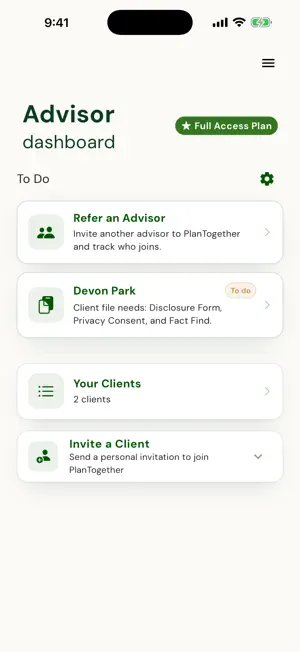

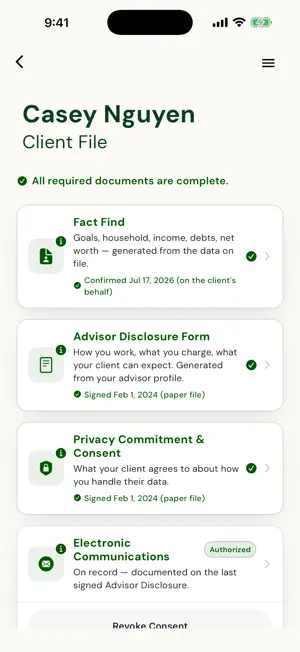

About PlanTogether: Budget & Plan
The paperwork starts once you've both said yes. After the yes, your client fills in their own information on their phone, with you across the desk or at home. It starts their plan, so there's nothing to retype when you get back to the office. PlanTogether by MyFinancialApps is a client onboarding app for life-insurance advisors, accountants, bookkeepers, tax preparers, money coaches, and mortgage and real estate agents. Your clients get their own budget from you, when you turn it on. IF YOU'RE A CLIENT You join by invitation from your advisor or other professional. This is your side of their app. Tell them about your household once, on your phone, with them or at home: who depends on you, how to reach you, and the goals you care about. Want your budget? Pick budgeting as a goal when you join and we ask them for you, or ask them yourself, right in the app. When they turn on your budget, it's yours: • A budget you build yourself, from your income, housing, debts and bills. • Build it in about 10 minutes, with common bills one tap away, ending on Your Result. • Debt Freedom: Snowball or Avalanche, when you'll be out of debt, and a slider that shows what an extra payment does. • Goals that shape your plan. • A Payday Planner to plan which paycheck pays which bill, and a Cashflow Calendar built from the bills and paydays you enter. Turn them on when you want them. • With the Cashflow Calendar on: what's safe to spend today, and the next 12 months at a glance. You enter and confirm your own numbers, so you stay in touch with your money. Reminders in their name? You can switch them off any time. IF YOU'RE A PROFESSIONAL Invite a client in four fields. Then let them do the typing. • They fill in their household, dependents, contact details and goals on their own phone. • Reminders go out in your name: to accept your invite, finish their profile, and start their budget if they chose budgeting and you've turned it on. Each one stops once the step is done. • Pause reminders for any client. • You're told when a client accepts, finishes onboarding, builds a budget or changes their goals. • See what changed in a client's file, who changed it and when. • Life-licensed advisors schedule client meetings and keep meeting notes in the client's file. You both get a reminder the day before. • Life-licensed advisors get a life-insurance needs analysis that starts from the numbers the client entered: need, coverage in force and the gap, on one screen. It works alongside the software you already use. Same app, two logins: professionals sign in to their dashboard, clients to their own plan. Support: [email protected]
What’s new
Version 2.0.16 · Updated October 29, 2026
New in this version: • Meetings for life-licensed advisors: schedule one, keep notes in the client's file, and you both get a reminder the day before. • Pause reminders for any client. Clients can switch them off, and a reminder opens the right screen. • Clients can ask you to turn on their budget. • Payday Planner: choose which payday covers which bill, and split a bill across paydays in one tap. • Clients build their budget in about 10 minutes, ending on Your Result, with common bills one tap away. • Clients who pick budgeting when they join send you a request to turn on their budget. • A simpler budget Overview: clients confirm their budget, then turn on the Payday Planner or Cashflow Calendar when they want them. Plus refinements throughout. Support: [email protected]
App privacy
The developer, Steven Snary, reported these privacy practices to Apple.
Data Linked to You
The following data, which may be collected and linked to your identity, may be used for the following purposes:
- Contact Info: Email Address, Phone Number, Name
- Usage Data: Product Interaction
- Financial Info: Other Financial Info
- User Content: Other User Content
- Identifiers: User ID, Device ID
Used for: Developer’s Advertising or Marketing, Product Personalization, App Functionality
Data Not Linked to You
The following data, which may be collected but is not linked to your identity, may be used for the following purposes:
- Diagnostics: Crash Data, Performance Data, Other Diagnostic Data
Used for: Analytics, App Functionality
Alternatives to PlanTogether: Budget & Plan
Looking for apps like PlanTogether: Budget & Plan? Here are 6 similar apps on the App Store. The highest rated is BillRadar: Bill Organizer (5.0/5), and all 6 are free to download.
-
 IQPF
IQPF
-
 BillRadar: Bill Organizer
5.0
BillRadar: Bill Organizer
5.0
-
 Insurance Compass
-
 Bill Organizer & Subscriptions
5.0
Bill Organizer & Subscriptions
5.0
-
 Stowe: Track Money & AI Budget
5.0
Stowe: Track Money & AI Budget
5.0
-
 TSL Preneed Calculator
5.0
TSL Preneed Calculator
5.0
| App | Rating | Price | Last updated | Compare |
|---|---|---|---|---|
| PlanTogether: Budget & Plan | – | Free | October 29, 2026 | |
| IQPF | – | Free | Dec 20, 2023 | Compare |
| BillRadar: Bill Organizer | 5.0 / 5 (6) | Free | Oct 21, 2026 | Compare |
| Insurance Compass | – | Free | Oct 26, 2026 | Compare |
| Bill Organizer & Subscriptions | 5.0 / 5 (4) | Free | Oct 14, 2026 | Compare |
| Stowe: Track Money & AI Budget | 5.0 / 5 (1) | Free | Oct 28, 2026 | Compare |
| TSL Preneed Calculator | 5.0 / 5 (6) | Free | Sep 9, 2026 | Compare |