

S2K NIG
The Lagos Analysis Corporation Utilities iPhoneiPadiPod touch
S2K NIG is a paid Utilities app for iPhone and iPad by The Lagos Analysis Corporation. Requires iOS 15.0. Updated October 30, 2026.
- Price
- 0.99 USD
- on the App Store
- Size
- 4 MB
- Age 4+
- Updated
- Oct 30
- 2026 · v2.1.0
Screenshots



About S2K NIG
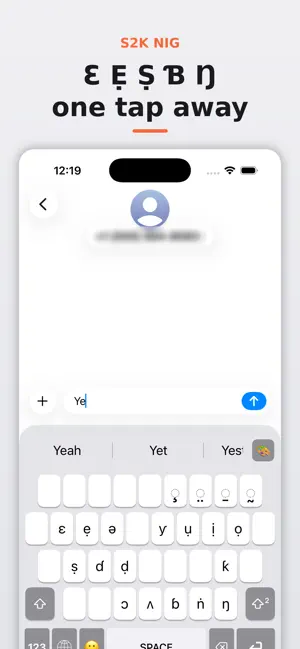
Type Hausa, Igbo, Edo, Fulfulde, Yorùbá and over 250 indigenous languages with 100% orthographic and tonal precision—without ever switching keyboard layouts. S2K Nigeria (S2K NIG) brings the patented Shift² Keyboard architecture to iOS, providing direct, single-layout access to extended African characters, sub-dots, and tonal marks while preserving standard English QWERTY touch-typing. Key Features: • Patented Shift² Modifier: Tap the dedicated Shift² key to instantly access 42+ base characters (including ẹ, ọ, ṣ, ḍ, ƙ, ɓ, ɗ, ŋ, ṅ, ɔ, ɛ, ụ, ị, ƴ) and 14+ tone marks directly on the primary keyboard. • 100% Standard QWERTY Preservation: English typing muscle memory remains completely untouched. Blend English and indigenous words in the same sentence without cognitive friction. • Accurate Orthographic & Tonal Resolution: Easily input sub-dots and tone marks to distinguish meanings like ákwá (cry) vs. àkwá (egg) vs. ákwà (cloth) vs. àkwà (bed), or owó (money) vs. òwò (trade) effortlessly. • Universal iOS Integration: Fully functional across WhatsApp, iMessage, X, Safari, Pages, Microsoft Word, and system search. • Absolute Privacy by Design: 100% on-device input processing. S2K NIG does not record, log, or transmit keystrokes, personal messages, or passwords. How to Enable S2K NIG: Go to Settings > General > Keyboard > Keyboards. Tap "Add New Keyboard" and select "S2K NIG". Switch to S2K NIG anytime by tapping the Globe icon on your keyboard.
What’s new
Version 2.1.0 · Updated October 30, 2026
We have introduced performance enhancements and layout refinements to make indigenous language typing even faster: • Enhanced Sequential Unicode Composition: Faster rendering of combined vowels, sub-dots, and tone marks across third-party chat and note applications. • Optimized Key Tap Targets: Adjusted hitboxes for Shift and Shift² keys to minimize mistypes during high-speed typing. • Expanded Haptic Feedback: Optional subtle haptic response when toggling Shift² states. • Dark Mode Polish: Refined contrast and typography for glyphs and diacritics in system Dark Mode. • Under-the-hood stability improvements and memory footprint reduction for seamless background performance.
App privacy
The developer, The Lagos Analysis Corporation, reported these privacy practices to Apple.
Data Not Collected
The developer does not collect any data from this app.
Alternatives to S2K NIG
Looking for apps like S2K NIG? Here are 6 similar apps on the App Store. The highest rated is keyInTwi (4.3/5), and 5 of the 6 are free to download.
-
 keyInTwi
4.3
keyInTwi
4.3
-
 BeastBoard - Voice Typing
-
 ArkClipKeyboard
-
 Dozecal
4.2
Dozecal
4.2
-
 QReport - Inspektion
-
 SUNGOLDPOWER
| App | Rating | Price | Last updated | Compare |
|---|---|---|---|---|
| S2K NIG | – | 0.99 USD | October 30, 2026 | |
| keyInTwi | 4.3 / 5 (3) | 1.99 USD | Jul 28, 2026 | Compare |
| BeastBoard - Voice Typing | – | Free | Dec 15, 2025 | Compare |
| ArkClipKeyboard | – | Free | Aug 23, 2024 | Compare |
| Dozecal | 4.2 / 5 (5) | Free | Aug 10, 2025 | Compare |
| QReport - Inspektion | – | Free | Oct 10, 2026 | Compare |
| SUNGOLDPOWER | – | Free | Jul 18, 2026 | Compare |
Compare S2K NIG with the top alternatives: ratings, updates, ASO score and keyword gaps →