

SMeet
Academtech LLC Business iPhoneiPadiPod touchMac
SMeet is a free Business app for iPhone and iPad by Academtech LLC. Requires iOS 16.0. Updated November 1, 2026.
- Price
- Free
- on the App Store
- Size
- 57 MB
- Age 4+
- Updated
- Nov 1
- 2026 · v3.35
Screenshots

About SMeet
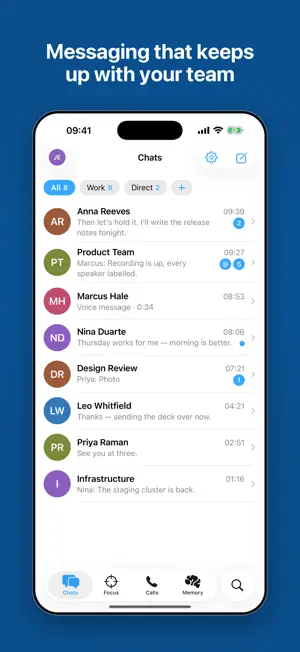
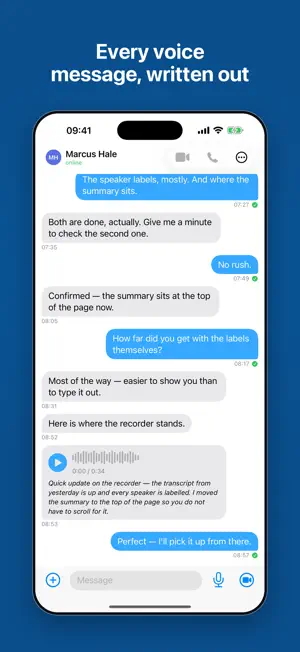
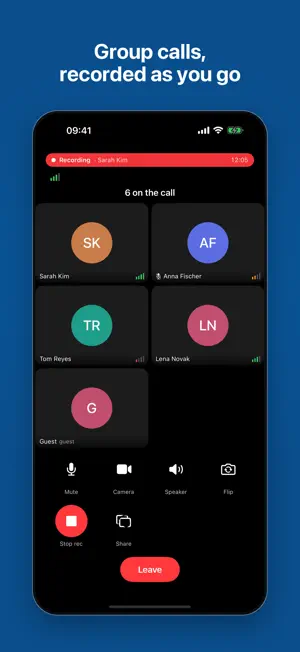
Talk through an idea, meet your team or catch up with someone close. SMeet brings chats, HD meetings and files together, then helps turn recorded conversations into clear next steps. BE IN THE CONVERSATION. COME BACK TO THE DETAILS. Turn on meeting recording. Once processed, it gives you a transcript by speaker, a summary, topics, decisions and suggested action items. Open the source or play the moment behind a note. • Ask Memory about past conversations and get answers with sources • Find meaning across transcripts without remembering the exact words • Review AI suggestions before turning them into commitments FOCUS: SEE WHAT NEEDS YOU Your promises, questions waiting for a reply and decisions involving you, gathered on a personal screen. Each item leads back to its message or recording. Replies in the conversation help close the loop. Your Focus is yours: no manager's dashboard or scoring. DECISIONS THAT KEEP THEIR CONTEXT Keep the wording, reason, owner and status alongside the source. If a new decision conflicts with an active one, SMeet brings the earlier one back into view. You decide whether to replace, clarify or keep it. Revision history and review dates help the agreement stay useful. ROOM FOR WORK AND EVERYONE ELSE Use the public space or switch into an organisation. Chats, people, search, folders and your work profile follow the space you choose. Set a different display name, @handle and job title for each organisation. • Several accounts with separate chats and notifications • Join by invitation or QR code; configured organisations also support verified work email • Your own profile card with status, birthday, @address and QR code MESSAGES THAT DO MORE • Personal and group chats, reactions, replies, threads and read receipts • Folders, pinned chats, Saved Messages, mentions and drafts • Links that take conversation members to an exact message • Polls and quizzes; shared checklists that show who checked an item • An AI editor to fix, shorten, change tone or translate into 11 languages. You see the result before sending • Voice messages with playback speed and translation in the sender's voice; round videos up to 60 seconds • Your location or a place on the map, with routes through Apple Maps • Files, GIFs, media galleries, search, link previews, formatting and emoji • Edit history, forwarding, deletion, moderation and scheduled messages VOICE, VIDEO AND GROUPS Start with voice and turn your camera on when you want. Share your screen, choose a virtual background, use Picture-in-Picture and record to the cloud. Set up automatic recording for groups. Public and private groups have roles and permissions; channels let owners publish to their audience. NEARBY: WHEN THERE IS NO INTERNET Open Nearby on SMeet devices with Bluetooth enabled. Messages travel directly and can be relayed by other participants nearby. No server is involved; private messages are encrypted for the recipient. On iPhone, you can turn Bluetooth back on in Airplane Mode. Keep Nearby open; reach depends on your surroundings and the participants around you. AT HOME ON YOUR DEVICES Use chats and calls on iPhone and iPad. On Mac, work in a dedicated desktop layout with sidebar navigation and message actions a right-click away. English and Russian, Dark Mode, locally available history and an offline send queue. Call audio and video travel encrypted. Start with a conversation. Keep what matters in SMeet.
What’s new
Version 3.35 · Updated November 1, 2026
Less searching, easier conversations and a clearer way back to what you agreed. CHATS AND MESSAGES More reactions and an easier emoji picker. Use the AI editor to fix, shorten, change the tone of a draft or translate it into 11 languages. You review the result and send it yourself. Polls, quizzes and shared checklists help you agree on the next step inside a chat. CALLS ON IPHONE Contacts and call history have separate views. Open a profile from the list, and confirm before starting a voice or video call. A shared screen starts fitted to the display, with zooming and panning when you need a closer look. RECORDINGS AND AGREEMENTS Set automatic recording for personal calls globally or for a particular conversation. Processed recordings provide transcripts, summaries and suggested tasks. Focus brings you back to your promises; Decisions keeps the wording and the source. ON MAC A dedicated desktop layout with sidebar navigation, collapsible columns, meetings and decisions alongside your chats. The app opens to Chats. The composer, search and settings windows are designed for mouse and keyboard, with emoji available from the composer. NEARBY WITHOUT INTERNET Talk over Bluetooth with people nearby. Open Nearby on both devices and leave Bluetooth enabled. Messages do not pass through a server. ALSO Mentions, saved drafts, pinned chats, message links, locations and public channel links help you return to the right conversation faster.
App privacy
The developer, Academtech LLC, reported these privacy practices to Apple.
Data Not Linked to You
The following data, which may be collected but is not linked to your identity, may be used for the following purposes:
- Contact Info: Email Address, Name
- User Content: Emails or Text Messages, Photos or Videos, Audio Data, Customer Support
- Identifiers: User ID
- Diagnostics: Crash Data, Performance Data, Other Diagnostic Data
- Location: Precise Location
Used for: Analytics, App Functionality
Alternatives to SMeet
Looking for apps like SMeet? Here are 6 similar apps on the App Store. The highest rated is navalink (5.0/5), and all 6 are free to download.


| App | Rating | Price | Last updated | Compare |
|---|---|---|---|---|
| SMeet | – | Free | November 1, 2026 | |
| Foxcolab Meet | – | Free | Sep 11, 2026 | Compare |
| Easy Link Assist | – | Free | May 28, 2026 | Compare |
| team+ GECP | – | Free | Oct 28, 2026 | Compare |
| navalink | 5.0 / 5 (1) | Free | Oct 18, 2024 | Compare |
| TutorsHelper | 5.0 / 5 (1) | Free | Oct 21, 2026 | Compare |
| TeamChat Team | – | Free | Jun 4, 2026 | Compare |
Compare SMeet with the top alternatives: ratings, updates, ASO score and keyword gaps →