

Foxcolab Meet
Foxcolab Technologies Productivity iPhoneiPadiPod touch
Foxcolab Meet is a free Productivity app for iPhone and iPad by Foxcolab Technologies. Requires iOS 15.0. Updated September 11, 2026.
- Price
- Free
- on the App Store
- Size
- 73 MB
- Age 4+
- Updated
- Sep 11
- 2026 · v1.0.4
Screenshots


About Foxcolab Meet
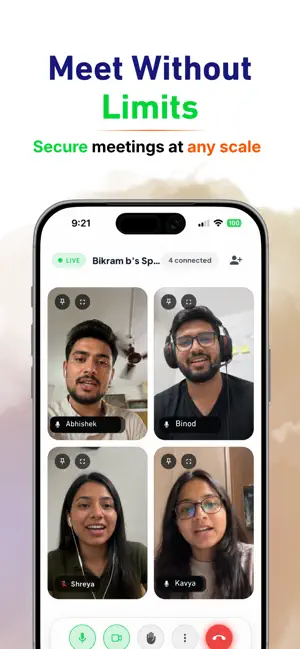
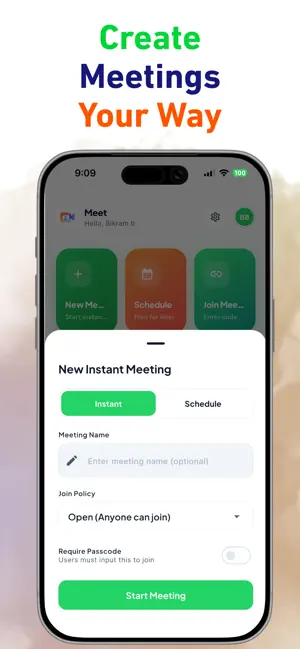
Connect, Collaborate, and Meet Securely. Foxcolab Meet is a secure, high-definition video conferencing and team collaboration platform designed for modern workspaces. Whether you are hosting an instant 1-on-1 check-in, presenting to an enterprise team, or scheduling a workspace sync, Foxcolab Meet provides crystal-clear media streams and productivity tools to keep your team connected. KEY FEATURES: High-Definition Video & Audio Experience low-latency, high-fidelity calls. Foxcolab Meet automatically adjusts stream quality based on your network bandwidth to ensure stable, interrupt-free communication. Industry-Standard Security Host with total peace of mind. All media, chat streams, and room connections are protected by advanced encryption protocols, preventing unauthorized access and keeping your team data secure. Effortless Screen Sharing Present slides, share documents, and collaborate on visual mockups in real-time. Deliver screen sharing streams with native clarity directly from your device. Multitask with Native Picture-in-Picture Minimize your call into a floating native window while taking notes, typing emails, or browsing other apps. The PiP interface features real-time indicators for microphone, camera, and speaking status. Optimized iPad & Tablet Experience Enjoy a native dashboard layout custom-tailored for wider displays. The responsive split-screen sidebar places host controls, participant listings, and meeting schedules beautifully within reach. Pre-Meeting Setup & Fit Check Preview your camera feed, toggle your audio devices, and verify your appearance before entering the call, ensuring you are always ready before you join. Quick Join & Scheduling Start instant meetings with a single tap, share invite codes, or schedule upcoming workspace syncs ahead of time. Unified Workspace Integration Sign in with your unified Foxcolab account credentials to access your organization's directory, calendar events, and meeting history instantly.
What’s new
Version 1.0.4 · Updated September 11, 2026
What's New in v1.0.4: • Simplified meeting join experience for guests and team members. • One-tap deep linking from meeting invite links with passcode and waiting room support. • Call exit confirmation to avoid accidental disconnections when navigating back. • Enhanced light mode visuals, and safe-area panel spacing. • Extended session longevity and connectivity improvements.
App privacy
The developer, Foxcolab Technologies, reported these privacy practices to Apple.
Data Linked to You
The following data, which may be collected and linked to your identity, may be used for the following purposes:
- Contact Info: Email Address, Name
- Identifiers: User ID
Used for: App Functionality
Alternatives to Foxcolab Meet
Looking for apps like Foxcolab Meet? Here are 6 similar apps on the App Store. The highest rated is Sangoma Meet (5.0/5), and all 6 are free to download.
-
 Sangoma Meet
5.0
Sangoma Meet
5.0
-
 Wizyconf by Wildix
5.0
Wizyconf by Wildix
5.0
-
 GenMail: AI Email Assistant
4.6
GenMail: AI Email Assistant
4.6
-
 Openly for Chrome & Firefox
4.6
Openly for Chrome & Firefox
4.6
-
 Themes for PowerPoint - DesiGN
4.2
Themes for PowerPoint - DesiGN
4.2
-
 Temp Mail Pro - Multiple Email
5.0
Temp Mail Pro - Multiple Email
5.0
| App | Rating | Price | Last updated | Compare |
|---|---|---|---|---|
| Foxcolab Meet | – | Free | September 11, 2026 | |
| Sangoma Meet | 5.0 / 5 (14) | Free | Oct 31, 2025 | Compare |
| Wizyconf by Wildix | 5.0 / 5 (2) | Free | Oct 20, 2026 | Compare |
| GenMail: AI Email Assistant | 4.6 / 5 (14) | Free | Oct 21, 2026 | Compare |
| Openly for Chrome & Firefox | 4.6 / 5 (216) | Free | Mar 25, 2026 | Compare |
| Themes for PowerPoint - DesiGN | 4.2 / 5 (51) | Free | Sep 23, 2026 | Compare |
| Temp Mail Pro - Multiple Email | 5.0 / 5 (5) | Free | Sep 4, 2026 | Compare |
Compare Foxcolab Meet with the top alternatives: ratings, updates, ASO score and keyword gaps →