

Pingers - Ping & Latency Check
Ahmed Nabeeh Utilities iPhoneiPadiPod touch
Pingers - Ping & Latency Check is a free Utilities app for iPhone and iPad by Ahmed Nabeeh. Rated 5.0/5 from 8 ratings. Requires iOS 17.0.
- Rating
- 5.0
- 8 ratings
- Price
- Free
- on the App Store
- Size
- 16 MB
- Age 4+
- Updated
- Sep 18
- 2026 · v1.246
Screenshots
About Pingers - Ping & Latency Check
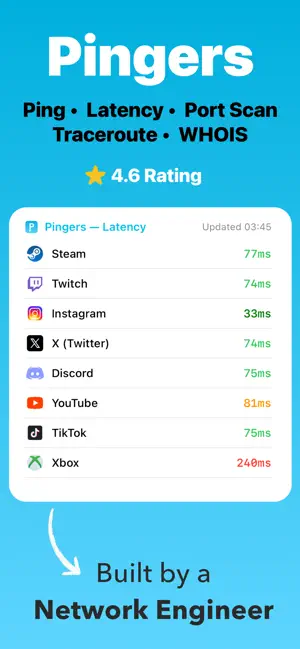
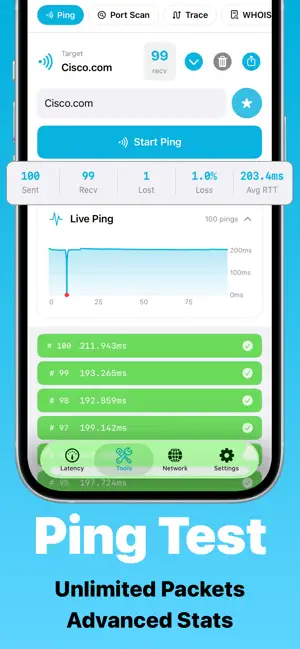
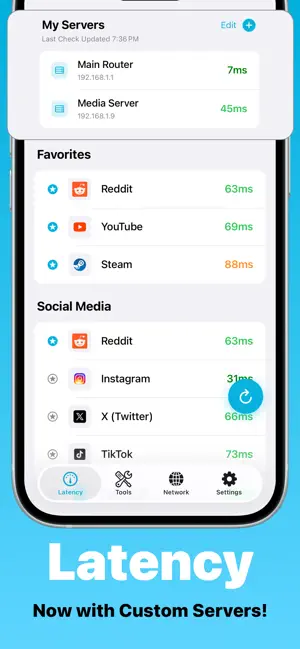
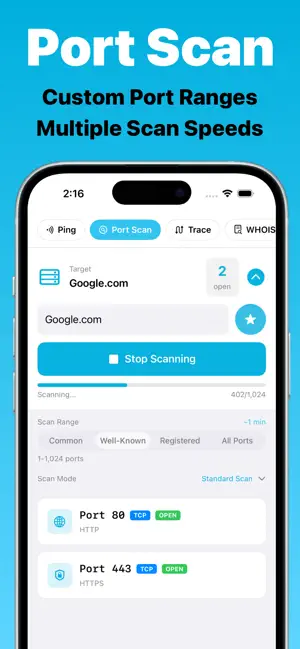
Pingers puts powerful network tools at your fingertips. Stop guessing and start troubleshooting from Ping and Traceroute to WHOIS, Port Scan, and DNS Lookup, all with favorite servers for quick access so you never type the same address twice. Plus Latency Checks and Full IP Configuration including your Public IP, all in one clean app. Users call the latency checker a "game-changer" for knowing if their connection is ready before gaming on Steam or streaming on YouTube. Built by a network engineer, so you know it's the real deal. Perfect for: - IT pros troubleshooting on the go - Gamers and streamers optimizing their connection - Anyone diagnosing Wi-Fi or network issues Features: - Check latency for popular services: YouTube, Steam, Discord, Xbox, Instagram and more - Ping by IP or domain name with advanced stats: packet loss, avg RTT, sent/received packets, unlimited ping support - Run a real-time Traceroute to see every hop - Port Scan with customizable ranges and scan speed - DNS Lookup: query any domain instantly - WHOIS info across 47+ registries: ownership, expiration, status - See your full network details: Public IP, Private IP, DNS, DHCP and Default Gateway - Save unlimited favorite servers for quick ping, traceroute, and port scan checks - Home Screen Widget: live latency for your favorite services without opening the app - Full iPad support and Dark Mode Fast. Clean. No "Windows 95 vibes." 100% Private. No ads. No data collection. No account needed. One-time purchase. Works across iPhone and iPad. Family Sharing included. Terms of Use: https://www.apple.com/legal/internet-services/itunes/dev/stdeula/
Ratings & reviews
5.0
8 ratings
What’s new
Version 1.246 · Updated September 18, 2026
The biggest update yet is here and Pingers looks and feels like a whole new app! • Five powerful network tools, one unified screen. Ping, Trace Route, Port Scan, WHOIS, and DNS are finally together. • Ping now comes alive with a real-time stats bar showing packets sent, received, lost, loss percentage, and average round trip time. • Your server list and packet settings are right there on the Tools screen, exactly where you need them. • Trace Route now lets you control your max hops, and automatically highlights the destination when the route completes so you never have to hunt for it. • The app tells you exactly what it is. No internet, bad host, service unreachable. No more guessing, no more silent failures. • Dark mode has been completely refined from top to bottom. • iPad users, this one's for you. A fully redesigned split layout puts controls on the left and results on the right. This is what Pingers on iPad was always supposed to look like. This is Pingers, rebuilt!
App privacy
The developer, Ahmed Nabeeh, reported these privacy practices to Apple.
Data Not Collected
The developer does not collect any data from this app.
Alternatives to Pingers - Ping & Latency Check
Looking for apps like Pingers - Ping & Latency Check? Here are 6 similar apps on the App Store. The highest rated is QRForge: QR Scanner Generator (5.0/5), and all 6 are free to download.
-
 Ping Analyzer: Latency Monitor
4.0
Ping Analyzer: Latency Monitor
4.0
-
 Ping Network Scanner
4.2
Ping Network Scanner
4.2
-
 Localhost Master - HTTP Server
3.0
Localhost Master - HTTP Server
3.0
-
 QRForge: QR Scanner Generator
5.0
QRForge: QR Scanner Generator
5.0
-
 Ping Stats – Network Analyzer
5.0
Ping Stats – Network Analyzer
5.0
-
 Ping – Network Tools
4.8
Ping – Network Tools
4.8
| App | Rating | Price | Last updated | Compare |
|---|---|---|---|---|
| Pingers - Ping & Latency Check | 5.0 / 5 (8 ratings) | Free | September 18, 2026 | |
| Ping Analyzer: Latency Monitor | 4.0 / 5 (1) | Free | Jun 28, 2025 | Compare |
| Ping Network Scanner | 4.3 / 5 (24) | Free | Oct 15, 2026 | Compare |
| Localhost Master - HTTP Server | 3.0 / 5 (2) | Free | Oct 17, 2026 | Compare |
| QRForge: QR Scanner Generator | 5.0 / 5 (4) | Free | Nov 12, 2025 | Compare |
| Ping Stats – Network Analyzer | 5.0 / 5 (4) | Free | Apr 2, 2026 | Compare |
| Ping – Network Tools | 4.8 / 5 (109) | Free | Sep 23, 2026 | Compare |