

Ping – Network Tools
Pankaj Gaikar Utilities iPhoneiPadiPod touch
Ping – Network Tools is a free Utilities app for iPhone and iPad by Pankaj Gaikar. Rated 4.8/5 from 107 ratings. Requires iOS 17.0.
- Rating
- 4.8
- 107 ratings
- Price
- Free
- on the App Store
- Size
- 42 MB
- Age 4+
- Updated
- Sep 23
- 2026 · v4.3.0
Screenshots


About Ping – Network Tools
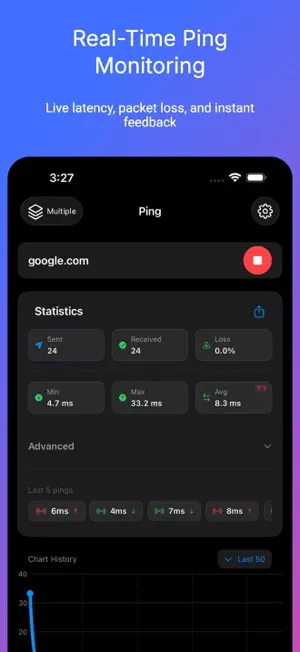
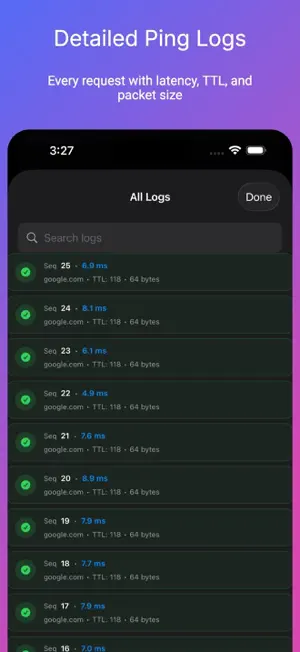
Ping Network Tools is an all-in-one network analyzer and ping test toolkit for iPhone. Run a fast connectivity check to any hostname or IP address, trace routes hop-by-hop, perform DNS lookups, scan open ports, check WHOIS records, calculate subnets, and monitor your connection in real time. No ads. No tracking. No data collection. Completely free. 7 NETWORK TOOLS IN ONE APP Ping goes far beyond a basic ping app — it’s a complete mobile network toolkit for Wi-Fi troubleshooting, LAN diagnostics, and server monitoring on the go. PING TEST & MONITOR • Ping test (ICMP) for any hostname or IP address (IPv4 + IPv6) • Live latency chart with last-point highlight and smooth visualization • Packet loss detection — instantly identify unstable connections • Smart alerts for latency spikes, packet loss thresholds, or connection drops • Advanced metrics — jitter, standard deviation, stability score, p50/p95/p99 percentiles • Quality grade (A+ to F) for instant connection health assessment • Insights like Stable, Spiking, or Degraded to explain results • Terminal-style console log with colored status indicators • Configurable interval, timeout, and count limit for precise ping tests SERVICE PULSE • At-a-glance reachability for popular services on the Monitor tab • Live latency with trend arrows and mini charts LOOKS & APP ICONS • Curated Looks — CRT, Windows 95, VHS, Arcade, and more • Alternate app icons to match your style • Optional Icon Pack, Theme Pack, or Bundle — network tools stay free NETWORK TOOLS • DNS Lookup — resolve A, AAAA, and reverse PTR records • Traceroute — hop-by-hop route tracing with per-hop latency and timeout detection • Port Scanner — TCP connect scan with common presets and custom ranges • WHOIS Lookup — domain registration, registrar, expiry, and name server info • Network Snapshot — find my IP address, public IP, DNS servers, network type, IPv6 status • Subnet Calculator — CIDR ranges, masks, broadcast, host count • Wake on LAN — send magic packets to power on devices remotely HISTORY & EXPORT • Auto-saved ping sessions with searchable history • Session detail with full chart replay and complete console log • Share connection quality summaries for faster troubleshooting BUILT FOR GAMERS & PROFESSIONALS • Gamers — monitor ping and latency before it costs you the match • Remote workers — diagnose Wi-Fi issues affecting VPN and video calls • IT & DevOps — server monitor for uptime, DNS propagation, port scanning • Network engineers — subnet calculations, WHOIS lookup, LAN utilities • Streamers & creators — detect packet loss and connection instability Download Ping Network Tools — your network scanner, ping monitor, and connectivity check in one app. MULTI-HOST PING & PRESET GROUPS Compare several hosts at once with multi-host ping: live Radar view, detailed packet Timeline, and side-by-side metrics. Organize favorites into groups and launch them together from the Favorites tab. • Curated preset groups ready to ping — Social, Streaming, Gaming, DNS, and Cloud & Work • Multipurpose host packs for different audiences; launch a whole group in one tap
Ratings & reviews
4.8
107 ratings
What’s new
Version 4.3.0 · Updated September 23, 2026
• Tip to unlock Looks & Icons — tippers unlock packs when tip amount meets pack price • Returning tippers get a thank-you unlock screen instead of the cosmetics promo • Theme Fonts now apply live across Monitor (Service Pulse and related screens) without relaunching
App privacy
The developer, Pankaj Gaikar, reported these privacy practices to Apple.
Data Not Linked to You
The following data, which may be collected but is not linked to your identity, may be used for the following purposes:
- Location: Coarse Location
- Usage Data: Product Interaction
- Diagnostics: Crash Data
Used for: Analytics
Alternatives to Ping – Network Tools
Looking for apps like Ping – Network Tools? Here are 6 similar apps on the App Store. The highest rated is Ping Stats – Network Analyzer (5.0/5), and 5 of the 6 are free to download.
-
 Ping Stats – Network Analyzer
5.0
Ping Stats – Network Analyzer
5.0
-
 Ping Test+
-
 Ping - network utility
4.3
Ping - network utility
4.3
-
 iDevice Monitor
3.7
iDevice Monitor
3.7
-
 Ping Analyzer: Latency Monitor
4.0
Ping Analyzer: Latency Monitor
4.0
-
 iNetTools - Ping,DNS,Port Scan
4.6
iNetTools - Ping,DNS,Port Scan
4.6
| App | Rating | Price | Last updated | Compare |
|---|---|---|---|---|
| Ping – Network Tools | 4.8 / 5 (107 ratings) | Free | September 23, 2026 | |
| Ping Stats – Network Analyzer | 5.0 / 5 (4) | Free | Apr 2, 2026 | Compare |
| Ping Test+ | – | Free | Apr 9, 2026 | Compare |
| Ping - network utility | 4.3 / 5 (377) | Free | Jul 8, 2025 | Compare |
| iDevice Monitor | 3.7 / 5 (16) | 0.99 USD | Feb 23, 2026 | Compare |
| Ping Analyzer: Latency Monitor | 4.0 / 5 (1) | Free | Jun 28, 2025 | Compare |
| iNetTools - Ping,DNS,Port Scan | 4.6 / 5 (5,674) | Free | Jun 23, 2026 | Compare |