

Riverside: Record, Edit, Share
RIVERSIDEFM, INC Photo & Video iPhoneiPadiPod touch
Riverside: Record, Edit, Share is a free Photo & Video app for iPhone and iPad by RIVERSIDEFM, INC. Rated 4.7/5 from 20,248 ratings. Requires iOS 18.0.
- Rating
- 4.7
- 20.2K ratings
- Price
- Free
- on the App Store
- Size
- 220 MB
- Age 4+
- Updated
- Oct 26
- 2026 · v4.24.0
Screenshots



About Riverside: Record, Edit, Share
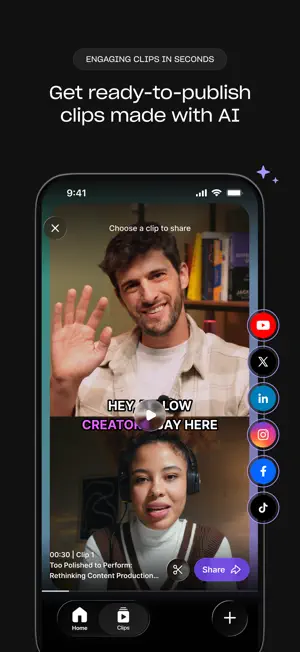
NEW: MEET RIVERSIDE AGENTS The first AI production team built only for video, now in your pocket. You finish recording, and your team's already on it. Your Producer preps the session, your Editor creates a rough cut, your Clipper pulls the best moments, and your Marketer gets them live. They're experts at video. You call the shots. Riverside turns your phone into a portable studio for conversations and talking head videos. Record crisp video and audio anywhere, go live to your audience, and let your agents take it from raw recording to ready to post. Whether you're creating a podcast, a YouTube channel, a personal brand, or content for your business, this is where it gets made. RECORD ANYWHERE, IN STUDIO QUALITY Record solo, bring on a remote guest, or go audio-only. Riverside captures every track locally, so your quality stays sharp even when your connection doesn't. A built-in stabilizer keeps your shot steady, and your footage uploads in the background as you record, so your agents can get started the moment you stop. CLIPS FOR SOCIAL, MADE FOR YOU Knowing what to post is hard. Making it is harder. Your Clipper agent does both. It finds your most engaging moments before you've even watched the recording back, then cuts them, frames them, and adds the captions. You get the best clips from every recording, ready to publish with a tap. EDIT WITH A PROMPT Describe your edit, and your Editor agent makes it. No timeline. No pinching and dragging clips around on a small screen. Tell it which parts to cut and keep, ask it to clean up audio and remove filler words, or add captions and branding. It'll even suggest edits of its own. It's the fastest route from raw recording to ready to post, and when you want more control, your project is waiting for you in the Riverside desktop editor. TURN ONE RECORDING INTO A CONTENT ENGINE Your agents take a single recording and make the rest for you: social clips, a thumbnail, captions, a blog post, full show notes. Just ask. LIVE STREAM TO EVERYWHERE AT ONCE Go live and multistream to YouTube, Facebook, LinkedIn, X, Twitch, TikTok, and custom RTMP destinations at the same time. One session, every audience. PICK UP WHERE YOU LEFT OFF Record on your phone and finish on your computer, or start at your desk and keep going on the move. Your videos are synced to the cloud, and your agents keep working in between, so you can review edits, watch your clips, and decide what to post from any device. A SECOND CAMERA IN YOUR POCKET Recording on desktop? Add your phone as a second angle and capture an extra video track for your edit. BUILT FOR CREATORS OF EVERY KIND Podcasters, YouTubers, personal brands, and marketing teams. Anyone who wants studio-quality content without the studio. WHY RIVERSIDE • Riverside Agents, the first AI production team built only for video • True local recording for quality independent of your connection • One recording = instantly generated clips, thumbnails, posts, and more • AI editing and audio cleanup • Full production suite across mobile and desktop Download Riverside and take your studio anywhere. Terms & Conditions: https://riverside.com/terms-conditions Privacy: https://riverside.com/privacy-policy
Ratings & reviews
4.7
20.2K ratings
What’s new
Version 4.24.0 · Updated October 26, 2026
• Meet Riverside Agents, your AI production team. Your Producer, Editor, Clipper, and Marketer take a recording from raw footage to ready to post. Find them in the new Agents tab • Editor is our new editing agent. Tell it what to cut, clean up, or caption • Your Clipper finds your best moments and notifies you when clips are ready • Your Marketer writes your posts and gets your clips live on social You still make the call. Now with a pro team behind you.
App privacy
The developer, RIVERSIDEFM, INC, reported these privacy practices to Apple.
Data Used to Track You
The following data may be used to track you across apps and websites owned by other companies:
- Identifiers: Device ID
Data Not Linked to You
The following data, which may be collected but is not linked to your identity, may be used for the following purposes:
- Usage Data: Advertising Data, Product Interaction, Other Usage Data
- Identifiers: Device ID
- Diagnostics: Crash Data, Performance Data, Other Diagnostic Data
- User Content: Audio Data
- Other Data: Other Data Types
Used for: Developer’s Advertising or Marketing, Analytics, Product Personalization, App Functionality, Other Purposes
Alternatives to Riverside: Record, Edit, Share
Looking for apps like Riverside: Record, Edit, Share? Here are 6 similar apps on the App Store. The highest rated is OpusClip - AI video clipping (4.9/5), and all 6 are free to download.
-
 StreamYard Guest
3.3
StreamYard Guest
3.3
-
 Detail: AI Video Editor
4.5
Detail: AI Video Editor
4.5
-
 OpusClip - AI video clipping
4.9
OpusClip - AI video clipping
4.9
-
 Frame.io
4.4
Frame.io
4.4
-
 Zencastr
4.9
Zencastr
4.9
-
 Templify・AI Video & Reel Maker
4.8
Templify・AI Video & Reel Maker
4.8
| App | Rating | Price | Last updated | Compare |
|---|---|---|---|---|
| Riverside: Record, Edit, Share | 4.7 / 5 (20,248 ratings) | Free | October 26, 2026 | |
| StreamYard Guest | 3.3 / 5 (73) | Free | Apr 16, 2026 | Compare |
| Detail: AI Video Editor | 4.5 / 5 (3,959) | Free | Oct 21, 2026 | Compare |
| OpusClip - AI video clipping | 4.9 / 5 (8,510) | Free | Sep 30, 2026 | Compare |
| Frame.io | 4.4 / 5 (928) | Free | Oct 26, 2026 | Compare |
| Zencastr | 4.9 / 5 (721) | Free | Oct 23, 2026 | Compare |
| Templify・AI Video & Reel Maker | 4.8 / 5 (7,290) | Free | Oct 23, 2026 | Compare |