

Frame.io
Frame.io Photo & Video iPhoneiPadiPod touch
Frame.io is a free Photo & Video app for iPhone and iPad by Frame.io. Rated 4.4/5 from 932 ratings. Requires iOS 18.0. Updated October 26, 2026.
- Rating
- 4.4
- 932 ratings
- Price
- Free
- on the App Store
- Size
- 111 MB
- Age 4+
- Updated
- Oct 26
- 2026 · v26.20.3
Screenshots


About Frame.io
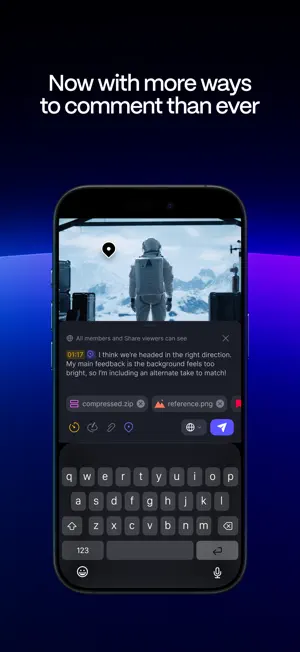
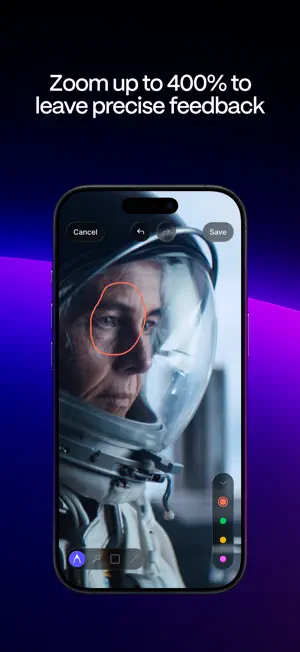
Supercharge your mobile workflow with the Frame.io experience on the smaller screen. Now it’s easier than ever to collaborate, review, and manage work with your team, clients, and other stakeholders from anywhere in the world using the Frame.io app for iPhone and iPad. Rebuilt from the ground up Customize how you view your assets — then scroll, scrub, zoom, and comment with incredible precision and responsiveness. Built natively in Swift, the Frame.io iOS and iPadOS apps allow you to bring the Frame.io experience with you anywhere. Find what you need faster Search comes to the Frame.io iPhone and iPad apps for the first time. Quickly find the assets, folders, or projects you need on the go. Experience a faster workflow Group, tag, and sort assets by out-of-the-box and custom metadata. Edit those fields right in the player — like Status or Rating, when you need to quickly approve on-the-go. Review more accurately Scroll, scrub, zoom, and comment with incredible precision and responsiveness. Pinch-and-zoom videos and images up to 400% to inspect fine details. Navigate quickly between assets by swiping left or right. Control your playback speed and resolution, and double-tap to skip backwards and forwards. Comment more effectively Leave anchored comments, include links and attachments for reference — even include emojis. Or draw annotations using the new full-screen experience. Over a dozen new commenting features help you get the point across faster. Customize your Shares Curate and send professional-looking shares from your iPhone or iPad. All the settings and controls are right there at your fingertips — title, description, appearance, visibility, and more. See everything the way you’d like to see it Customize your view including List and Grid options, thumbnail size, and aspect ratio. Reorder visible fields like Status and Rating, or easily sort by fields for more control over your browsing experience. Enhanced file and folder management Manage files and folders as easily as using Frame.io on your desktop. Rename, move, copy, export, and delete files and folders, modify files in bulk, or navigate through all your assets with full folder path support. Reduce notification fatigue Get more granular control over which notifications you get and where you get them. Terms & Conditions: Your use of this application is governed by the Frame.io Terms of Service https://frame.io/terms-linkfree and the Frame.io Privacy Policy https://frame.io/privacy-linkfree and any successor versions thereto. Do Not Sell or Share My Personal Information: https://www.adobe.com/go/ca-rights-linkfree
Ratings & reviews
4.4
932 ratings
What’s new
Version 26.20.3 · Updated October 26, 2026
• Improved layout and presentation of the app for the iPhone Duo • Local search is now supported in the comments and fields panel Bug fixes and performance improvements, including a fix for a regression that impacted our Inbox-only users' ability to access Shares.
App privacy
The developer, Frame.io, reported these privacy practices to Apple.
Data Linked to You
The following data, which may be collected and linked to your identity, may be used for the following purposes:
- User Content: Photos or Videos, Customer Support, Audio Data, Other User Content
- Identifiers: User ID, Device ID
- Usage Data: Product Interaction
- Diagnostics: Crash Data, Performance Data, Other Diagnostic Data
- Contact Info: Email Address, Name
Used for: Analytics, Product Personalization, App Functionality
Alternatives to Frame.io
Looking for apps like Frame.io? Here are 6 similar apps on the App Store. The highest rated is DJI Ronin (4.7/5), and all 6 are free to download.
-
 Sony | Monitor & Control
4.5
Sony | Monitor & Control
4.5
-
 DJI Ronin
4.7
DJI Ronin
4.7
-
 Blackmagic Remote Monitor
3.9
Blackmagic Remote Monitor
3.9
-
 HollyView
2.4
HollyView
2.4
-
 DaVinci Resolve for iPad
4.5
DaVinci Resolve for iPad
4.5
-
 Sony | Creators' App
3.9
Sony | Creators' App
3.9
| App | Rating | Price | Last updated | Compare |
|---|---|---|---|---|
| Frame.io | 4.4 / 5 (932 ratings) | Free | October 26, 2026 | |
| Sony | Monitor & Control | 4.5 / 5 (681) | Free | Oct 28, 2026 | Compare |
| DJI Ronin | 4.7 / 5 (8,192) | Free | Sep 14, 2026 | Compare |
| Blackmagic Remote Monitor | 3.9 / 5 (31) | Free | Apr 30, 2026 | Compare |
| HollyView | 2.4 / 5 (74) | Free | Sep 11, 2026 | Compare |
| DaVinci Resolve for iPad | 4.5 / 5 (2,995) | Free | Oct 27, 2026 | Compare |
| Sony | Creators' App | 3.9 / 5 (2,554) | Free | Oct 28, 2026 | Compare |
Compare Frame.io with the top alternatives: ratings, updates, ASO score and keyword gaps →