

Sony | Creators' App
Sony Corporation Photo & Video iPhoneiPadiPod touch
Sony | Creators' App is a free Photo & Video app for iPhone and iPad by Sony Corporation. Rated 3.9/5 from 2,546 ratings. Requires iOS 18.7.
- Rating
- 3.9
- 2.5K ratings
- Price
- Free
- on the App Store
- Size
- 309 MB
- Age 4+
- Updated
- Oct 28
- 2026 · v3.6.0
Screenshots



About Sony | Creators' App
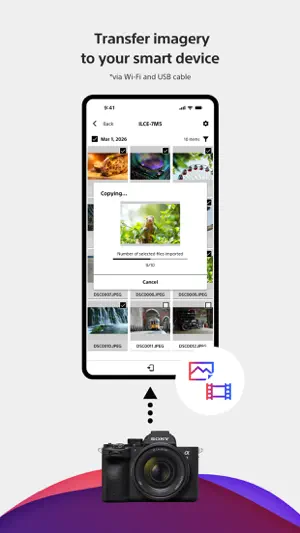
■ Please refer to the "Support Page" for the connection process and list of supported models. https://www.sony.net/ca/help/camera/ ■For app/service availability of countries and regions, please check here. https://creatorscloud.sony.net/catalog/servicearea.html This application allows anytime, anywhere smartphone access to the Creators' Cloud, a platform that provides powerful support for creators from shooting to production with Sony's camera technology and cloud AI. By connecting this application to your camera, you can easily operate convenient functions such as photo and video transfer from your smartphone. ■ Anytime access to Creators' Cloud Experience the various functions offered by Creators' Cloud, including file storage and management in cloud storage, a wide range of services and applications including video editing services using cloud AI, and access to articles and content that will serve as a source of inspiration. You can experience a variety of functions provided by Creators' Cloud. ■ Extend the shooting experience and manage shooting files more easily You can transfer and save photos and videos you have already taken, and use your smartphone as a remote control for the camera for remote shooting. In addition, the smartphone can be used to check the camera's battery and media information, set the date, time, and camera name, and easily update the camera's software. - Easy transfer of photos and videos taken anytime, anywhere Photos and videos taken can be transferred to cloud storage or a smartphone for centralized management. Data transfer can be performed while shooting or while the camera is turned off or charging. The camera also supports a variety of user shooting styles, such as transferring only those photos and videos that have been rated or marked as shots in advance. - Operate the camera from your smartphone By connecting the camera to a smartphone, the smartphone can be used as a remote control for the camera. This allows you to take pictures from a distance, such as group photos, or take pictures of night scenes without causing vibrations to the camera. In addition, you can easily check the camera's battery and media information, and set the date, time, and camera name from your smartphone. - Save camera settings and reflect changes Camera settings that change with each shooting scene can be saved to the smartphone and reflected in the camera. The ability to save settings for multiple cameras greatly streamlines setting changes during shooting. - Important announcements and software updates are also available from your smartphone. Important notifications such as software updates can be checked, and updates to the camera itself can be easily performed from a smartphone. ■ Operating environment: iOS18.7-27.0 ■ Remarks - This application is not guaranteed to work on all smartphones and tablets. ■ Terms of use https://creatorscloud.sony.net/locales_termsofuse_cc.html ■ Privacy policy https://creatorscloud.sony.net/locales_privacypolicy_cc.html
Ratings & reviews
3.9
2.5K ratings
What’s new
Version 3.6.0 · Updated October 28, 2026
The Creative Look by creators collection continues to grow and is now easier to browse. Explore the latest Creative Look by creators and fine-tune white balance settings in-camera to achieve your preferred expression. Be sure to check back regularly and discover new styles for your photography. For details please see: https://creatorscloud.sony.net/app/custom-looks/?cid=app-ca-store-20261028
App privacy
The developer, Sony Corporation, reported these privacy practices to Apple.
Data Used to Track You
The following data may be used to track you across apps and websites owned by other companies:
- Identifiers: User ID, Device ID
- Usage Data: Product Interaction
Data Linked to You
The following data, which may be collected and linked to your identity, may be used for the following purposes:
- Identifiers: Device ID, User ID
- Usage Data: Product Interaction
- User Content: Other User Content
- Contact Info: Email Address, Name
Used for: Third-Party Advertising, Developer’s Advertising or Marketing, Analytics, Product Personalization, App Functionality
Data Not Linked to You
The following data, which may be collected but is not linked to your identity, may be used for the following purposes:
- Identifiers: User ID
- Usage Data: Other Usage Data
- Diagnostics: Crash Data, Other Diagnostic Data
Used for: Third-Party Advertising, Analytics, App Functionality
Alternatives to Sony | Creators' App
Looking for apps like Sony | Creators' App? Here are 6 similar apps on the App Store. The highest rated is DJI Ronin (4.7/5), and all 6 are free to download.
-
 Monitor+
3.2
Monitor+
3.2
-
 Alpha Linker - Camera Transfer
4.3
Alpha Linker - Camera Transfer
4.3
-
 DJI Ronin
4.7
DJI Ronin
4.7
-
 Shutter+ Sony Camera Remote
4.4
Shutter+ Sony Camera Remote
4.4
-
 DaVinci Resolve for iPad
4.5
DaVinci Resolve for iPad
4.5
-
 Capture One
3.5
Capture One
3.5
| App | Rating | Price | Last updated | Compare |
|---|---|---|---|---|
| Sony | Creators' App | 3.9 / 5 (2,546 ratings) | Free | October 28, 2026 | |
| Monitor+ | 3.2 / 5 (281) | Free | Oct 1, 2026 | Compare |
| Alpha Linker - Camera Transfer | 4.3 / 5 (3,822) | Free | Oct 9, 2026 | Compare |
| DJI Ronin | 4.7 / 5 (8,184) | Free | Sep 14, 2026 | Compare |
| Shutter+ Sony Camera Remote | 4.4 / 5 (1,088) | Free | Oct 27, 2026 | Compare |
| DaVinci Resolve for iPad | 4.5 / 5 (2,994) | Free | Oct 27, 2026 | Compare |
| Capture One | 3.5 / 5 (331) | Free | Oct 29, 2026 | Compare |